


MCP and REST APIs solve different integration problems. A REST API gives application code direct, predictable access to resources and operations, while the Model Context Protocol (MCP) gives AI clients a standard way to discover and call tools. MCP does not replace REST: an MCP server often uses REST APIs behind the scenes. For many AI applications, the best architecture combines both approaches.
Technical review: 10 August 2026. MCP terminology and protocol details were checked against the MCP 2026-07-28 specification release.
| Choose | When it is usually the better fit |
|---|---|
| MCP | An AI assistant or agent should discover available tools and decide when to call them from natural-language requests. |
| REST API | Application code needs direct control over requests, validation, retries, response handling, and user experience. |
| Both | An AI-facing MCP layer and a deterministic application backend need access to the same services. |
On this page
MCP vs. REST APIs: Quick Answer
Use MCP when the primary consumer is an MCP-compatible AI assistant or agent. The server describes its tools and input schemas, the AI client discovers them, and the model can select an appropriate tool based on the user's request.
Use a REST API when your own code should decide exactly which endpoint to call and how to process its response. REST is a strong fit for application features such as an address form, delivery calculator, map, search interface, or scheduled data pipeline.
Use MCP and REST together when your product has both conversational and conventional interfaces. For example, an operations assistant could use Geoapify MCP Server to answer an ad hoc routing question, while the dispatch dashboard calls the Routing API directly to calculate routes whenever a user submits a form.
| Question | MCP | REST API |
|---|---|---|
| Who normally chooses the operation? | The AI client or model, within host permissions | Application code |
| How are capabilities found? | Tool discovery and schemas | API documentation, SDKs, or an OpenAPI description |
| Typical input | Natural-language intent converted to tool arguments | Parameters assembled by code or a UI |
| Typical integration target | AI assistants, agents, and AI development tools | Web, mobile, backend, data, and automation applications |
| Best characteristic | Interoperable tool access for AI clients | Explicit control and predictable execution |
MCP and REST API Basics
Before comparing architecture and use cases, it helps to define what each approach provides and who controls the integration.
What Is a REST API?
A REST API exposes resources or operations through a uniform web interface, most commonly using HTTP methods such as GET, POST, PATCH, and DELETE. Application code constructs a request for a known URL, sends parameters or a body, and handles a response in a format such as JSON. REST is an architectural style rather than a single wire protocol; its foundations are described in Roy Fielding's REST architectural style.
The important point for an AI application is who controls the call. With a direct REST integration, the developer writes the logic that selects the endpoint, validates parameters, handles errors, applies retries, and transforms the response.
Here is a direct JavaScript call to the Geoapify Geocoding API:
const apiKey = "YOUR_API_KEY";
const address = "1600 Amphitheatre Parkway, Mountain View, CA";

const params = new URLSearchParams({
  text: address,
  format: "json",
  limit: "1",
  apiKey
});

const response = await fetch(
  `https://api.geoapify.com/v1/geocode/search?${params}`
);

if (!response.ok) {
  throw new Error(`Geocoding failed: ${response.status}`);
}

const result = await response.json();
console.log(result.results[0]);
The application explicitly calls one endpoint and controls the complete request lifecycle. An LLM can still help interpret the result, but REST itself does not define how a model discovers the endpoint or decides to use it.
What Is the Model Context Protocol (MCP)?
The Model Context Protocol is a standard for connecting AI applications to external capabilities and context. An MCP host connects to one or more MCP servers, discovers what they expose, and makes those capabilities available to the AI application. MCP servers can expose tools, resources, and prompts; tools are the most relevant primitive when comparing MCP with APIs.
An MCP tool has a name, description, and input schema. Those machine-readable definitions help an AI client understand what the tool does and which arguments it accepts.
For example, an MCP client can use the Geoapify MCP tool catalog to review available tools, then ask the server for its current tool definitions:
{
  "jsonrpc": "2.0",
  "id": 1,
  "method": "tools/list"
}
The response describes tools such as geocode_address, search_places, calculate_route, and calculate_route_matrix. When a user asks, “Find cafés within one kilometer of these coordinates,” the AI client can match that request to search_places and build the required arguments.
MCP uses JSON-RPC messages and supports local and remote transports. The protocol continues to evolve, so production integrations should use a maintained MCP client or SDK and negotiate a revision supported by both the client and server rather than assuming every client implements the same revision.
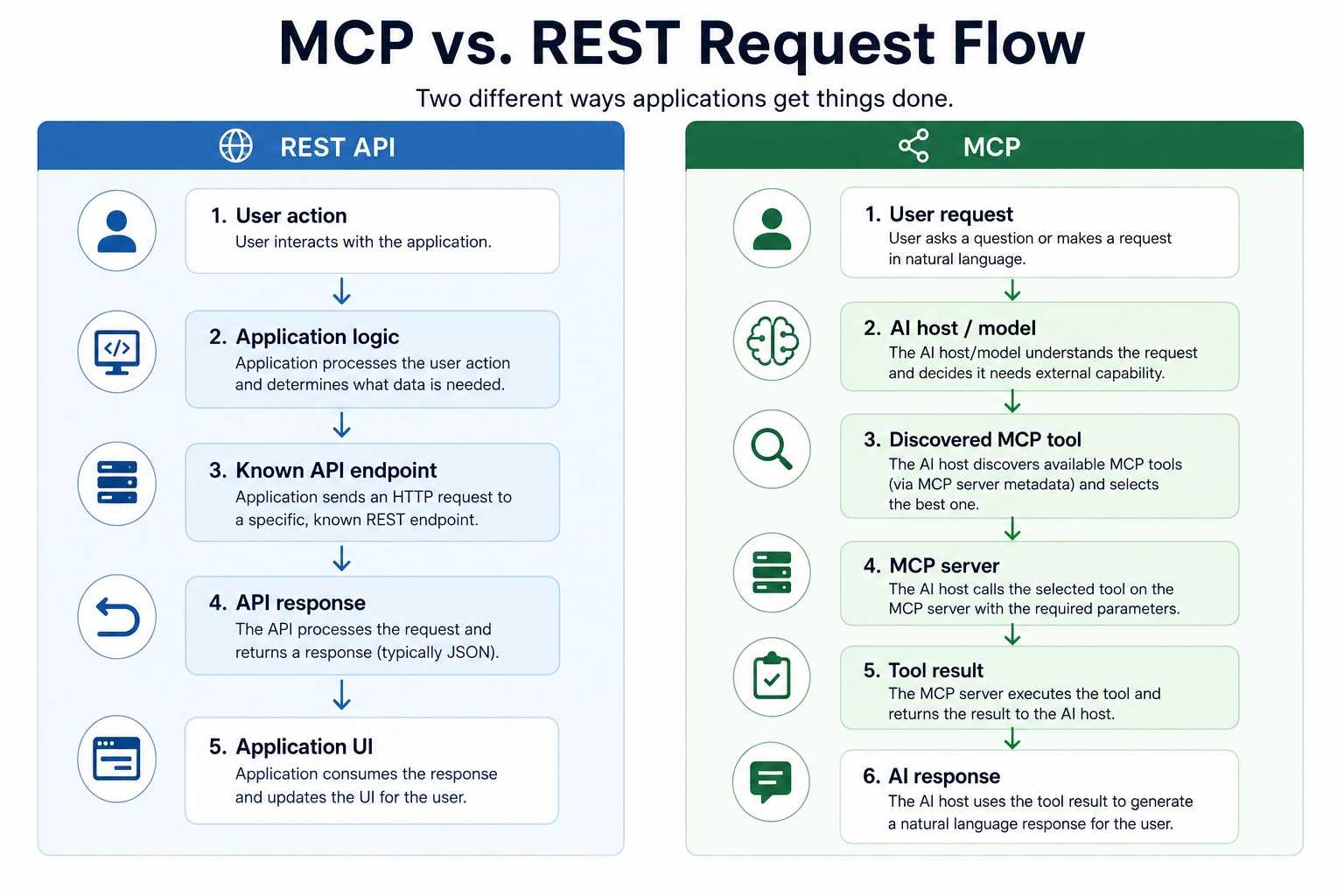
How MCP and REST APIs Work
Both approaches can ultimately retrieve the same business data, but the decision path is different.
How an AI Application Uses a REST API
To use a REST API, developers normally provide the model or application with custom function definitions, write an adapter, or call the API from deterministic backend logic. The integration owns the mapping between user intent and API parameters.
A direct REST workflow generally includes:
- Choose an endpoint in application code.
- Validate and normalize the input.
- Add authentication and request parameters.
- Send the HTTP request.
- Handle status codes, retries, and response data.
- Pass only the required result to the model or interface.
How an AI Application Uses MCP Tools
With MCP, the server publishes tool definitions in a standard format. The host controls which server and tools are available, while the model can select a tool and provide arguments when the user request calls for it.
| Stage | What happens with MCP |
|---|---|
| Connect | The host connects to an approved local or remote MCP server. |
| Discover | The client obtains tool names, descriptions, and input schemas. |
| Decide | The model selects a relevant tool based on the request and available definitions. |
| Approve | The host applies its permission and confirmation policies. |
| Execute | The client sends a tool call to the MCP server. |
| Continue | The model uses the structured result to answer or choose another step. |
The model-driven step makes MCP useful for open-ended requests, but it also means teams should test more than HTTP correctness. They should evaluate whether tool descriptions are clear, arguments are selected correctly, unnecessary calls are avoided, and sensitive actions require appropriate confirmation.
MCP vs. REST APIs: Key Differences
MCP and REST are not equivalent layers. REST organizes an application-facing web API, while MCP standardizes how AI clients discover and interact with tools and context. An MCP tool may call a REST endpoint, a database, a local process, or another service.
| Area | MCP | REST API |
|---|---|---|
| Primary consumer | MCP-compatible AI client | Any HTTP-capable application |
| Operation selection | Often model-controlled | Developer-controlled |
| Discovery | Built-in methods such as tools/list | Documentation, SDK, or OpenAPI |
| Interface | Tools with descriptions and schemas | URLs, HTTP methods, parameters, and bodies |
| Transport | MCP transport carrying JSON-RPC messages | Usually HTTP directly |
| State | Depends on protocol revision and application design | Commonly designed as stateless requests |
| Error handling | Tool result plus client/model behavior | Status codes and application logic |
| Testing focus | Protocol, schema, permissions, and model behavior | Endpoint contract and application behavior |
| Best fit | Conversational and agentic tool use | Deterministic product and backend features |
Integration and Tool Discovery
REST integrations usually begin with documentation: a developer finds the endpoint, reads its parameters, and implements a client. Geoapify OpenAPI specifications make those descriptions machine-readable, but the application still needs logic or a framework that turns them into model-usable tools.
Our guide to Geoapify OpenAPI with AI coding tools shows how to import specifications, generate typed clients, and prompt coding agents with the real API contract.
MCP defines discovery as part of the client-server interaction. This makes it easier for a compatible host to connect to a new server and expose its tools without a custom adapter for every AI product.
Control and Predictability
REST gives application code explicit control. If a user clicks “Calculate route,” the code calls the routing endpoint with a known mode and validated waypoints.
In a typical MCP workflow, the model interprets the request and decides whether it should geocode an address, search for a place, or calculate a route. That flexibility is valuable for natural language, but the result depends on tool definitions, model behavior, permissions, and the clarity of the user's request.
Authentication and Security
Neither approach is automatically secure. REST integrations must protect credentials, validate input, limit access, and avoid exposing privileged endpoints. MCP hosts and servers need the same controls plus clear tool permissions, user consent for sensitive actions, and defenses against untrusted instructions or tool output.
| Security question | Recommended practice |
|---|---|
| Where should an API key live? | In protected server or client configuration, never in a prompt or committed source file. |
| Who can access a tool? | Restrict the MCP server and tool set to the users and workflows that need them. |
| Can a model perform an action automatically? | Require confirmation for destructive, expensive, or externally visible operations. |
| Can tool output be trusted as instructions? | Treat external content as data and preserve the host's security policy. |
| How should usage be controlled? | Apply API quotas, rate limits, monitoring, and request validation. |
Performance and Cost
A direct REST call is usually the shorter execution path. An MCP workflow may include tool discovery, model reasoning, one or more tool calls, and additional model turns. The underlying service can have the same API cost, while the AI workflow also consumes model tokens and adds orchestration latency.
That does not make MCP inefficient by default. If an agent replaces manual investigation across several systems, a few tool calls may be the more efficient workflow overall. For fixed, high-volume operations, however, a direct REST pipeline is normally easier to optimize and budget.
Development and Maintenance
REST has a mature ecosystem for documentation, generated clients, caching, observability, contract testing, and gateways. MCP reduces the need to build a separate AI-specific connector for every compatible host, but teams still need to maintain tool schemas and evaluate agent behavior as models and protocol revisions evolve.
When to Use MCP, REST APIs, or Both
The right integration depends on whether a model or application code should choose the operation, and whether the workflow is conversational, deterministic, or a combination of both.
When to Use MCP for an AI Application
Choose MCP when natural-language intent should drive access to external tools. It works especially well when users ask varied questions and should not have to know the name of an endpoint or every required parameter.
Good MCP use cases include:
- An operations assistant that geocodes addresses and compares travel times on demand.
- A research agent that discovers and combines approved data tools.
- An AI development environment that needs access to several external services.
- A support assistant that retrieves structured information before answering.
- An internal assistant shared across multiple MCP-compatible clients.
| MCP is a strong fit when... | Why |
|---|---|
| Requests begin as natural language | Tool descriptions help the model map intent to operations. |
| The exact sequence is not known in advance | The model can choose one or several tools based on intermediate results. |
| Several AI clients need the same integration | A standard server can reduce client-specific adapter work. |
| Capabilities change over time | Clients can rediscover the server's current tool set. |
| A human remains in the loop | The host can show calls or request confirmation according to its policies. |
MCP is less attractive when every request follows the same fixed path, when ultra-low latency is essential, or when the AI client does not support the required server and transport.
When to Use REST APIs for an AI Application
Choose REST when application logic should remain the source of truth. A REST API is usually the better option for user-interface actions, batch processing, scheduled jobs, high-volume pipelines, and workflows that require strict validation or predictable latency.
| REST is a strong fit when... | Example |
|---|---|
| The operation is predetermined | Geocode an address after a form is submitted. |
| The application owns the interface | Search for nearby places when a map moves. |
| Requests run at high volume | Enrich a controlled data pipeline. |
| Responses require custom processing | Render route geometry and turn-by-turn instructions on a map. |
| Reliability rules are explicit | Retry selected errors and fall back according to application policy. |
| The consumer is not an MCP client | Serve a browser, mobile app, backend, or partner integration. |
For example, a map interface can call the Geoapify Places API whenever the user selects a category and search radius:
const params = new URLSearchParams({
  categories: "catering.cafe",
  filter: "circle:2.2945,48.8584,1000",
  bias: "proximity:2.2945,48.8584",
  limit: "10",
  apiKey: "YOUR_API_KEY"
});

const response = await fetch(
  `https://api.geoapify.com/v2/places?${params}`
);

const places = await response.json();
This call is deterministic: the interface decides the category, location, radius, and timing. No model needs to infer which operation to run.
When to Use MCP and REST APIs Together
Many production AI applications benefit from a hybrid design. The REST API remains the stable service interface, while the MCP server exposes a curated set of those capabilities to AI clients.
                         +-> Web or mobile UI -> REST API --+
User or business data ---|                              |   |
                         +-> AI assistant -> MCP server +---+-> Location service
This design provides two ways to reach the same service without forcing every workflow through an LLM. Deterministic features remain deterministic, and conversational workflows gain discoverable tools.
A useful separation of responsibilities is:
| Layer | Responsibility |
|---|---|
| REST API | Stable service contract, domain operations, authentication, quotas, and structured responses |
| MCP server | AI-friendly tool selection, descriptions, schemas, and result shaping |
| AI host | Model access, server permissions, user confirmation, and conversation context |
| Application | Business rules, persistent state, user experience, and deterministic automation |
An MCP server can also narrow a large REST platform to the operations appropriate for an agent. This is often safer and easier for a model than exposing every endpoint and parameter without curation.
MCP vs. REST APIs with Geoapify
Geoapify offers both a remote Geoapify MCP Server and direct Maps API access. The MCP server is designed for AI assistants and agents, while the REST APIs are designed for direct integration into applications, websites, backends, and data workflows.
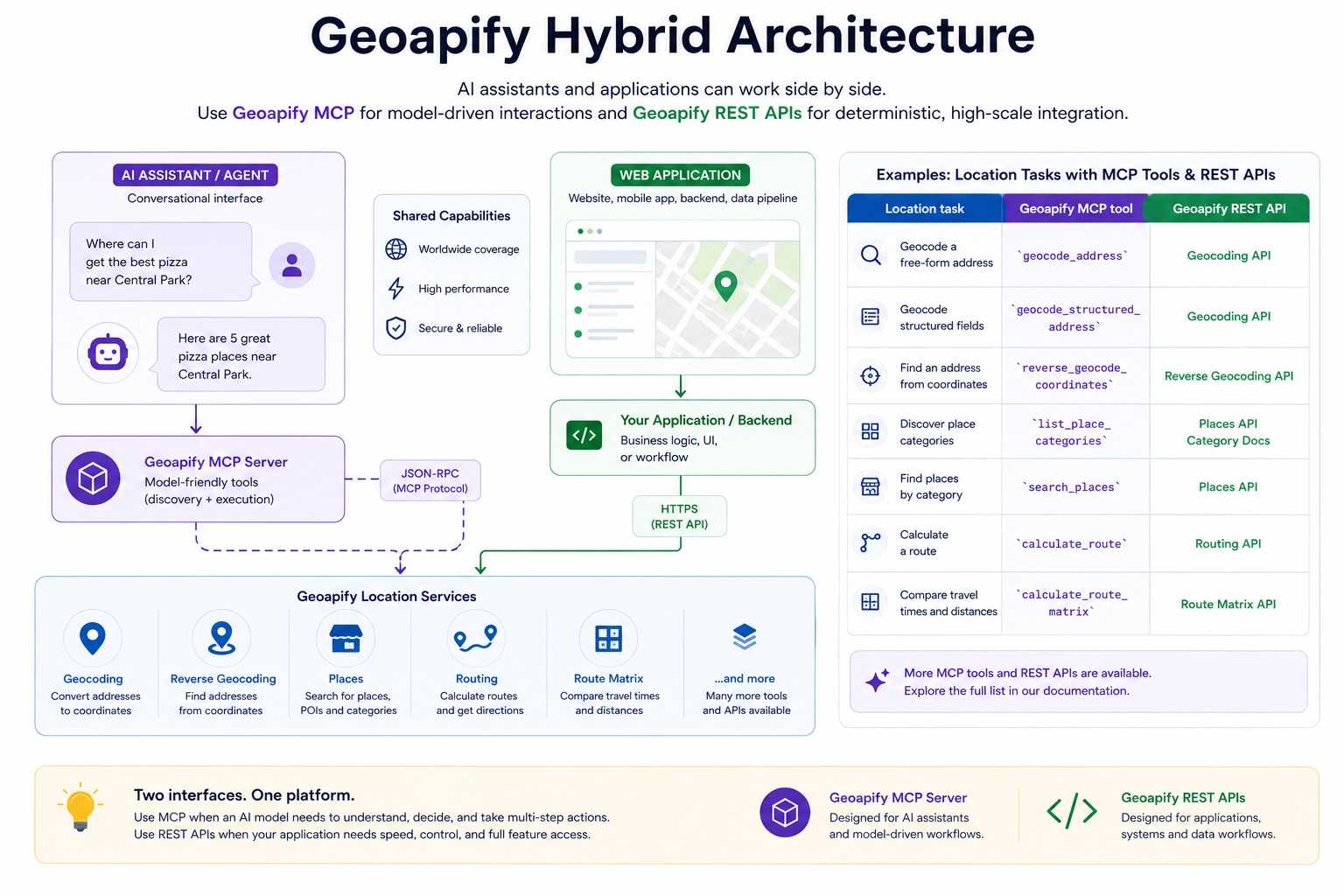
| Location task | Geoapify MCP tool | Geoapify REST API |
|---|---|---|
| Geocode a free-form address | geocode_address | Geocoding API |
| Geocode structured fields | geocode_structured_address | Geocoding API |
| Find an address from coordinates | reverse_geocode_coordinates | Reverse Geocoding API |
| Discover place categories | list_place_categories | Places API category documentation |
| Find places by category | search_places | Places API |
| Calculate a route | calculate_route | Routing API |
| Compare travel times and distances | calculate_route_matrix | Route Matrix API |
Using Geoapify Through MCP
Connect an MCP-compatible AI client using the endpoint and authentication options in the MCP developer documentation. For a product overview and client setup guides, see the Geoapify MCP Server page. The client can discover the current tools and select one based on the user's request.
Place Search Result
For the prompt:
Find cafés within one kilometer of the Eiffel Tower coordinates, 48.8584, 2.2945.
the client can call search_places with structured arguments:
{
  "jsonrpc": "2.0",
  "id": 1,
  "method": "tools/call",
  "params": {
    "name": "search_places",
    "arguments": {
      "category": "catering.cafe",
      "lat": 48.8584,
      "lon": 2.2945,
      "radius_meters": 1000,
      "limit": 3,
      "lang": "en"
    }
  }
}
Geoapify MCP responses include text content for broad client compatibility and structuredContent for clients that can work directly with typed results. Here is a shortened view of the actual structuredContent returned for this place search:
{
  "category": "catering.cafe",
  "coordinates": {
    "lat": 48.8584,
    "lon": 2.2945
  },
  "radius_meters": 1000,
  "count": 3,
  "results": [
    {
      "name": "Fruit Stand",
      "formatted": "Fruit Stand, Quai Jacques Chirac, 75007 Paris, France",
      "lon": 2.2930926,
      "lat": 48.858407,
      "distance": 103
    },
    {
      "name": "Le Carrousel de la Tour Eiffel",
      "formatted": "Le Carrousel de la Tour Eiffel, Promenade Marie de Roumanie, 75007 Paris, France",
      "lon": 2.2926673,
      "lat": 48.8590336,
      "distance": 152
    },
    {
      "name": "Le Bailli de Suffren",
      "formatted": "Le Bailli de Suffren, Avenue de Suffren, 75007 Paris, France",
      "lon": 2.2923773,
      "lat": 48.8567551,
      "distance": 240
    }
  ]
}
If the correct category is unclear, the assistant can call list_place_categories first. This is a typical MCP advantage: the model can discover a supporting tool and use its output in the next step without requiring the user to know Geoapify category keys.
Route Tool Result
A compact calculate_route call between the Eiffel Tower and the Louvre area, using driving mode and no route geometry, returned the following structuredContent:
{
  "distance": 4326,
  "distance_units": "meters",
  "time": 490.957,
  "time_units": "seconds",
  "waypoints": [
    {
      "lat": 48.8584,
      "lon": 2.2945
    },
    {
      "lat": 48.8606,
      "lon": 2.3376
    }
  ]
}
The result is ready for the assistant to summarize—for example, as a 4.326 km route taking approximately 8 minutes and 11 seconds—without parsing a route geometry that the user did not request.
Geocoding Tool Result
For the query 1600 Amphitheatre Parkway, Mountain View, CA, the geocode_address tool returned one match. This shortened structuredContent keeps the fields most useful for an AI response or a follow-up tool call:
{
  "query": "1600 Amphitheatre Parkway, Mountain View, CA",
  "count": 1,
  "results": [
    {
      "formatted": "Google Building 41, 1600 Amphitheatre Parkway, Mountain View, CA 94043, United States of America",
      "lon": -122.0855846,
      "lat": 37.4224858,
      "confidence": 1,
      "city": "Mountain View",
      "state": "California",
      "country": "United States",
      "timezone": {
        "name": "America/Los_Angeles"
      }
    }
  ]
}
Place, address, and route results can change as the underlying map and location data are updated. Applications should treat these examples as representative response structures rather than permanent values.
Using Geoapify REST APIs
Direct REST calls are preferable when the application already knows what it needs to do. A delivery application, for example, can geocode stops, calculate routes, and render the returned geometry without involving a model.
This request calculates a driving route between two coordinates:
curl "https://api.geoapify.com/v1/routing?waypoints=48.8584,2.2945%7C48.8606,2.3376&mode=drive&apiKey=YOUR_API_KEY"With REST, developers can use the complete documented API surface and control details such as route type, transport mode, geometry, instruction language, filters, bias, and response processing. Explore request parameters in the Geoapify API documentation.
Using Geoapify MCP and REST APIs Together
Consider a logistics platform with a dispatch dashboard and an internal AI assistant:
| Workflow | Recommended integration |
|---|---|
| Recalculate a route when a dispatcher edits a stop | Call the Routing API directly from application logic. |
| Draw route geometry on the map | Process the REST response in the application. |
| Ask “Which warehouse is fastest for these deliveries?” | Let the assistant use geocoding and route-matrix MCP tools. |
| Run a scheduled matrix calculation | Call the Route Matrix API from a backend job. |
| Investigate an unusual address conversationally | Let the assistant use geocoding and reverse-geocoding MCP tools. |
Both approaches use a Geoapify API key. Keep the key in protected configuration, apply restrictions where appropriate, and never include a real key in prompts, public repositories, or client-side code where it cannot be adequately restricted. See the Geoapify Getting Started guide for key setup.
How to Choose Between MCP and REST APIs
Start with the consumer and the control model. If an MCP-compatible assistant should interpret varied requests and choose tools, MCP is the natural interface. If your application already knows which operation to perform, use REST.
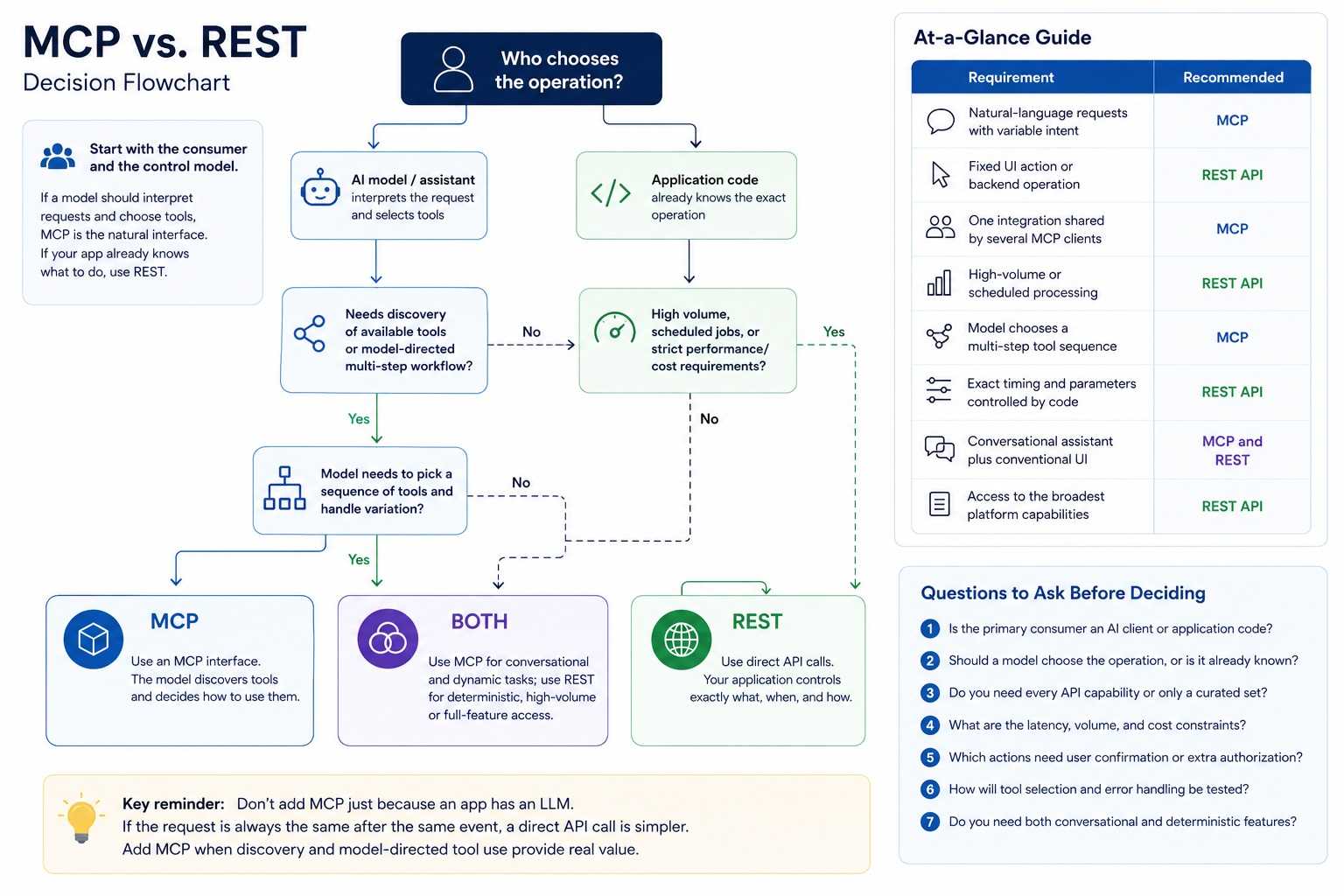
| Requirement | Recommended approach |
|---|---|
| Natural-language requests with variable intent | MCP |
| Fixed UI action or backend operation | REST API |
| One integration shared by several MCP clients | MCP |
| High-volume or scheduled processing | REST API |
| Model chooses a multi-step tool sequence | MCP |
| Exact request timing and parameters controlled by code | REST API |
| Conversational assistant plus conventional product UI | MCP and REST together |
| Access to the broadest documented platform capabilities | REST API |
Before deciding, ask these questions:
- Is the primary consumer an AI client or application code?
- Should a model choose the operation, or is the operation already known?
- Does the workflow require every API feature or only a curated tool set?
- What are the latency, volume, and cost constraints?
- Which actions require user confirmation or additional authorization?
- How will tool selection and error handling be tested?
- Do you need both a conversational interface and deterministic product features?
Do not add MCP only because an application contains an LLM. If the application always makes the same request after the same event, a direct API call is simpler. Add MCP when standardized discovery and model-directed tool use create real value.
Conclusion
MCP and REST APIs belong in different parts of an AI architecture. MCP is an AI integration layer that helps compatible clients discover and call tools. REST is a direct application interface that gives developers precise control over requests and responses.
Use MCP for conversational, agentic, and open-ended workflows. Use REST for deterministic interfaces, backend services, and high-volume automation. Use both when an application needs a reliable API foundation and an AI assistant that can work with the same capabilities through natural language.
With Geoapify, you can connect an AI assistant through Geoapify MCP Server or build directly with the Geoapify Maps APIs. The right choice depends on who selects the operation—the model or your application code.
FAQ
Does MCP replace REST APIs?
No. MCP and REST operate at different layers. REST APIs provide application-facing HTTP interfaces, while MCP gives AI clients a standard way to discover and call tools. An MCP server frequently uses one or more REST APIs behind the scenes.
Can an MCP server connect to an existing REST API?
Yes. A common architecture is to wrap selected REST operations as MCP tools with AI-friendly names, descriptions, and input schemas. This preserves the REST API as the service interface while making approved capabilities available to MCP-compatible assistants.
Is MCP only for AI agents?
MCP is designed for AI applications that need standardized access to external tools and context. It is especially useful for assistants and agents, while conventional web, mobile, backend, and data applications will often find a direct REST API simpler.
Is MCP more secure than a REST API?
Not automatically. Both approaches require authentication, authorization, input validation, credential protection, monitoring, and rate limits. MCP hosts should also restrict available servers and tools, preserve user control, and request confirmation for sensitive or externally visible actions.
Can an AI application use MCP and REST APIs at the same time?
Yes. Use MCP for model-directed, conversational workflows and REST APIs for deterministic application features or backend jobs. Both interfaces can connect to the same underlying services while serving different consumers.
When should I use Geoapify MCP Server?
Use Geoapify MCP Server when an MCP-compatible AI assistant should geocode addresses, find places, calculate routes, or compare travel times and distances from natural-language requests.
When should I use Geoapify REST APIs?
Use Geoapify Maps APIs directly when your website, mobile app, backend, or data pipeline needs explicit control over endpoints, parameters, request timing, retries, and response processing.
Does Geoapify MCP Server cost extra?
No. Geoapify MCP Server does not add separate charges or extra credits. Usage is counted for the underlying Geoapify API requests. The list_place_categories tool requires an API key but costs zero credits. See Geoapify pricing for plan details.