


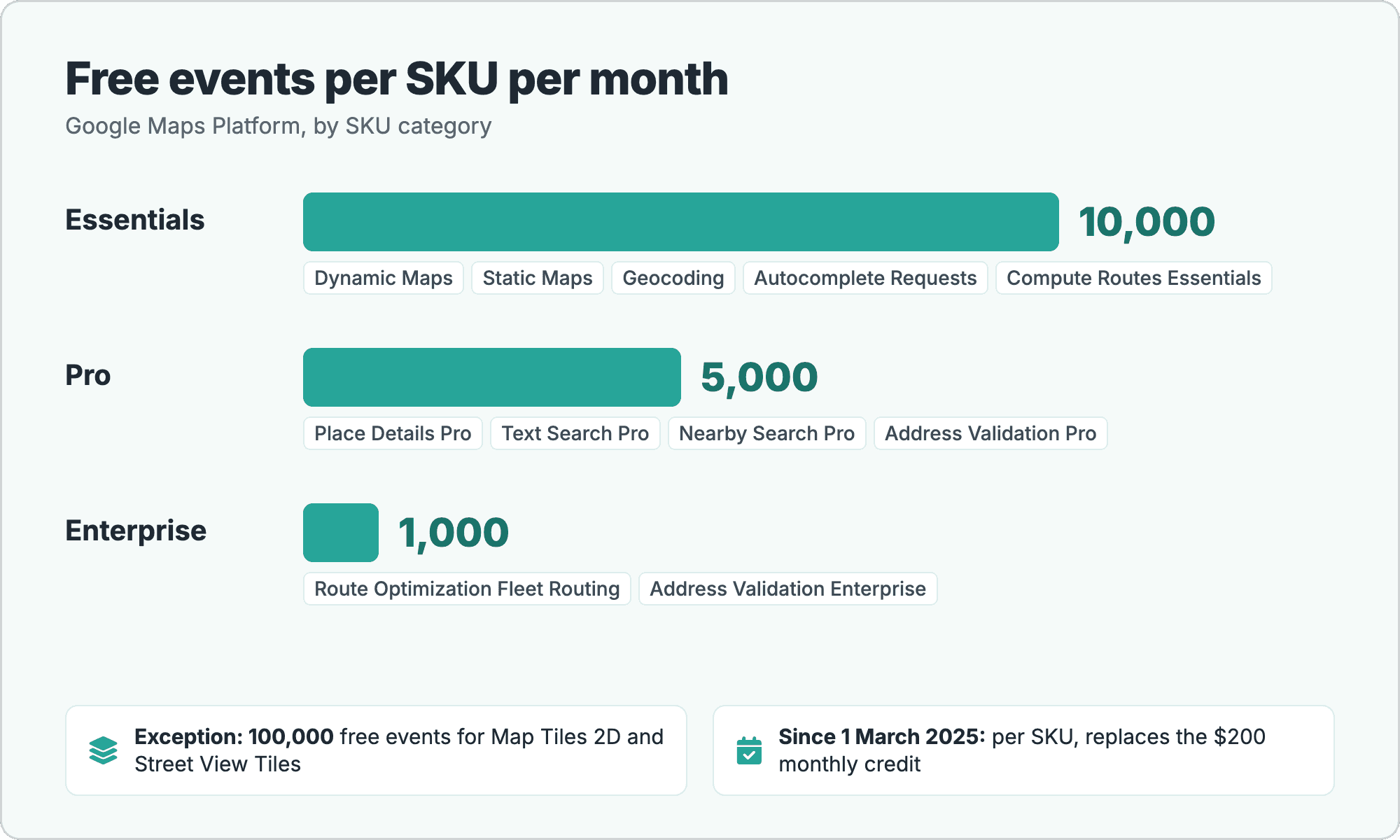
The Google Maps API is free up to a monthly amount per product: 10,000 events for Essentials SKUs, 5,000 for Pro and 1,000 for Enterprise; above that, usage is billed per 1,000 events. You need a billing account even when you stay within the free amounts. Google replaced the old $200 monthly credit with these per-SKU free amounts on 1 March 2025. Below: prices per 1,000 events, the API key steps, how to cap spending, and how open-data alternatives compare (all sources checked 22 October 2026).
Key takeaways
- Free per SKU, per month: each product (SKU) has its own free amount; there is no longer a shared $200 credit.
- Billing account needed: an API key for production sits on a project with billing; the Maps Demo Key is for prototyping only.
- Budgets notify, quotas cap: a budget sends alerts but does not stop usage; quota limits cap the number of requests.
- Alternatives count differently: daily credits, monthly requests or rate-limited public servers. Compare the terms, not just the numbers.
On this page
How Does the Google Maps API Free Tier Work?
The Google Maps Platform free tier is a free monthly usage amount for each SKU. A SKU is one billable product, such as Dynamic Maps, Geocoding or Compute Routes. Each SKU belongs to a category (Essentials, Pro or Enterprise), and the category sets how many events are free each month:
| SKU category | Free events per SKU per month | Examples |
|---|---|---|
| Essentials | 10,000 | Dynamic Maps, Static Maps, Geocoding, Autocomplete Requests, Compute Routes Essentials |
| Pro | 5,000 | Place Details Pro, Text Search Pro, Nearby Search Pro, Address Validation Pro |
| Enterprise | 1,000 | Route Optimization Fleet Routing, Address Validation Enterprise |
| Exceptions (Essentials) | 100,000 | Map Tiles API: 2D Map Tiles and Street View Tiles |
Several SKUs on the same list are marked Unlimited, meaning there is no charge for them: Embed, Maps SDK (the mobile Maps SDKs), Street View Metadata, Autocomplete Session Usage, Place Details Essentials (IDs Only) and Text Search Essentials (IDs Only).
What changed in March 2025
Until early 2025, every account got a $200 monthly credit that it could spend on any product. According to Google's March 2025 changes page, Google "has replaced the USD $200 monthly recurring credit with a free monthly usage threshold for each Core Services SKU", effective 1 March 2025. The practical difference: the free amount no longer moves between products. 10,000 free Geocoding events cannot be spent on Dynamic Maps.
The free amounts recur every month. Google also offers other credits:
- New Google Cloud customers get a $300 trial credit, which can be used on Maps Platform (Maps Platform pricing).
- Credit programs exist for nonprofits, startups, education and other groups; the Get started page lists them.
Subscription plans
Besides pay-as-you-go, Google sells monthly subscription plans that bundle popular products at a fixed price. On the Maps Platform pricing page:
| Plan | Price per month | Calls included per month |
|---|---|---|
| Starter | $100 | 50,000 |
| Essentials | $275 | 100,000 |
| Pro | $1,200 | 250,000 |
| Enterprise | Custom | Custom |
Each plan covers a defined set of products, listed on the pricing page. Google states that with a subscription, "Service remains uninterrupted with extra usage billed as pay-as-you-go."
How Much Does the Google Maps API Cost?
After the free amount, each SKU is billed per 1,000 events, and the price per 1,000 drops in higher volume tiers. The table shows commonly used SKUs with the price in the first paid tier:
| SKU | Category | Free per month | Price per 1,000 after free |
|---|---|---|---|
| Dynamic Maps | Essentials | 10,000 | $7.00 |
| Static Maps | Essentials | 10,000 | $2.00 |
| Map Tiles API: 2D Map Tiles | Essentials | 100,000 | $0.60 |
| Geocoding | Essentials | 10,000 | $5.00 |
| Autocomplete Requests | Essentials | 10,000 | $2.83 |
| Place Details | Essentials | 10,000 | $5.00 |
| Place Details | Pro | 5,000 | $17.00 |
| Text Search | Pro | 5,000 | $32.00 |
| Nearby Search | Pro | 5,000 | $32.00 |
| Compute Routes | Essentials | 10,000 | $5.00 |
| Compute Routes | Pro | 5,000 | $10.00 |
| Compute Route Matrix (elements) | Essentials | 10,000 | $5.00 |
| Compute Route Matrix (elements) | Pro | 5,000 | $10.00 |
| Route Optimization: Single Vehicle Routing | Pro | 5,000 | $10.00 |
| Route Optimization: Fleet Routing | Enterprise | 1,000 | $30.00 |
| Address Validation | Pro | 5,000 | $17.00 |
| Time Zone | Essentials | 10,000 | $5.00 |
The category often depends on which fields you request, not only on which API you call. A Place Details request that asks only for Essentials fields is billed as Place Details Essentials ($5.00 per 1,000); adding fields from the Pro category moves the same request to Place Details Pro ($17.00 per 1,000). Routes work the same way: Compute Routes Essentials and Compute Routes Pro differ by the features in the request.
Worked example: a store locator for one month
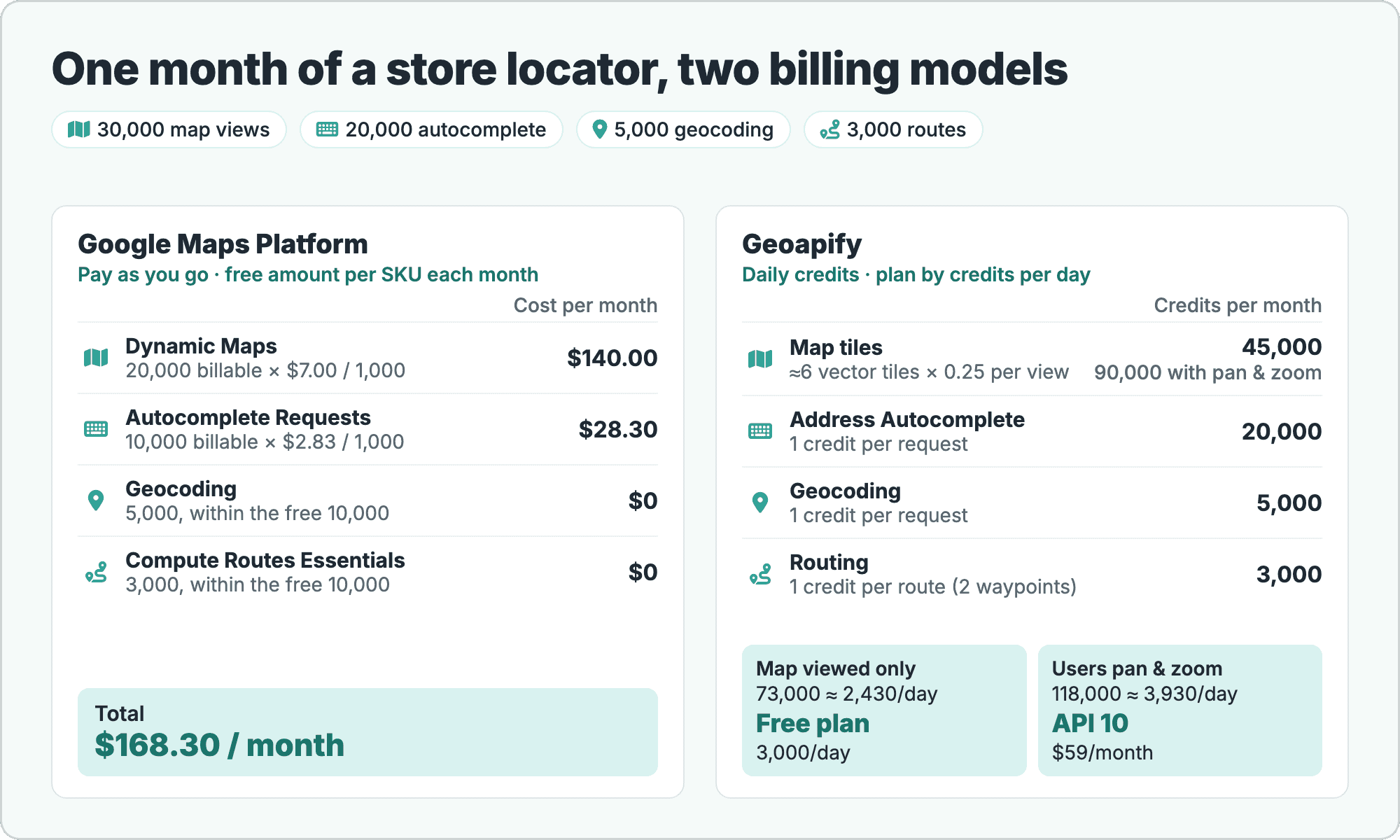
To see how the free amounts and prices combine, take a store locator with a map, address autocomplete, geocoding of the entered address and a route to the nearest store. One month of usage:
| SKU | Monthly usage | Free | Billable | Price per 1,000 | Cost |
|---|---|---|---|---|---|
| Dynamic Maps | 30,000 map loads | 10,000 | 20,000 | $7.00 | $140.00 |
| Autocomplete Requests | 20,000 | 10,000 | 10,000 | $2.83 | $28.30 |
| Geocoding | 5,000 | 10,000 | 0 | $5.00 | $0.00 |
| Compute Routes Essentials | 3,000 | 10,000 | 0 | $5.00 | $0.00 |
| Total | $168.30/month |
Two assumptions matter here. First, the autocomplete calls are billed as Autocomplete Requests; sessions that end in a Place Details call are billed differently, as described on the pricing list. Second, Dynamic Maps is billed per "successful map load" (SKU details), so the map line follows the number of map loads, here one per page view.
How Do You Get a Google Maps API Key?
You get a Google Maps API key by creating a Google Cloud project with billing, enabling the APIs you need and creating a key in the console. The steps from Google's Get started page (last updated 2026-10-21):
- Create a Cloud project with billing. Google states that you "must set up a billing account" to set up a Cloud project.
- Enable the APIs or SDKs you need, for example Maps JavaScript API, Geocoding API or Routes API, in the Maps API Library, or with
gcloud services enable. - Create an API key in Credentials → Create credentials → API key, or with
gcloud services api-keys create. - Restrict the key before production: limit it to your websites or apps and to the APIs it calls, as described in Google's API security best practices.
Prototyping without billing: the Maps Demo Key
If you only want to try the APIs, Google offers a Maps Demo Key (page last updated 2026-05-21). It is a no-cost key that needs no billing account, made for testing and prototyping and "not designed for production use":
- Covers: Maps JavaScript API features and some web services, including Places API (New), Geocoding API v4, Compute Routes and Weather API.
- Limit: a daily limit; when it is reached, usage pauses until the next day.
For a live site, you move to a regular key on a project with billing.
How Do You Keep Google Maps API Costs Under Control?
Google Maps Platform gives you several tools to keep spending predictable, and they do different things. The key distinction from Google's Manage costs page (last updated 2026-10-21): "Setting a budget does not automatically cap Google Cloud or Google Maps Platform usage or spending." Budgets inform you; quotas limit requests.
A short checklist:
- Set budgets and alerts in Cloud Billing, so you get an email when spending reaches a threshold you choose.
- Lower quota limits per API in the Cloud Console. Google describes quotas as "capping the number of requests" your project can make, which prevents unexpected charges.
- Restrict every API key to your domains or apps and to the APIs it needs, so a copied key cannot run up usage elsewhere.
- Request only the fields you need. In Places API (New) and Routes API, the requested fields decide which SKU a request is billed under, so fewer fields can mean Essentials instead of Pro pricing.
- Watch usage reports in the Google Maps Platform section of the Cloud Console, per API and per SKU.
Quotas also explain one common error: when a request hits a limit, Google's web services can answer with OVER_QUERY_LIMIT. Our post on Google geocoding rate limits and OVER_QUERY_LIMIT covers the causes and how to pace requests.
Which Free Alternatives Are There, and How Open Are They?
Free alternatives to the Google Maps API differ in four ways: the unit (per day or per month, requests or credits), whether commercial use is allowed on the free plan, whether a card is needed, and the data behind them (open data such as OpenStreetMap, or the provider's own). They also behave differently at the limit: some bill, some pause, some contact you.
Commercial APIs with a free tier
These providers run paid APIs and include a free plan. All rows are from each provider's official pricing page, checked 22 October 2026:
| Provider | Data | Free tier | Card | Commercial use on free | Main restrictions |
|---|---|---|---|---|---|
| Geoapify | OpenStreetMap and other open data | 3,000 credits/day (≈ 90,000/month), shared by all APIs | No | Yes, with attribution | Up to 5 requests/s; daily quota; soft limits: we contact you and ask for an upgrade; isochrones up to 15 min |
| Mapbox | Commercial API | Per month: 50,000 web map loads, 100,000 Temporary Geocoding requests, 100,000 Directions requests, 100,000 Matrix elements, 100,000 Isochrone requests | Optional; without a card the account is on demo access with lower caps | Yes; some use cases need a Commercial Application License | Temporary Geocoding results are not for storing; Permanent Geocoding has no free tier ($5.00 per 1,000) |
| MapTiler Cloud | OpenStreetMap data | 5,000 map sessions + 100,000 API requests/month | No | No (testing, proof of concept, personal, non-commercial) | MapTiler logo on the map; service pauses until next month |
| Stadia Maps | Open data | 200,000 credits/month; geocoding 20 credits per request (≈ 10,000 geocodes), autocomplete (v2) 1, routing 20, matrix 10 per element | Not stated | No ("Commercial use not allowed") | No additional usage on Free |
| TomTom | Commercial API | Free requests per API each month: 200,000 for tile APIs (e.g. vector tiles), 20,000 for Routing and other non-tile APIs (some APIs less) | No | Not stated; check the terms | Monthly limits per API |
| HERE | Commercial API | Base Plan includes free monthly transactions per service | Not stated | Not stated | Amounts are shown in the pricing calculator on HERE's page; check them there |
| LocationIQ | Geocoding API | 5,000 requests/day | Not stated | Yes, with a prominent link back | 2 requests/s, 60/min |
| OpenCage | Geocoding API, OpenStreetMap among its sources | Free trial: 2,500 requests/day | No | Testing only; production needs a paid plan | 1 request/s; results may be stored permanently |
Each option has its own strengths. Mapbox has large monthly quotas and mature web and mobile SDKs. MapTiler and Stadia Maps build on open standards and work with open-source renderers such as MapLibre GL JS. TomTom and HERE offer a wide range of APIs with free monthly amounts per API or service. LocationIQ and OpenCage focus on geocoding, and OpenCage allows storing results permanently.
Public open-source servers
The OpenStreetMap ecosystem also runs public servers for open-source software. They have no fixed quota, but each has a usage policy that limits how you may use it:
| Service | What it does | Free use | Commercial use | Main restrictions |
|---|---|---|---|---|
| Nominatim public server (OSM Foundation) | Geocoding on OpenStreetMap | No fixed quota, no key | Governed by the usage policy | Max 1 request/s; no client-side autocomplete; cache results; bulk geocoding not encouraged; valid User-Agent or Referer; attribution; access can be withdrawn |
| OSRM demo server | Routing on OpenStreetMap | No fixed quota | No ("reasonable, non-commercial use-cases") | Max 1 request/s; car, foot and bike profiles |
| openrouteservice (HeiGIT) | Routing, isochrones and more on OpenStreetMap | Default limits: Directions 2,000 requests/day, 40/minute | Not stated | Daily and per-minute limits per endpoint |
| OpenStreetMap tiles (tile.openstreetmap.org) | Raster map tiles | No fixed quota | Light use only | Best effort, no SLA; offline use not permitted; blocked if usage degrades the service |
These servers are community and research infrastructure. They suit testing, light use and projects that respect the policy limits, for example a Nominatim request per user action, never per keystroke. For background, see our posts on the Nominatim geocoder and OpenStreetMap routing.
Self-hosting
The software behind the public servers is open source: Nominatim, OSRM, openrouteservice and tile servers can all run on your own hardware. On your own instance there are no per-request fees and the public servers' limits don't apply. Instead, you pay for servers, keep the OpenStreetMap data up to date and maintain the software, which makes self-hosting a good fit for high, steady volumes or offline setups.
What does the same store locator use on Geoapify?
To compare the models on the same workload, we can price the store locator from the worked example in Geoapify credits. Geoapify counts credits per day, and the costs per API come from the Pricing Details and the API docs:
- Map tiles: 1 tile = 0.25 credits (maps pricing). An 800×600 vector map needs about 4–9 tiles per view; we use 6.
- Geocoding, Reverse Geocoding, Address Autocomplete: 1 request = 1 credit.
- Static Maps: 1 + map tiles / 4 + icons credits per image.
- Routing: 1 credit per waypoint pair, with a surcharge for long routes (routing pricing). A 498,991 m route from Los Angeles to Prunedale, CA costs 1 credit; a 630,340 m route to Marin County costs 2.
route_detailsandelevationeach add 1 credit per pair. - Places: 1 credit per 20 places returned. Route Matrix with up to 10 locations: sources × targets. Isochrones: 1 credit per 5 minutes.
With these rules, the store locator looks like this. Routes are short (2 waypoints, under 500 km), and the map is counted once at about 6 tiles per view and once with users panning and zooming (activity coefficient 2):
| Item | Monthly usage | Credits/month (map viewed only) | Credits/month (users pan and zoom) |
|---|---|---|---|
| Map views (vector tiles) | 30,000 views | 180,000 tiles × 0.25 = 45,000 | 360,000 tiles × 0.25 = 90,000 |
| Address Autocomplete | 20,000 requests | 20,000 | 20,000 |
| Geocoding | 5,000 requests | 5,000 | 5,000 |
| Routing | 3,000 routes | 3,000 | 3,000 |
| Total | 73,000 ≈ 2,430/day | 118,000 ≈ 3,930/day | |
| Plan | Free (3,000/day) | API 10 (10,000/day, $59/month) |
Two differences from the Google model follow from this. The quota is daily, so plan for your busiest day rather than the monthly average: a sale weekend can exceed 3,000 credits even when the month fits. And tile-based counting grows with interaction, while Dynamic Maps is billed per map load; a map that is only looked at uses few credits, and one that users explore uses more. The Credits Calculator does this conversion for your own numbers.
The geocoding step itself is a single REST request. Request (REST):
curl "https://api.geoapify.com/v1/geocode/search?text=1600%20Pennsylvania%20Avenue%20NW%2C%20Washington%2C%20DC&limit=1&format=json&apiKey=YOUR_API_KEY"Simplified response (one result, selected fields):
{
  "results": [
    {
      "formatted": "White House, 1600 Pennsylvania Avenue Northwest, Washington, DC 20500, United States of America",
      "lat": 38.8976387,
      "lon": -77.0365528,
      "result_type": "amenity",
      "rank": { "confidence": 1 }
    }
  ]
}
One request, one credit. See the Geocoding API, Address Autocomplete, Routing API and Map Tiles pages for the full feature lists.
If usage grows past the Free plan, the next step is a daily credit plan. These are the plans on the pricing page, checked 22 October 2026, monthly billing in USD:
| Plan | Credits per day | Price per month | Rate limit |
|---|---|---|---|
| Free | 3,000 | $0 | 5 requests/s |
| API 10 | 10,000 | $59 | 12 requests/s |
| API 25 | 25,000 | $109 | 15 requests/s |
| API 50 | 50,000 | $179 | 20 requests/s |
| API 100 | 100,000 | $299 | 25 requests/s |
| API 250 | 250,000 | $609 | 30 requests/s |
| Custom | Unmetered | from $860 | Unmetered, dedicated endpoint |
The Free plan needs no credit card. It may be used in production for commercial sites and apps within its quota, rate limit and feature limits (isochrones up to 15 minutes, isodistances up to 10 km), with a "Powered by Geoapify" link and the data attribution; see commercial use.
Which Option Fits Your Project?
The right choice depends less on the headline free number than on your situation: where your stack runs, whether the project is commercial, and how much volume you expect.
- Already on Google Cloud, or you need Street View or Google's place content: the Google free amounts may cover a small project. Set quota limits and budget alerts from the start.
- Commercial project, small budget, no card: Geoapify Free (3,000 credits a day, with attribution) or LocationIQ (5,000 requests a day, with a prominent link back).
- Testing or a proof of concept: OpenCage's free trial, the MapTiler or Stadia Maps free plans, or the Google Maps Demo Key.
- Low-volume, non-commercial or hobby projects with OpenStreetMap: the public OSM servers, within their usage policies.
- High volume or offline use: self-host the open-source servers, or use a custom plan with dedicated resources.
For a task-by-task mapping of Google Maps APIs to Geoapify APIs, see the Google Maps API alternative page. If you only need map display, our free maps API comparison converts each free tier into map views. To start, get a free Geoapify API key and compare plans on the pricing page.
Frequently Asked Questions
Is the Google Maps API free?
Partly. Each SKU has a free monthly amount: 10,000 events for Essentials SKUs, 5,000 for Pro and 1,000 for Enterprise; above that, usage is billed per 1,000 events. A billing account is required. See the Google Maps Platform pricing list (checked 22 October 2026).
Does Google still give a $200 monthly credit?
No. On 1 March 2025, Google replaced the $200 monthly recurring credit with a free monthly usage threshold for each SKU. See Google's March 2025 changes. New Google Cloud customers can still use the $300 trial credit on Maps Platform.
Do I need a credit card for a Google Maps API key?
For a regular API key, yes: Google requires a billing account on the Cloud project. For testing and prototyping without billing, Google offers the Maps Demo Key, which has a daily limit and is not designed for production use.
How much does the Google Maps API cost per 1,000 requests?
It depends on the SKU. In the first paid tier: Dynamic Maps $7.00, Static Maps $2.00, Geocoding $5.00, Autocomplete Requests $2.83, Place Details Pro $17.00, Text Search Pro $32.00 and Compute Routes Essentials $5.00 per 1,000. Higher volumes cost less per 1,000. See the pricing list (checked 22 October 2026).
Can I cap Google Maps API spending?
Yes, with quota limits: Google describes them as capping the number of requests a project can make, and you can lower them for each API. Budgets and alerts only notify you; Google states that a budget does not cap usage or spending. See Manage costs.
Is there a free Google Maps API alternative for commercial use?
Yes. Geoapify's Free plan allows commercial use with attribution (3,000 credits a day, no card; see commercial use). LocationIQ allows it with a prominent link back, and Mapbox's free tier allows it, with a Commercial Application License for some use cases. MapTiler, Stadia Maps and OpenCage limit their free plans to non-commercial use or testing.