


A free maps API includes anywhere from about 5,000 to 60,000 map views a month, depending on whether the provider counts map loads, sessions or individual tiles. Load- and session-based quotas count a view once however much the user pans or zooms, while tile- and credit-based quotas count every tile the map loads. Below we convert the free tiers of six map tile providers into map views, with sources checked on 9 October 2026, and add the card, commercial-use and limit terms. Then we show how to estimate the tiles your own map needs.
Key takeaways
- Compare map views, not headline numbers: 10,000 map loads, 200,000 tiles and 3,000 credits a day are different units.
- Interaction counts differently: load and session quotas count a view once; tile and credit quotas count each loaded tile, so panning and zooming use more.
- Check the terms: whether a card is needed, whether commercial use is allowed, and what happens at the limit.
- Estimate in tiles per view: an 800×600 map needs about 4–9 vector tiles or 12–20 raster tiles.
On this page
What Does "Free" Mean for a Map Tiles API?
A free maps API for map display is a map tile service you can use without paying, up to a quota and under the provider's terms. Two providers can both say "free" and still fit very different projects. Before you pick one, check these five things:
- Unit and quota. What is counted (map loads, map sessions, tiles, requests or credits) and over what period (per day or per month).
- Credit card. Whether you need a billing account or card before you can use the free quota, or only when you move to production.
- Commercial use. Whether a business website, a SaaS product or a paid app may run on the free tier.
- Attribution. Which credits must stay visible on the map: the provider, OpenStreetMap, or both.
- Behaviour over the limit. Whether usage is billed automatically, the service pauses, requests stop, or the provider contacts you.
The first item decides how far the quota goes. The other four decide whether you can use the free tier at all for your project.
Free Maps APIs Compared (October 2026)
The table below lists the free tier of six commonly used map tile and map API options. Each row links to the provider's official page; quotas and terms change, so check the source before you commit.
| Provider | Free quota (unit) | Credit card | Commercial use on free | Over the limit | Source |
|---|---|---|---|---|---|
| Google Maps Platform | 10,000 Dynamic Maps loads/month (Essentials); 100,000 Map Tiles API 2D tiles/month | Billing account for production; a Maps Demo Key allows prototyping without billing | Yes | Pay as you go | Pricing, pricing list |
| Mapbox | 50,000 GL JS map loads/month; 200,000 vector tiles; 750,000 raster tiles | Optional; without a card the account is on demo access with lower, unpublished caps | Yes; some use cases need a Commercial Application License | Paid automatically; demo access stops at its cap | Pricing, demo access |
| MapTiler Cloud | 5,000 map sessions and 100,000 API requests/month | No | No (Flex and Custom plans only); MapTiler logo required | Service pauses until next month | Pricing |
| Stadia Maps | 200,000 credits/month | No | No | No additional usage | Pricing |
| Geoapify | 3,000 credits/day ≈ 12,000 map tiles/day | No | Yes, with attribution | Soft limits: we contact you and ask for an upgrade | Pricing, commercial use |
| OpenStreetMap (tile.openstreetmap.org) | No fixed quota | No | Light use only; best effort, no SLA; offline use not permitted | Blocked without notice if usage degrades the service | Tile usage policy |
Each option has its own strengths. Google Maps Platform covers a broad product range under one billing account, and the Demo Key lets you prototype before setting up billing. Mapbox has a generous monthly tile quota and mature SDKs for web and mobile. MapTiler and Stadia Maps build on open standards and work with open-source renderers such as MapLibre GL JS. The OpenStreetMap tile servers are community infrastructure for the OSM project, funded by donations and sponsorship, and open to light third-party use.
Two columns usually decide the shortlist: commercial use on free and over the limit. A personal project can choose on quota alone; a business site needs a free tier that allows commercial use and a limit behaviour it can plan around.
How many map views does each free tier include?
To compare the quotas, we convert each one into map views. The assumptions: one view is one person opening an 800×600 map, and an initial vector view loads about 6 tiles (the Geoapify maps pricing docs give 4–9).
| Provider | Free unit | ≈ map views per month | Panning and zooming |
|---|---|---|---|
| Google Maps Platform | 10,000 Dynamic Maps loads | ≈ 10,000 | Not counted: no additional map loads |
| Mapbox | 50,000 GL JS map loads | ≈ 50,000 | Not counted: one map load regardless of interaction |
| MapTiler Cloud | 5,000 map sessions (plus 100,000 API requests) | ≈ 5,000 | Within the session; a new session starts on reload, after 6 hours or after 10,000 requests |
| Stadia Maps | 200,000 credits, 1 credit per vector or raster tile | ≈ 33,000 initial vector views | Each loaded tile counts |
| Geoapify | 3,000 credits a day, 0.25 credits per tile (12,000 tiles a day) | ≈ 60,000 initial vector views (≈ 2,000 a day; ≈ 750 raster views a day) | Each loaded tile counts; the quota is daily |
| OpenStreetMap tile server | No fixed quota | No fixed number | Light use only |
The last column is the main difference between the models. Load- and session-based quotas (Google, Mapbox, MapTiler) count a view once, however much the user pans or zooms. Tile- and credit-based quotas (Stadia, Geoapify) count each loaded tile: a map that is only shown uses very little, while a map users explore uses more. Neither model is better in general; match it to how people use your map.
Why Aren't Free Map Quotas Comparable?
Free quotas aren't comparable because each provider counts a different unit, and one map view produces a different amount of each. The period also differs: most quotas reset monthly, Geoapify's resets daily.
Four units for the same map
A single user opening an 800×600 map can count as one unit or as several, depending on the provider:
| Unit | Who counts it | What one 800×600 view costs |
|---|---|---|
| Map load | Google Maps Platform (Dynamic Maps), Mapbox (GL JS) | 1 load when the map is initialised |
| Map session | MapTiler Cloud (plus API requests) | 1 session |
| Tile | Google Map Tiles API, Mapbox tile APIs | About 4–9 vector or 12–20 raster tiles |
| Credit | Stadia Maps, Geoapify | Stadia: 1 credit per tile, about 6 credits; Geoapify: 0.25 credits per tile, about 1.5 credits |
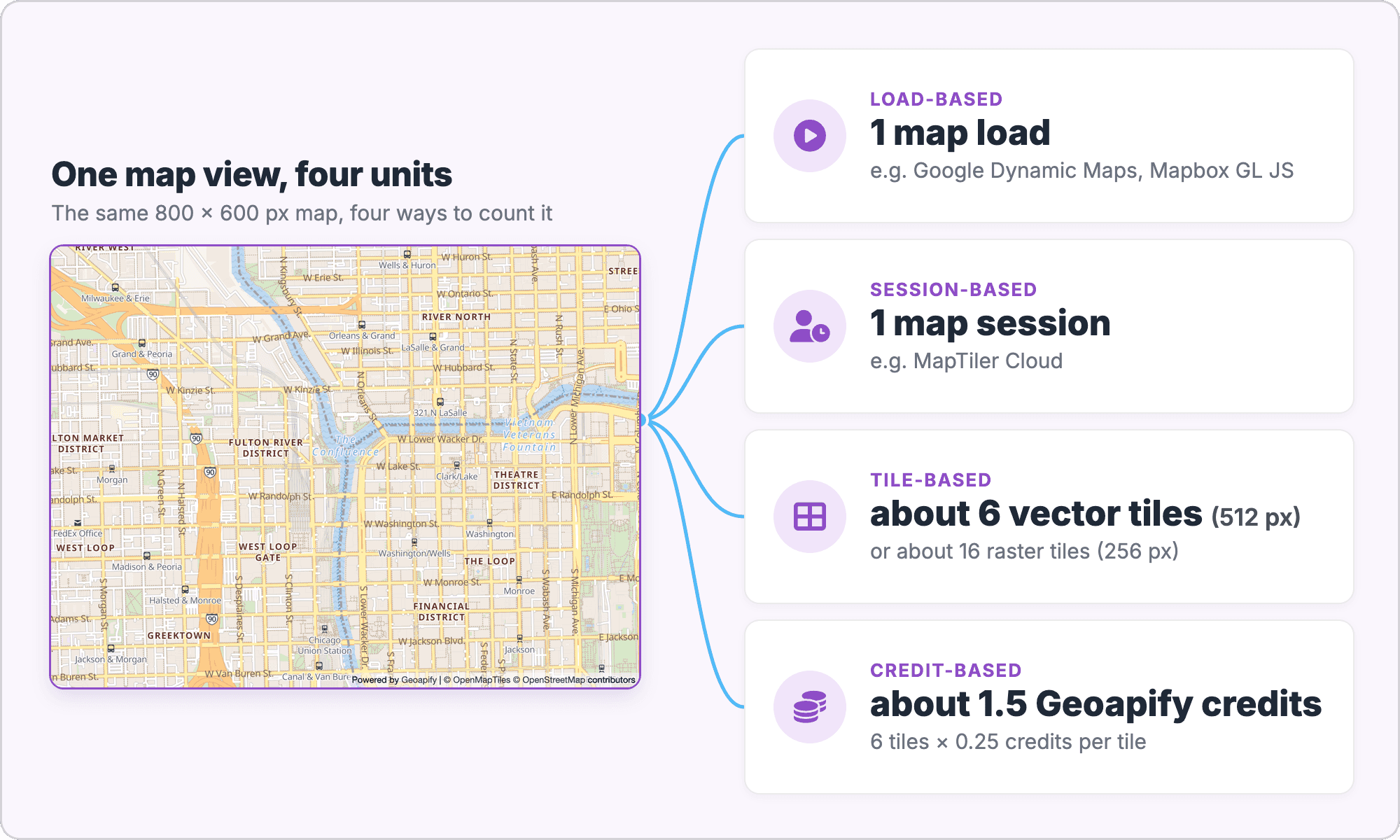
Before you compare 50,000 against 200,000 or 3,000, translate each into the same thing: map views your users open. The units also differ in what happens after the map opens.
What happens when users pan and zoom
For load- and session-based quotas, interaction is included in the view:
- Google Maps Platform: the billable event is a "successful map load", and "user interactions with the map don't generate additional map loads, including panning, zooming, or switching map layers" (SKU details).
- Mapbox: "it counts as one map load regardless of how much the user interacts with the map" (pricing guide).
- MapTiler Cloud: a session starts when a user opens a page with the map; a new one starts on reload, after 6 hours, or after 10,000 requests (map sessions).
For tile- and credit-based quotas (Stadia Maps, Geoapify), every tile the map loads counts, including the new tiles loaded while panning and zooming. A contact page whose map is only looked at stays close to the initial 6 tiles; a store locator that users browse loads several times that. Both models are predictable once you know which kind of map you have.
How many tiles one view needs
A map tile is a square piece of the map that the library requests for the visible area and zoom level. According to the Geoapify maps pricing docs, raster tiles are 256×256 px and vector tiles are rendered at 512×512 px, for example by MapLibre GL:
| Map size | Vector tiles (512 px) | Raster tiles (256 px) |
|---|---|---|
| 800×600 px | about 4–9 | about 12–20 |
| 1200×800 px | about 6–12 | about 20–30 |
The exact number depends on where the tile grid falls on the map. Panning and zooming load more tiles, and a perspective (tilted) view loads more again. For the difference between the two formats, see our raster vs vector map tiles comparison.
How Do You Estimate Your Monthly Map Usage?
Estimate usage as tiles per day: map size, tile size, number of users and how actively they use the map. The Geoapify docs give this rough formula:
MAP_WIDTH * MAP_HEIGHT / (TILE_SIZE * TILE_SIZE) * NUMBER_OF_USERS * USER_ACTIVITY_COEFFTILE_SIZE is 256 for raster and 512 for vector tiles. The activity coefficient reflects the map's role: 1–2 when the map shows a location, 5–10 when users search or analyse data on the map. Because the tile grid rarely lines up with the map edges, real views usually load more than the area alone suggests, so the examples below use about 6 vector tiles or about 16 raster tiles per 800×600 view.
Worked example: Geoapify's Free plan
Geoapify's Free plan has 3,000 credits a day, and one map tile costs 0.25 credits. Step by step:
- Tiles per day: 3,000 credits ÷ 0.25 = 12,000 tiles a day.
- Vector views per day: 12,000 tiles ÷ about 6 tiles per 800×600 view ≈ 2,000 map views a day.
- Raster views per day: 12,000 tiles ÷ about 16 tiles per 800×600 view ≈ 750 map views a day.
Over 30 days, that is about 60,000 vector or 22,500 raster views. Because the quota is daily, plan for your busiest day rather than the monthly average.
Three typical sites
The same arithmetic works for any provider that counts tiles. The table applies it to three common cases, with an 800×600 map:
| Use case | Visitors/day | Activity coefficient | Tiles per view | Tiles/day | Geoapify credits/day |
|---|---|---|---|---|---|
| Contact page with an office map (vector) | 300 | 1 | ~6 | 1,800 | 450 |
| Store locator with search (vector) | 400 | 5 | ~6 | 12,000 | 3,000 |
| Store locator with search (raster) | 400 | 5 | ~16 | 32,000 | 8,000 |
Vector tiles cover the same view with fewer requests, which is why the same store locator fits the Free plan with vector tiles and needs about 2.7 times the quota with raster tiles. These are estimates: the docs recommend starting on the Free plan and measuring real usage, and the Credits Calculator on the pricing page does the conversion for you.
What Does "Free" Include on Geoapify?
Geoapify's Free plan gives 3,000 credits a day, with no credit card required, and allows commercial use with attribution. The same free credits also cover Geoapify's geocoding, routing and places APIs.
Free plan facts
These are the terms from the pricing page and the maps pricing docs:
- Quota: 3,000 credits a day, up to 12,000 map tiles a day (one tile request = 0.25 credits).
- Card: no credit card required.
- Commercial use: allowed, including in production, within the quota, rate limits and feature limits (details).
- Rate limit: up to 5 requests per second; the pricing FAQ notes that for map tiles this limit can be multiplied by 4, because a tile costs a quarter of a credit.
- Over the limit: limits are soft. If usage constantly goes over the quota, we contact you and ask for an upgrade.
Add the map with style.json
For a vector map, pass the style.json URL to MapLibre GL JS. The style is compatible with the Mapbox style specification, so it works in modern map libraries; the map tiles docs list all 18 styles.
import maplibregl from "maplibre-gl";
import "maplibre-gl/dist/maplibre-gl.css";

const map = new maplibregl.Map({
  container: "map",
  style: "https://maps.geoapify.com/v1/styles/osm-bright/style.json?apiKey=YOUR_API_KEY",
  center: [13.405, 52.52], // Berlin
  zoom: 12
});
For a raster map in Leaflet or QGIS, use the ZXY tile URL. The @2x variant serves high-resolution tiles for retina screens:
https://maps.geoapify.com/v1/tile/osm-bright/{z}/{x}/{y}.png?apiKey=YOUR_API_KEY
https://maps.geoapify.com/v1/tile/osm-bright/{z}/{x}/{y}@2x.png?apiKey=YOUR_API_KEY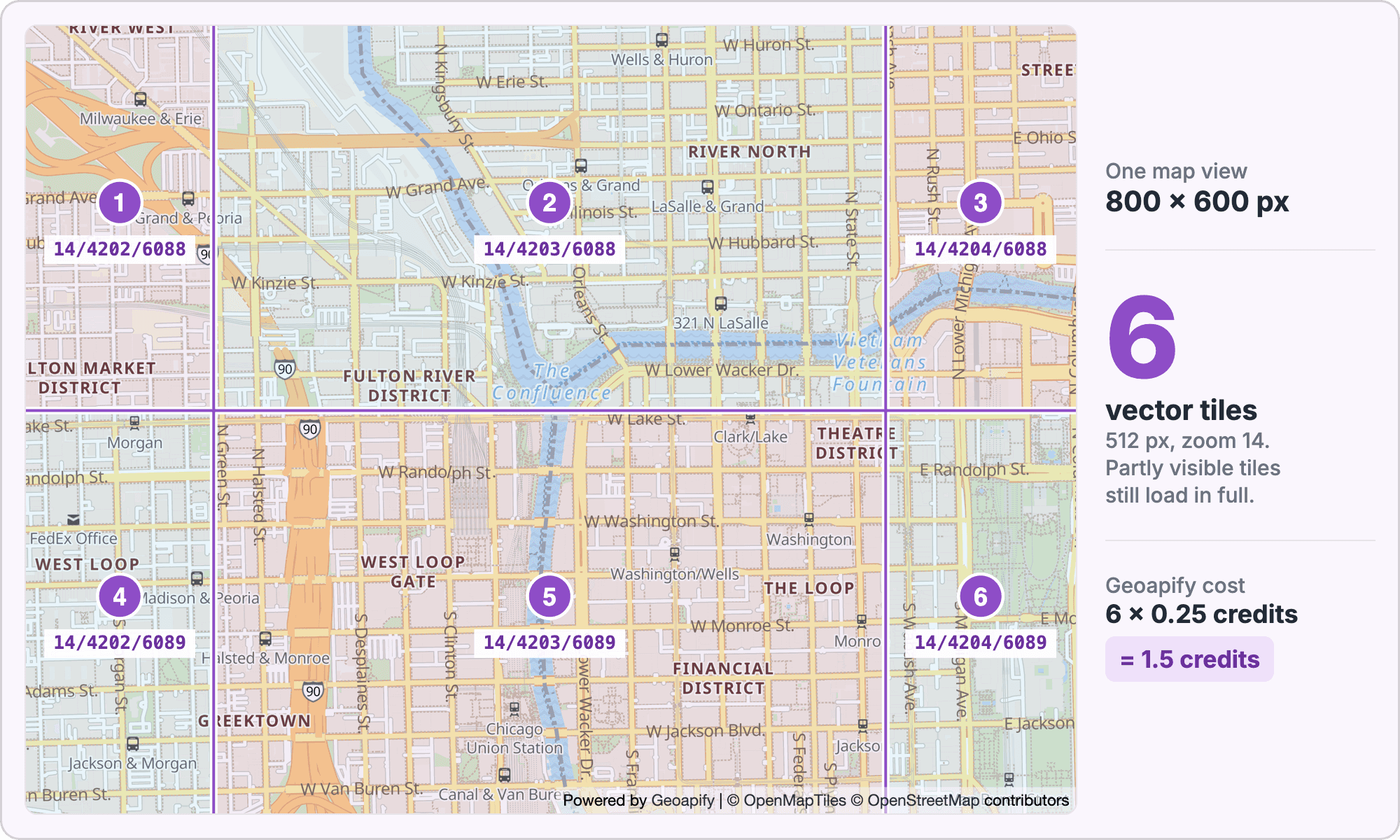
Where the attribution goes
On the Free plan, the map must show the Geoapify credit and the data credits. When you create the map with style.json, the attribution is added to the bottom of the map automatically; keep it visible. With raster tiles, add it yourself in the map corner, for example in Leaflet:
L.tileLayer("https://maps.geoapify.com/v1/tile/osm-bright/{z}/{x}/{y}.png?apiKey=YOUR_API_KEY", {
  attribution: 'Powered by <a href="https://www.geoapify.com/">Geoapify</a> | ' +
    '<a href="https://openmaptiles.org/" target="_blank">© OpenMapTiles</a> ' +
    '<a href="https://www.openstreetmap.org/copyright" target="_blank">© OpenStreetMap contributors</a>'
}).addTo(map);
The OpenMapTiles credit applies to all styles except osm-carto; the OpenStreetMap credit applies to all of them. Paid plans include a white-label option, so the Geoapify credit is no longer needed there. To start, get a free API key and see the Map Tiles page for the available styles.
When Is a Free Maps API Not Enough?
A free tier stops fitting when steady usage passes the quota, when you need guarantees such as an SLA, or when the terms don't cover your use. There are four usual next steps, and the right one depends on volume and how much infrastructure you want to run:
- Upgrade to a subscription. A fixed monthly plan gives a larger quota and predictable cost. On Geoapify, paid plans add the white-label option and a default SLA of 99.5% monthly availability; see Pricing.
- Pay as you go. Google Maps Platform and Mapbox bill usage above the free quota automatically, so cost follows actual usage.
- Move to a plan that allows commercial use. On MapTiler Cloud and Stadia Maps, commercial projects use a paid plan; both offer several sizes.
- Self-host the tiles. OpenStreetMap data is open, so you can run your own tile server and pay for hardware and maintenance instead of requests. The OSM tile usage policy is meant for light use, so heavier traffic should move to a provider or your own server. Geoapify also offers dedicated servers on the Custom plan.
If you are comparing providers for a broader move, our Google Maps API alternative page and the post on Mapbox GL's license and free alternatives cover the libraries and services in more detail.
Frequently Asked Questions
Is the Google Maps API free?
Google Maps Platform has free monthly usage per product: for example, 10,000 Dynamic Maps loads a month on Essentials and 100,000 Map Tiles API 2D tiles. Panning, zooming and switching map layers don't generate additional map loads. Production use needs a billing account; a Maps Demo Key allows prototyping without billing. See Google Maps Platform pricing and the SKU details (checked 9 October 2026).
Which maps API is free for commercial use?
Of the six options compared here, Google Maps Platform, Mapbox and Geoapify allow commercial use on their free tiers (Mapbox requires a Commercial Application License for some use cases). MapTiler Cloud and Stadia Maps don't allow it on their free plans. Geoapify allows it with attribution; see Geoapify commercial use.
Do I need a credit card for a free maps API?
Not always. MapTiler Cloud, Stadia Maps and Geoapify don't ask for a card on their free plans. Google needs a billing account for production, and Mapbox works without a card on demo access with lower caps. Check each provider's pricing page, as terms change.
How many map views do I get for free?
It depends on the unit. Counting one view as one person opening an 800×600 map: about 10,000 a month on Google Maps Platform, 50,000 on Mapbox, 5,000 sessions on MapTiler Cloud, about 33,000 initial vector views on Stadia Maps, and about 2,000 a day (60,000 a month) on Geoapify. Tile-based counts go down when users pan and zoom. See the Geoapify maps pricing docs for the tile formula.
Can I use OpenStreetMap tiles for free?
The tile.openstreetmap.org servers have no fixed quota and are free for light use, on a best-effort basis without an SLA. Offline use isn't permitted, and heavy usage can be blocked without notice. Read the OSM tile usage policy, or use a tile provider or your own server for larger projects.
Why does a vector map use fewer tiles per view than a raster map?
Vector tiles are rendered at 512×512 px and raster tiles are 256×256 px, so one view needs fewer vector tiles: about 4–9 versus 12–20 for an 800×600 map. On tile-based pricing that means fewer requests per view. See raster vs vector map tiles.