


European Alternative to Google Maps: Maps, Geocoding & Routing with EU Hosting
Geoapify is a European alternative to Google Maps for maps, address search, place discovery, routing, and location analysis. Its REST APIs can be used from web, mobile, and backend applications. You can choose between the default and EU-focused delivery options according to your processing and map-delivery requirements.
- Default:
api.geoapify.comfor location APIs andmaps.geoapify.comfor Map Tiles and Static Maps, using Cloudflare. - EU-focused:
api-eu.geoapify.comfor Geoapify REST APIs, Map Tiles, and Static Maps, using BunnyCDN.
On this page
Why teams evaluate a European alternative to Google Maps
Google Maps Platform is a common choice for maps and location services. For some organizations, API functionality is only one part of the decision. Procurement, infrastructure, and data-processing requirements can also lead teams to evaluate a European alternative.
- A European provider that fits regional vendor or procurement policies
- A documented EU-focused processing option for applications with EU service-processing or data-location requirements
- Coverage of core location workflows, including maps, geocoding, autocomplete, places, routing, and route matrices
- A clear infrastructure choice that developers and decision-makers can describe in technical and procurement documentation
- Usage flexibility through terms that fit the required use, caching, or storage of results, together with the option to combine APIs from different providers
- Predictable costs that teams can evaluate against their expected APIs, request volumes, and caching patterns
Geoapify addresses these requirements with a location API platform offered through default and EU-focused delivery configurations. Before comparing those configurations, it is useful to confirm which common Google Maps Platform workflows the Geoapify APIs cover. Usage terms and costs should still be evaluated for the specific APIs and workload involved. A European provider, GDPR-compliant processing, and an EU-focused infrastructure option are related criteria, but they are not the same thing.
Geoapify APIs for common Google Maps workflows
Geoapify provides focused APIs for the core map and location tasks that commonly lead teams to evaluate a Google Maps Platform alternative. The services use Geoapify request formats and are not intended to be feature-for-feature or response-compatible replacements.
| Common workflow | Google Maps Platform reference | Geoapify service |
|---|---|---|
| Display an interactive map | Maps JavaScript API / Maps SDKs | Map Tiles API with vector or raster tiles |
| Generate a map image | Maps Static API | Static Maps API for PNG or JPEG images |
| Convert an address to coordinates | Geocoding API | Geocoding API with coordinates and structured address fields |
| Suggest addresses while a user types | Place Autocomplete | Address Autocomplete API with ranked address and place suggestions |
| Search for points of interest | Places API | Places API with category and geographic filters |
| Calculate directions | Routes API — Compute Routes | Routing API with route geometry, distance, time, and directions |
| Compare travel times between many points | Routes API — Compute Route Matrix | Route Matrix API with distance and time matrices |
Beyond the workflows shown in the table, Geoapify also provides Route Planning, Isolines, Reverse Geocoding, Map Matching, boundaries, elevation, postcode, IP geolocation, and batch processing. Browse the complete Maps API catalog for current API coverage and documentation links.
Migration is not a drop-in hostname change from Google Maps Platform. Review Geoapify endpoints, parameters, response schemas, map clients, attribution requirements, and application-specific tests. Once the required API coverage is confirmed, the next decision is which Geoapify delivery configuration to use.
Geoapify default and EU endpoints
The two configurations provide the same Geoapify API concepts but use different hostnames, network providers, service-processing configurations, and map-cache coverage. They use the same Geoapify API-key mechanism, and API operations retain their request paths and parameters. The default option separates location APIs from map delivery, while the EU-focused option uses one hostname for location APIs, Map Tiles, and Static Maps.
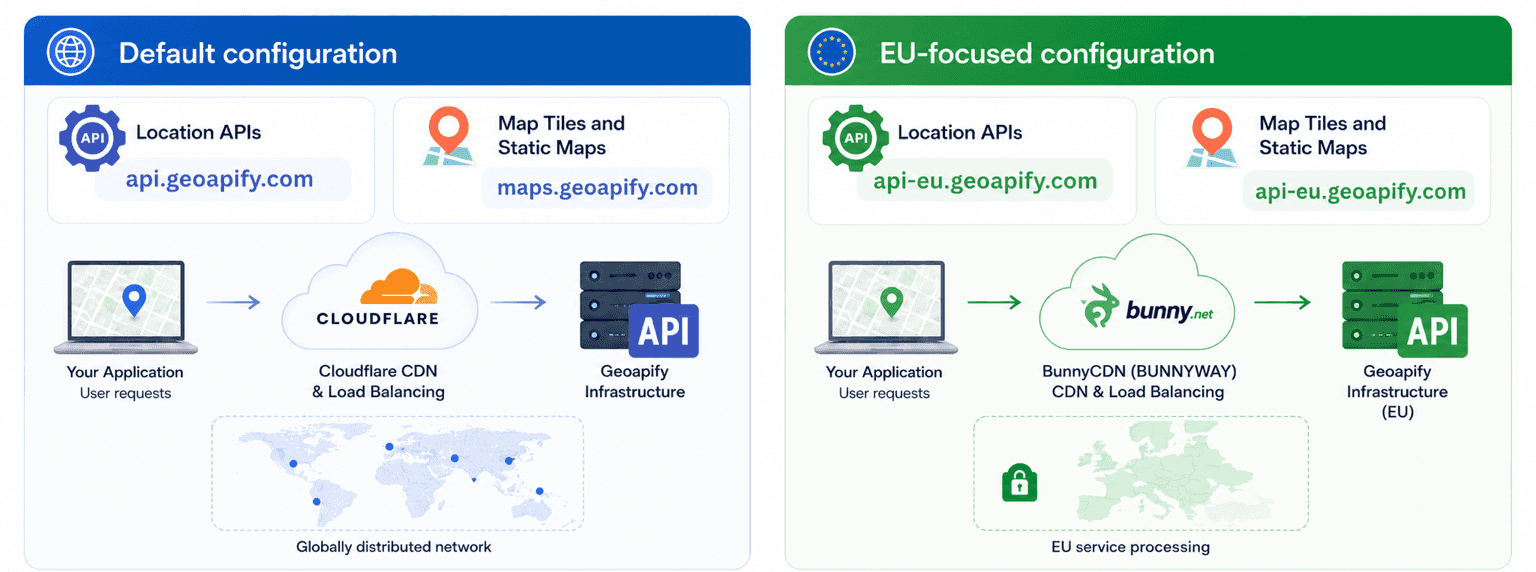
Default configuration
api.geoapify.commaps.geoapify.comNetwork: Cloudflare provides the CDN and cloud load-balancing layer.
GDPR compliant: Yes. See why both endpoint options are GDPR compliant.
EU-only service processing: No. Cloudflare operates a globally distributed network, so the default configuration is not restricted to EU infrastructure.
Caching: Cloudflare extensively caches tiles and static map images. Cache-served content is not counted as Geoapify usage and does not consume credits.
Use when: You do not require Geoapify's EU-focused service-processing configuration, are following the default documentation, or want the more extensive map cache.
EU-focused configuration
api-eu.geoapify.comapi-eu.geoapify.comNetwork: BunnyCDN, operated by BUNNYWAY in Slovenia, provides the CDN and cloud load-balancing layer.
GDPR compliant: Yes.
EU-only service processing: Yes. This endpoint is configured for service-side processing by Geoapify and the subprocessors designated for this endpoint using EU infrastructure. This commitment covers infrastructure under their control, not the geographical route traffic takes across the public Internet.
Caching: BunnyCDN caches tiles and images, but less extensively than Cloudflare.
Use when: Geoapify service processing in EU infrastructure is required by technical specifications, procurement, or internal data-location policies.
Map Tiles and Static Maps endpoint options
Maps need additional clarification because the default configuration uses maps.geoapify.com, while the EU-focused configuration uses api-eu.geoapify.com. The API path after the hostname remains the same.
| Map service | Default Cloudflare-backed URL | EU-focused BunnyCDN URL |
|---|---|---|
| Map Tiles | https://maps.geoapify.com/v1/tile/... | https://api-eu.geoapify.com/v1/tile/... |
| Static Maps | https://maps.geoapify.com/v1/staticmap?... | https://api-eu.geoapify.com/v1/staticmap?... |
| CDN caching | Extensive; cache-served tiles and images do not count as usage | Available, but less extensive than on Cloudflare |
The default maps hostname can be advantageous for map-heavy applications because popular tiles and repeated static images may be served from Cloudflare without adding to Geoapify usage. Choose the EU hostname when the EU-focused service-processing configuration is the controlling requirement, and account for the less extensive cache when estimating usage.
What stays the same between the endpoints
For Geoapify APIs that support both hostnames, switching endpoints is intentionally a small integration change. The core request and application logic remain the same.
The same
- Geoapify API product and operation
- Request path
- Query parameters or request body
apiKeyauthentication- Response format and application parsing
Different
- API hostname
- Network provider
- Documented service-processing configuration
- Map-delivery hostname and cache coverage
- Hostname entries in network allowlists, monitoring, or application configuration
For standard location APIs, the EU switch is api.geoapify.com → api-eu.geoapify.com. For Map Tiles and Static Maps, it is maps.geoapify.com → api-eu.geoapify.com. Keep this distinction explicit in application configuration.
Which Geoapify endpoint should you use?
The choice should follow a documented requirement rather than a general assumption that one endpoint is better for every project.
Choose api.geoapify.com when
- You do not have a requirement for Geoapify service processing to use EU infrastructure
- You are following the default API documentation
- You are evaluating Geoapify or building an initial integration
- Your existing application already uses the default endpoint and no policy requires a change
- You want the more extensive Cloudflare cache for Map Tiles and Static Maps
Choose api-eu.geoapify.com when
- Geoapify service processing in EU infrastructure is explicitly required
- Procurement or vendor review requires an EU-focused endpoint configuration
- Your architecture documentation specifies an EU endpoint
- You need to identify the EU-focused hostname in application or network configuration
- The EU-focused service-processing configuration is more important than maximizing map cache coverage
If both endpoints are technically acceptable, test the selected endpoint from the regions where your application operates. Do not assume that the endpoint name alone predicts application latency; measure the complete request from your own environment.
How to switch Geoapify API endpoints
The following geocoding requests show the practical difference. The path, address query, response format, limit, and API-key parameter are identical.
Default endpoint
curl "https://api.geoapify.com/v1/geocode/search?text=Berlin%2C%20Germany&limit=1&format=json&apiKey=YOUR_API_KEY"EU endpoint
curl "https://api-eu.geoapify.com/v1/geocode/search?text=Berlin%2C%20Germany&limit=1&format=json&apiKey=YOUR_API_KEY"Map Tiles and Static Maps
For map delivery, change the default maps.geoapify.com hostname to api-eu.geoapify.com. The tile or static-map path remains unchanged.
# Default Map Tile
https://maps.geoapify.com/v1/tile/osm-bright/{z}/{x}/{y}.png?apiKey=YOUR_API_KEY

# EU-focused Map Tile
https://api-eu.geoapify.com/v1/tile/osm-bright/{z}/{x}/{y}.png?apiKey=YOUR_API_KEY

# Default Static Map
https://maps.geoapify.com/v1/staticmap?style=osm-bright&width=600&height=400&apiKey=YOUR_API_KEY

# EU-focused Static Map
https://api-eu.geoapify.com/v1/staticmap?style=osm-bright&width=600&height=400&apiKey=YOUR_API_KEY
For production applications, keep the hostname in configuration instead of repeating it throughout the codebase. This makes the chosen endpoint configuration visible and avoids mixing hostnames unintentionally.
Before switching:
- Identify whether the default request uses
api.geoapify.comormaps.geoapify.com. - Change the configured hostname to
api-eu.geoapify.comfor the EU-focused option. - Keep the existing path, parameters, request body, and Geoapify API key.
- Update hostname-based allowlists, monitoring rules, or environment configuration.
- Test representative requests and error handling in each environment.
- For Map Tiles and Static Maps, compare usage with the default configuration because BunnyCDN caching is less extensive than Cloudflare caching.
Are both Geoapify endpoint options GDPR compliant?
Yes. We operate both configurations as GDPR-compliant Geoapify services. The additional distinction is that the EU-focused endpoint is configured for Geoapify service processing in EU infrastructure. This describes processing performed by Geoapify and the subprocessors designated for the endpoint; it does not guarantee the geographical route traffic takes across the public Internet.
| Configuration | GDPR compliant | EU-only service processing | EU-only Internet route |
|---|---|---|---|
Default: api.geoapify.com and maps.geoapify.com | Yes | No | No |
EU-focused: api-eu.geoapify.com | Yes | Yes | No |
Why the default Cloudflare-backed option is GDPR compliant
GDPR does not prohibit all processing or data transfers outside the EU. It requires a valid transfer mechanism and appropriate safeguards when protected personal data is transferred internationally.
We use Cloudflare for the default configuration under its Data Processing Addendum. Cloudflare states that it uses the EU Standard Contractual Clauses (SCCs), supplementary safeguards, and the EU-US Data Privacy Framework where applicable. You can review Cloudflare's GDPR explanation and Cloudflare Data Processing Addendum for details.
The result is an important distinction: the default configuration is GDPR compliant, but its globally distributed Cloudflare network is not restricted to an EU service-processing configuration.
What the EU-focused endpoint adds
The api-eu.geoapify.com endpoint uses BunnyCDN, operated by BUNNYWAY in Slovenia, together with Geoapify's EU infrastructure. It is the endpoint for customers whose architecture, procurement process, or internal data-location policy requires Geoapify service processing to use EU infrastructure.
This scope does not include the route taken before a request reaches, or after a response leaves, the service infrastructure. Public Internet routing operates across independently administered networks, including the customer's ISP and other network operators, and cannot be geographically guaranteed by Geoapify.
Geoapify lists Hetzner data centers in Germany and Finland as its server and data-center infrastructure. The Geoapify Data Processing Agreement documents our API-processing providers and organizational measures.
Endpoint compliance does not cover the complete application
Selecting a GDPR-compliant Geoapify endpoint does not automatically make the customer's complete application GDPR compliant. The application may also process, log, store, or forward location data through other systems.
Review the complete data flow and consult the Geoapify Data Processing Agreement and Privacy Policy as part of the application's own assessment.
Geoapify API Endpoint FAQ
Is Geoapify a European alternative to Google Maps?
Yes. Geoapify is operated by an EU business and provides APIs for maps, geocoding, autocomplete, places, routing, route matrices, and other location workflows. Review the Geoapify Maps API catalog to map the services required by your application.
Why does Geoapify provide two API endpoints?
Geoapify provides default and EU-focused delivery options for different infrastructure and service-processing requirements. The default configuration uses api.geoapify.com for location APIs and maps.geoapify.com for maps. The EU-focused configuration uses api-eu.geoapify.com with BunnyCDN and Geoapify's EU infrastructure.
What is the difference between api.geoapify.com and api-eu.geoapify.com?
The main differences are the hostname, network provider, caching coverage, and documented service-processing configuration. The default configuration uses Cloudflare with api.geoapify.com for location APIs and maps.geoapify.com for Map Tiles and Static Maps. The EU configuration uses api-eu.geoapify.com with BunnyCDN, operated by BUNNYWAY in Slovenia, for Geoapify location APIs and map delivery.
When should I use api.geoapify.com?
Use the default endpoint when you do not have an explicit requirement for Geoapify service processing to use EU infrastructure. It is the hostname used in most Geoapify API documentation. For Map Tiles and Static Maps, the default maps.geoapify.com hostname also provides more extensive Cloudflare caching.
When should I use api-eu.geoapify.com?
Use the EU endpoint when your technical specification, procurement process, or internal data-location policy requires Geoapify service processing to use EU infrastructure. It also serves EU-focused Map Tiles and Static Maps, although BunnyCDN caching is less extensive than the Cloudflare caching used by the default maps hostname.
Can I use the same API key with the EU endpoint?
Yes. Use your Geoapify API key in the apiKey parameter with api-eu.geoapify.com. The EU endpoint does not use a separate API-key format. See the getting-started guide for API-key setup.
Which Geoapify APIs are available through the EU endpoint?
Geoapify location APIs are available through api-eu.geoapify.com, including Map Tiles, Static Maps, Geocoding, Reverse Geocoding, Address Autocomplete, Places, Routing, Route Matrix, Route Planning, Isolines, Map Matching, boundaries, elevation, postcode, IP geolocation, and batch processing. Browse the Geoapify Maps API catalog for the current API list and individual documentation.
Do I need to change my API request to use the EU endpoint?
For location APIs whose documented hostname is api.geoapify.com, change the hostname to api-eu.geoapify.com and keep the same path, parameters, request body, API key, and response handling. Test the result and update any hostname-based allowlists or monitoring configuration.
Which hostnames should I use for Map Tiles and Static Maps?
For the default Cloudflare-backed option, use maps.geoapify.com for both Map Tiles and Static Maps. For EU-focused delivery, keep the same API path but use api-eu.geoapify.com.
How does map caching affect Geoapify usage?
Cloudflare provides extensive caching for tiles and static map images requested through maps.geoapify.com. Tiles and images served from that cache are not counted as Geoapify API usage and do not consume credits. BunnyCDN also caches maps requested through api-eu.geoapify.com, but its cache is less extensive, so customers should compare actual usage when selecting the EU-focused option.
Are both Geoapify endpoint options GDPR compliant?
Yes. Geoapify operates both configurations as GDPR-compliant services through its EU-based organization, EU data-center infrastructure, documented subprocessors, and data-processing agreements. For international transfers, Cloudflare documents mechanisms including EU Standard Contractual Clauses, supplementary safeguards, and the EU-US Data Privacy Framework where applicable; see Cloudflare's GDPR explanation. The additional distinction is that api-eu.geoapify.com uses Geoapify's EU-focused service-processing configuration. See the Geoapify DPA for the applicable contractual processing commitments and the Privacy Policy.
Does the EU endpoint guarantee that every Internet packet stays in the EU?
No. The EU-focused configuration covers service processing performed by Geoapify and the subprocessors designated for the endpoint. Geoapify does not control the route selected by the customer's ISP and other independent networks before traffic reaches or after it leaves the service infrastructure.
Does using the EU endpoint make an application GDPR compliant?
No. Geoapify's endpoint configuration is only one part of the customer's data flow. Application-level GDPR compliance also depends on how the application collects, logs, stores, shares, and deletes location or personal data.
Can Geoapify replace Google Maps APIs?
Geoapify can replace many common Google Maps Platform workflows, including maps, geocoding, autocomplete, places, routing, and route matrices. It is not a drop-in replacement: applications must update endpoints, parameters, response handling, map integration, attribution, and tests. Review the Geoapify Maps API catalog to map the services required by your application.