


Geolocation marketing adapts what a visitor sees (language, currency, prices, local stores and offers) to where they are; done well, it uses the coarsest location that works, lets the visitor change it, and never pretends to know more than it does. Most of it runs on an IP lookup that returns a country and an approximate city, with no prompt and no click. That is enough to show prices in euros to a visitor in Amsterdam, and not enough to say which street they are on. This post shows what to personalise at each level of precision, with real responses from the Geoapify IP Geolocation API, and where personalisation starts to overstep.
Key takeaways
- Use the coarsest level that works: the country for currency and language, the city for local content and local time.
- Precise location only with permission: ask with a button or an address field when the exact place matters.
- Always show a visible "Change" control: never block a page or force a redirect based on location.
is_in_european_unionis not "GDPR applies": the field covers EU member states only, and the law depends on more than the visitor's location.- Search engines may not see your local versions: Googlebot's default IP addresses appear to be in the USA, so keep a default version of every page and personalise on top of it.
On this page
What Is Geolocation Marketing?
Geolocation marketing is the use of a visitor's location to adapt content, offers and defaults. This post is about the on-site part: what your own website or app shows once a visitor arrives. Choosing who sees an ad by region, or analysing markets by area, is ad geotargeting and geomarketing, covered on our geotargeting in marketing page.
On your own site, the location can come from three sources, and they differ a lot in precision and in what they ask of the visitor:
- The IP address. An IP geolocation lookup returns a country, region, city and an approximate point. It needs no prompt, works on the first page view, and is approximate.
- Browser geolocation. The browser can share a precise position from GPS, Wi-Fi or cell data, but only after the visitor allows it. Our post on how to get user location with JavaScript covers the browser API.
- An address the visitor typed. A delivery or store-search address is exact and given on purpose, for example through Address Autocomplete.
IP geolocation marketing is the IP-based subset: personalisation that runs on the first request, before the visitor has given you anything. Because it is the least precise and the least visible to the visitor, it needs the most care.
How Precise Should Personalisation Be?
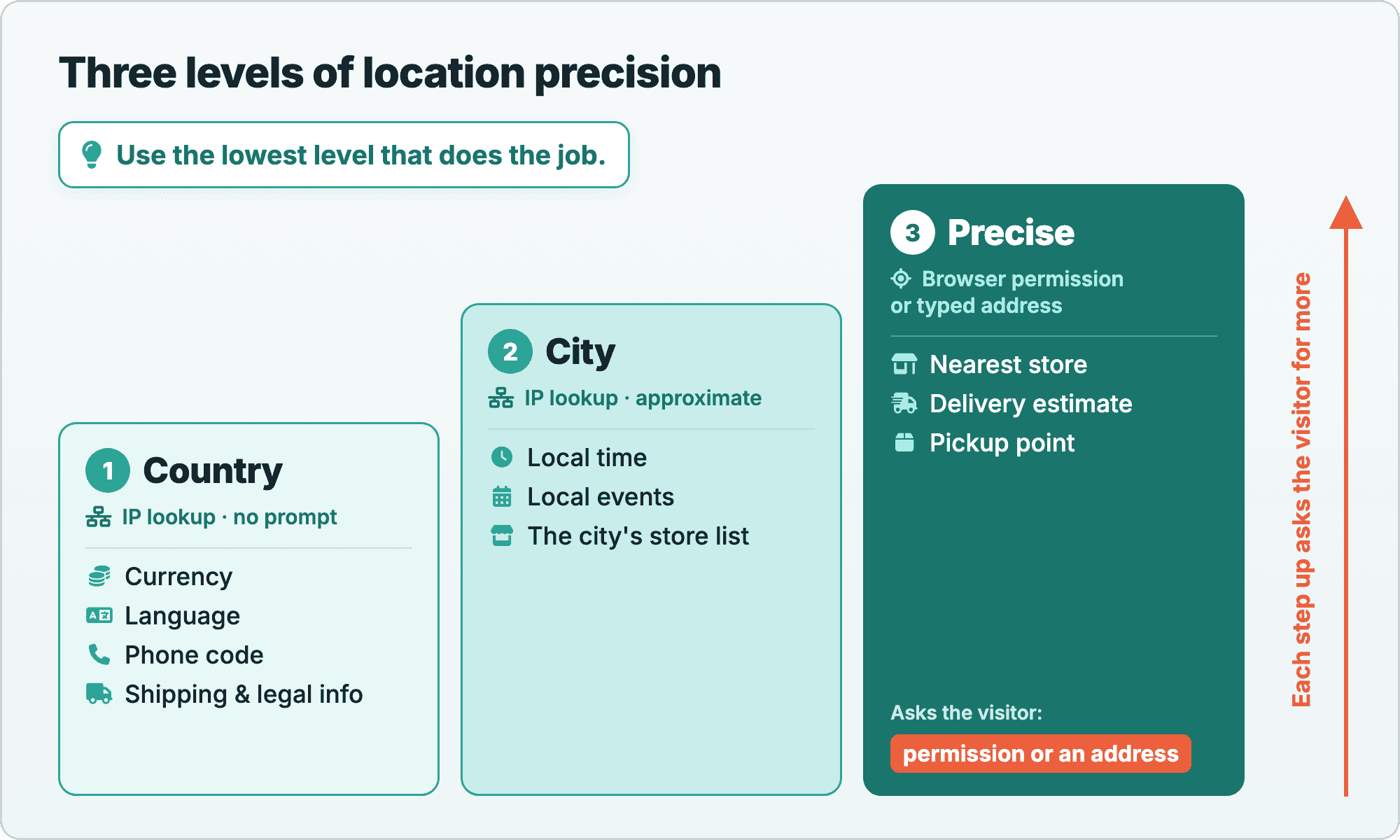
Personalisation should use the lowest level of precision that does the job. A currency needs a country; a store list needs a city; walking directions to the nearest store need a precise point. Three levels cover almost every case:
| Level | Where it comes from | Good for | Not good for |
|---|---|---|---|
| Country | IP lookup, no prompt | Language, currency, prices in local currency, phone code, legal and shipping information | Anything inside the country |
| City | IP lookup, no prompt, approximate | Local events, the store list for the city, local time | Distances, "nearest to you" |
| Precise | Browser geolocation with permission, or a typed address | Nearest store, delivery estimate, pickup point | Nothing, as long as the visitor chose to share it |
The rule follows from how the data behaves: the country from an IP lookup is reliable enough for defaults, the city is often right, and the coordinates are an approximate point. Each step up the ladder asks the visitor for more, so take the step only when the task needs it.
What Can You Personalise at Country Level?
At country level you can pre-fill the country, phone prefix, currency and language, and show the right shipping and legal information. One IP lookup returns all of it. Here is a REST request for 194.109.6.66, resolver.xs4all.nl, a public DNS resolver of the Dutch internet provider XS4ALL (KPN):
https://api.geoapify.com/v1/ipinfo?ip=194.109.6.66&apiKey=YOUR_API_KEYSimplified response, captured on 2026-11-11 (the names objects, subdivisions, postal, continent and some country fields are left out):
{
  "ip": "194.109.6.66",
  "city": { "name": "Amsterdam" },
  "state": { "name": "North Holland" },
  "country": {
    "name": "The Netherlands",
    "iso_code": "NL",
    "name_native": "Nederland",
    "phone_code": "31",
    "currency": "EUR",
    "is_in_european_union": true,
    "languages": [
      { "iso_code": "nl", "name": "Dutch", "name_native": "Nederlands" }
    ]
  },
  "location": { "latitude": 52.3667, "longitude": 4.89454 }
}
Two visitors, two sets of defaults
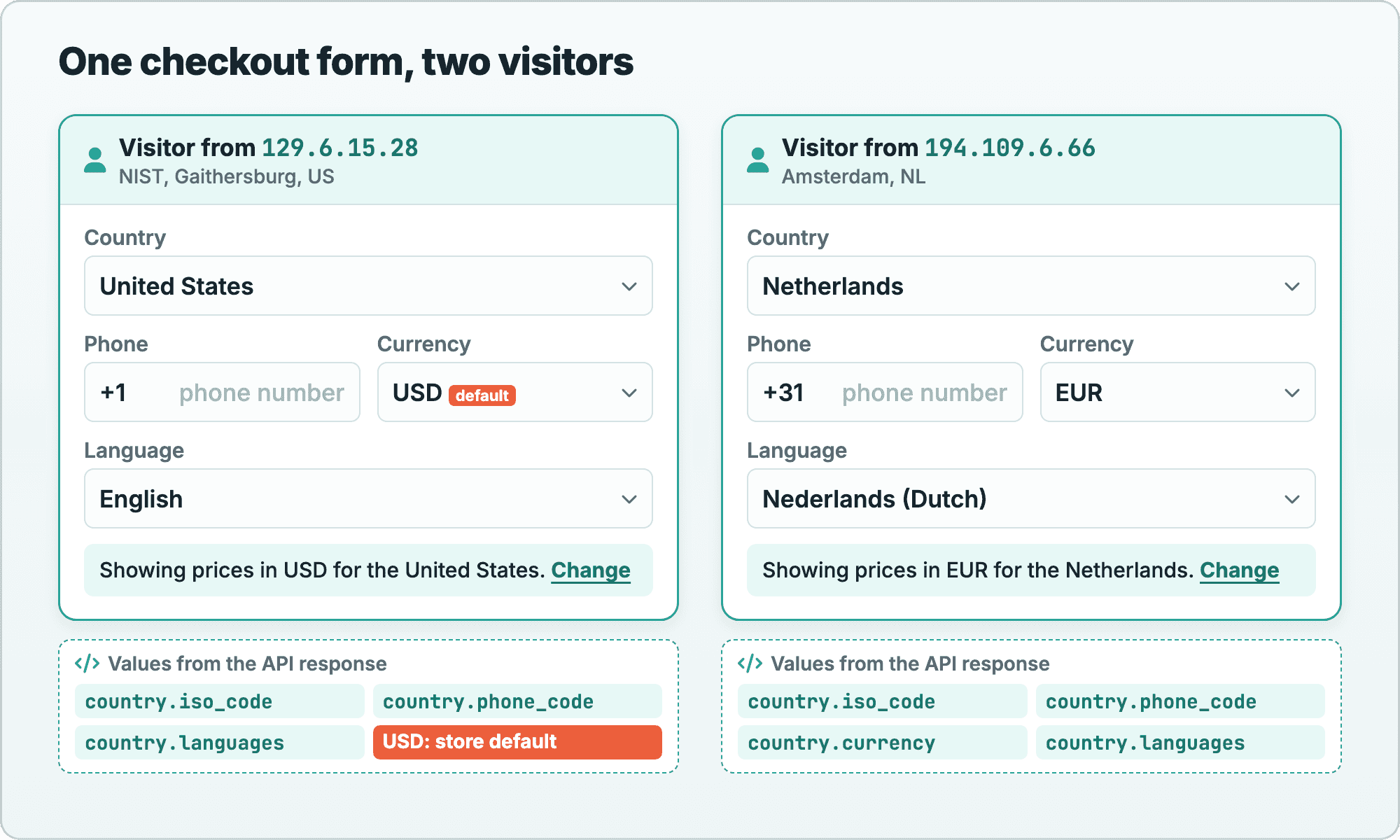
The same fields give different defaults for different visitors. This table compares the Amsterdam resolver with 129.6.15.28, a public NIST time server in Gaithersburg, Maryland, which we looked up on 2026-11-10:
| Field | NIST visitor (129.6.15.28) | Amsterdam visitor (194.109.6.66) | What to pre-fill |
|---|---|---|---|
country.iso_code | US | NL | The country select |
country.phone_code | 1 | 31 | The phone prefix: +1 or +31 (the API returns it without the +) |
country.currency | Not shown | EUR | EUR for the Netherlands; for the US visitor, your store's USD prices |
country.languages | English (en) | Dutch (nl) | Suggest the language if your site has it: English, or offer Dutch |
country.is_in_european_union | Missing | true | Nothing on its own; see where personalisation oversteps |
Read the fields defensively
Two notes from the API reference shape the code. First, country.currency "can list several codes, separated by commas", so split it and pick the first code your store supports. Second, "A field can be missing when there is no data for it", so every value needs a fallback to your default.
This browser sketch puts both rules together and lets a saved choice win over the IP guess:
const API_KEY = "YOUR_API_KEY";
const DEFAULTS = { country: "US", currency: "USD", language: "en" };
const CURRENCIES = ["USD", "EUR", "GBP"]; // what your store supports
const LANGUAGES = ["en", "nl", "de"];     // what your site is translated into

async function getLocaleDefaults() {
  const saved = JSON.parse(localStorage.getItem("locale-choice") || "null");
  if (saved) return saved; // the visitor's own choice wins

  try {
    const response = await fetch(`https://api.geoapify.com/v1/ipinfo?apiKey=${API_KEY}`);
    if (!response.ok) return DEFAULTS;
    const { country } = await response.json();

    const currencies = (country?.currency ?? "").split(",").map((c) => c.trim());
    const languages = (country?.languages ?? []).map((l) => l.iso_code);

    return {
      country: country?.iso_code ?? DEFAULTS.country,
      currency: currencies.find((c) => CURRENCIES.includes(c)) ?? DEFAULTS.currency,
      language: languages.find((l) => LANGUAGES.includes(l)) ?? DEFAULTS.language,
    };
  } catch {
    return DEFAULTS;
  }
}
Without the ip parameter, the API looks up the address of whoever sends the request, which in the browser is the visitor. Restrict a browser key to your domain in Geoapify MyProjects. The how-to on pre-filling a form by IP shows a complete form.
What it costs
Each IP Geolocation request costs 1 credit, and the Free plan includes 3,000 credits per day. Caching the result per visitor, or storing their choice, means a returning visitor doesn't need a new request. See the pricing page for paid plans.
What Works at City Level?
At city level, personalisation can show local time, local events and the stores in the visitor's city. The city name and the approximate point from the IP lookup are enough for these, because none of them depends on where exactly in the city the visitor is.
Local time from the IP point
Local time is a good example. The Geoapify Timezone API takes coordinates, so you can pass the approximate point from the IP lookup straight in. REST request with the Amsterdam point:
https://api.geoapify.com/v1/timezone?lat=52.3667&lon=4.89454&apiKey=YOUR_API_KEYSimplified response, captured on 2026-11-11 (the before, after and offset-seconds fields are left out):
{
  "timezones": [
    {
      "name": "Europe/Amsterdam",
      "type": "standard",
      "utc_offset": "+01:00",
      "abbreviation": "CET",
      "local_time": "2026-11-11T10:50:14.230+01:00",
      "next_transition": {
        "at": "2027-03-28T01:00:00.000Z",
        "kind": "daylight-start"
      }
    }
  ],
  "tzdb_version": "2026e"
}
The IANA name Europe/Amsterdam is what you pass to date libraries and Intl.DateTimeFormat. With it you can:
- Show "Open now" and opening hours of a store or support line in the visitor's local time.
- Send emails and notifications at a local hour, such as 9:00, instead of the same UTC moment worldwide.
- Show event and sale dates in local time, including the right offset after the next daylight-saving change in
next_transition.
An approximate point works here because a time zone covers a whole city in almost every case. Each Timezone API request also costs 1 credit, with the same Free plan of 3,000 credits per day.
Store lists for the city, not "nearest to you"
For stores, show the list for the visitor's city rather than a list sorted by distance from the IP point. A distance from an approximate point looks precise and isn't: the API docs say "The location is approximate, usually at city level. An IP address doesn't give a street address or identify a person." In our IP location accuracy checks, the point landed 0.53 km from one real site and 4.6 km from another.
Once you have a precise point or an address, sorting by distance makes sense; the how-to on a store locator with the nearest places shows how to build it.
When Do You Need Precise Location?
You need a precise location when the answer changes within a city: the nearest store, a delivery estimate, the closest pickup point. For these, ask the visitor. There are two ways, and both are clear to the visitor:
- Browser geolocation with a permission button. The visitor clicks "Use my precise location" and the browser asks for permission.
- An address field. The visitor types a street or postcode, and Address Autocomplete turns it into a verified address with coordinates.
The pattern that works best combines the levels. The page starts from the IP default, so the visitor sees their city at once, and offers precision as an option:
- On page load, look up the IP and show the stores in the visitor's city.
- Show a "Use my precise location" button and an address field next to the list.
- If the visitor shares a location, sort the stores by distance and show the delivery estimate.
- If they decline, keep the city view. Nothing breaks.
The how-to on centering a map on the visitor's location implements the first steps with a map, and our post on getting user location with JavaScript explains the browser permission flow.
Where Does Personalisation Overstep?
Personalisation oversteps when it claims more than the data says, takes decisions away from the visitor, or keeps more data than it needs. These are the common lines to watch:
- Claiming precision you don't have. "We see you're on Main Street" is wrong twice: an IP lookup doesn't give a street address, and it doesn't identify a person. Many people share one IP address, and VPNs and mobile networks move the result elsewhere.
- Inferring sensitive traits from location. Guessing income, religion, health or ethnicity from a neighbourhood turns a default into a profile. Keep location-based personalisation to practical defaults such as currency, language and local stores.
- Forcing a version. Auto-redirecting visitors or blocking a page by country removes their choice. In the EU, the Geo-blocking Regulation (EU) 2018/302 says in Article 3 that a trader shall not block or limit a customer's access to its online interface for reasons related to nationality, place of residence or place of establishment, and shall not redirect the customer to another version without their explicit consent. After a redirect the customer agreed to, the original version "shall remain easily accessible". The recitals name tracking location by IP address as one of the technical measures covered. Suggest the local version and keep the original one reachable.
- Hiding options. Show the guess and a way out, for example "Not in the Netherlands? Change", and keep every currency and language selectable. When the visitor picks something, remember it and prefer it over the IP guess on the next visit.
- Using
is_in_european_unionas a GDPR switch. The field istrueonly for EU member states. The GDPR also applies in the EEA countries Iceland, Liechtenstein and Norway, the UK has its own UK GDPR, and whether a law applies depends on more than where a visitor is. Don't decide consent banners on this field alone. - Keeping more than you need. In the EU, an IP address can be personal data: the Court of Justice ruled so for dynamic IP addresses in the Breyer case (C-582/14). Store the derived choice, such as the country or currency, not the IP address. Our post on GDPR-compliant apps with location APIs goes into the details.
Suggest, don't decide. A location-based default is a guess that the visitor can correct with one click; everything that removes that click is where personalisation oversteps. This section is general information, not legal advice.
Does Location-Based Content Hurt SEO?
Location-based content can hide parts of your site from search engines if it replaces the page by location. Google's guidance on locale-adaptive pages explains why: "the default IP addresses of the Googlebot crawler appear to be based in the USA", and the crawler sends requests without an Accept-Language header. Googlebot also crawls from IP addresses outside the USA, but content that changes by IP may not be seen in all its versions. For different languages and regions, Google recommends "separate locale URL configurations" annotated with hreflang.
In practice, three habits keep personalisation and search on good terms:
- Keep one default version of each page, and render it for any client you can't locate, including crawlers.
- Personalise defaults on top of the page, such as the currency, the pre-filled country or the city's store list, rather than swapping the main content.
- Use separate URLs for languages, for example
/nl/and/de/, linked withhreflang, and suggest them to visitors instead of redirecting.
Build It With an AI Coding Agent
An AI coding agent can build location-based defaults in a few minutes if the prompt states the API flow and the limits from this post. Before you start:
- Get a free API key in Geoapify MyProjects.
- Create a new folder or open an existing project folder.
- Create a
.envfile withGEOAPIFY_API_KEY=followed by your key. - Open the folder in Claude Code, Codex or Cursor and paste one of the prompts below.
Prompt A: a checkout form with location-based defaults
A standalone page that suggests currency, phone code and language from the visitor's IP, with a visible way to change them:
Create a single web page, index.html in this folder: a small checkout form (country, phone with country code, currency, language) that is pre-filled from the visitor's location with the Geoapify IP Geolocation API.

- Call GET https://api.geoapify.com/v1/ipinfo without the ip parameter, so the API uses the visitor's IP address. Docs: https://apidocs.geoapify.com/docs/ip-geolocation/
- Read my Geoapify API key from the .env file in this folder (GEOAPIFY_API_KEY) and put it in one constant at the top of the script. Never show the key in chat or copy it anywhere else. Remind me to restrict the key to my website in Geoapify MyProjects.
- Pre-fill only defaults: country from country.iso_code, the phone prefix from country.phone_code (add the +), the currency from country.currency if my store supports it (supported: USD, EUR, GBP; the field can list several codes, separated by commas), and the language from country.languages if the page has it (English, Dutch, German). Fields can be missing, so fall back to United States, USD and English.
- Show a line such as "Showing prices in EUR for the Netherlands. Change" that opens the selectors. Never redirect and never hide an option.
- When the visitor changes a value, remember it in localStorage and prefer it over the IP guess on the next visit.
- If the request fails (400, 401, 429), keep the defaults and show the form anyway.

When it's done, open the page in a browser, save a screenshot, and tell me how to open it.
What happened in our test:
- The agent built one
index.htmlwith the country, phone prefix, currency and language fields, kept the key in one constant, and added the reminder to restrict it in MyProjects. - The form showed the defaults (United States, +1, USD, English) at once, then applied the IP guess, then any saved choice on top.
- With the Amsterdam IP
194.109.6.66it showed the Netherlands, +31, EUR and Dutch, with the line "Showing prices in EUR for the Netherlands. Change". With the NIST IP it showed the United States, +1, USD and English. - It split
country.currencyon commas and took the first code the store supports. A saved choice of GBP and English beat the Amsterdam guess after a reload, and with a wrong key the form still appeared with the defaults. - On the first try the line read "for Netherlands". The agent fixed the wording itself, without using the API's own
country.name("The Netherlands").
Prompt B: location-based defaults in an existing backend
Add location-based defaults to an existing web app on the server, with the visitor's own choice always winning:
Add location-based defaults (country, currency, language) to the backend of my web app with the Geoapify IP Geolocation API.

Before you start
- Inspect the project first: framework, how locale and currency are handled now, configuration, caching and conventions. Make the smallest change.
- Read the API key from GEOAPIFY_API_KEY in the .env file. Never print, log or hardcode it.
- Ask only what the project doesn't answer: which proxies sit in front of the app, and which currencies and languages it supports.

API flow
1. If the visitor already chose a country, currency or language (a cookie or their account), use that and don't call the API.
2. Otherwise get the client IP: the connection's remote address, or the client address from X-Forwarded-For only when the request came through a proxy I trust. Skip private and loopback addresses.
3. Call GET https://api.geoapify.com/v1/ipinfo?ip=<client ip>&apiKey=<key>. Docs: https://apidocs.geoapify.com/docs/ip-geolocation/. Each call costs 1 credit.
4. Map country.iso_code, country.currency (it can list several codes, separated by commas) and country.languages to the values the app supports, with the app's defaults as the fallback. Any field can be missing.

Requirements
- These are defaults only: never redirect, never block a page, and always render the page's default version for clients you can't locate, such as search engine crawlers.
- Store the visitor's choice when they change it, and never store the IP address itself.
- Cache API results by IP for a configurable time, use a timeout, and on any error fall back to the defaults.
- Add tests with ip=194.109.6.66 (a public DNS server in Amsterdam, expect NL and EUR) and with a saved user choice that must win over the IP.

When you're done, run the tests, then report the files you changed and the command to start the app.
What happened in our test:
- We ran it on a small Express 5 app that showed a price in USD, EUR or GBP and text in English, Dutch or German. The agent would have asked about the proxies, the supported currencies and languages, and whether there are user accounts; we answered one local proxy, what the app has, and a cookie only.
- It added one module and a
POST /preferencesroute, and the page now picks values in this order: the query, the saved-choice cookie, the IP lookup, the defaults. - With
X-Forwarded-For: 194.109.6.66the page came back in Dutch with EUR; with the NIST IP, in English with USD. With a saved GBP and German cookie plus the Amsterdam IP, it used the cookie and made no API call; a private address got the defaults and no call. - It skipped the lookup for search engine user agents, added
Vary: Cookie, and stored only the choice in the cookie, never the IP. All 10 of its tests passed on the first run.
Frequently Asked Questions
What is IP geolocation marketing?
IP geolocation marketing is personalisation based on the location of the visitor's IP address: pre-filling the country, currency, phone code or language, or showing local content, from the first page view and without a prompt. The location is approximate, usually at city level, so it works for defaults the visitor can change. See the IP Geolocation API reference.
Is geolocation marketing legal under GDPR?
It can be done under the GDPR, but the rules apply: in the EU an IP address can be personal data, as the Court of Justice ruled in the Breyer case. Tell visitors why you use their location, keep only the derived values you need, such as the country, and follow your own legal basis and retention rules. Our post on GDPR-compliant location apps has details. This is general information, not legal advice.
Do I need consent to look up a visitor's IP location?
An IP lookup doesn't trigger the browser's location prompt, because it uses the IP address of the request, not the device's position. Whether your use needs consent depends on your purpose and legal basis, so check it with your privacy team or counsel. Browser geolocation always needs the visitor's permission.
Should I redirect visitors by country?
No. Suggest the local version and let the visitor choose. In the EU, the Geo-blocking Regulation prohibits redirecting customers to another version of a site for reasons related to their nationality or residence without their explicit consent. For search, Google's guidance says Googlebot's default IP addresses appear to be in the USA and recommends separate locale URLs with hreflang, so a page that changes by IP may not be indexed in every version.
How accurate is location for marketing?
The country from an IP lookup is reliable enough for defaults, the city is often right, and the coordinates are an approximate point. In our accuracy checks, the point landed 0.53 km from one real site and 4.6 km from another. For the nearest store or a delivery estimate, ask for precise location or an address.
How much does location-based personalisation cost with Geoapify?
An IP Geolocation API request costs 1 credit, and so does a Timezone API request. The Free plan includes 3,000 credits per day, and caching results or storing the visitor's choice saves requests for returning visitors. See the pricing page.


