


Send the IP address to an IP geolocation API and you get its country, region, city, postal code and approximate coordinates; you never get a street address or the person behind it. The answer comes from a database that maps blocks of IP addresses to places, not from the device itself. That makes it good for defaults, such as the country in a form or the starting view of a map, and wrong for anything that needs an exact place. This post shows real requests to the Geoapify IP Geolocation API, checks two results against the real places, and explains where IP location stops working.
Key takeaways
- One GET call, 1 credit:
https://api.geoapify.com/v1/ipinforeturns country, state, city, postal code and coordinates for an IPv4 or IPv6 address. - No
ip, your own address: without theipparameter, the API looks up the IP of whoever sends the request, so a backend must pass the visitor's IP. - An approximate point: the coordinates are usually at city level. In our checks they landed 0.53 km from one real site and 4.6 km from another.
- VPNs, mobile networks and private addresses move or hide the real location: the lookup sees the network, not the device.
- Use IP for defaults: when the exact place matters, ask for precise location with permission or for an address.
On this page
How Does IP Geolocation Work?
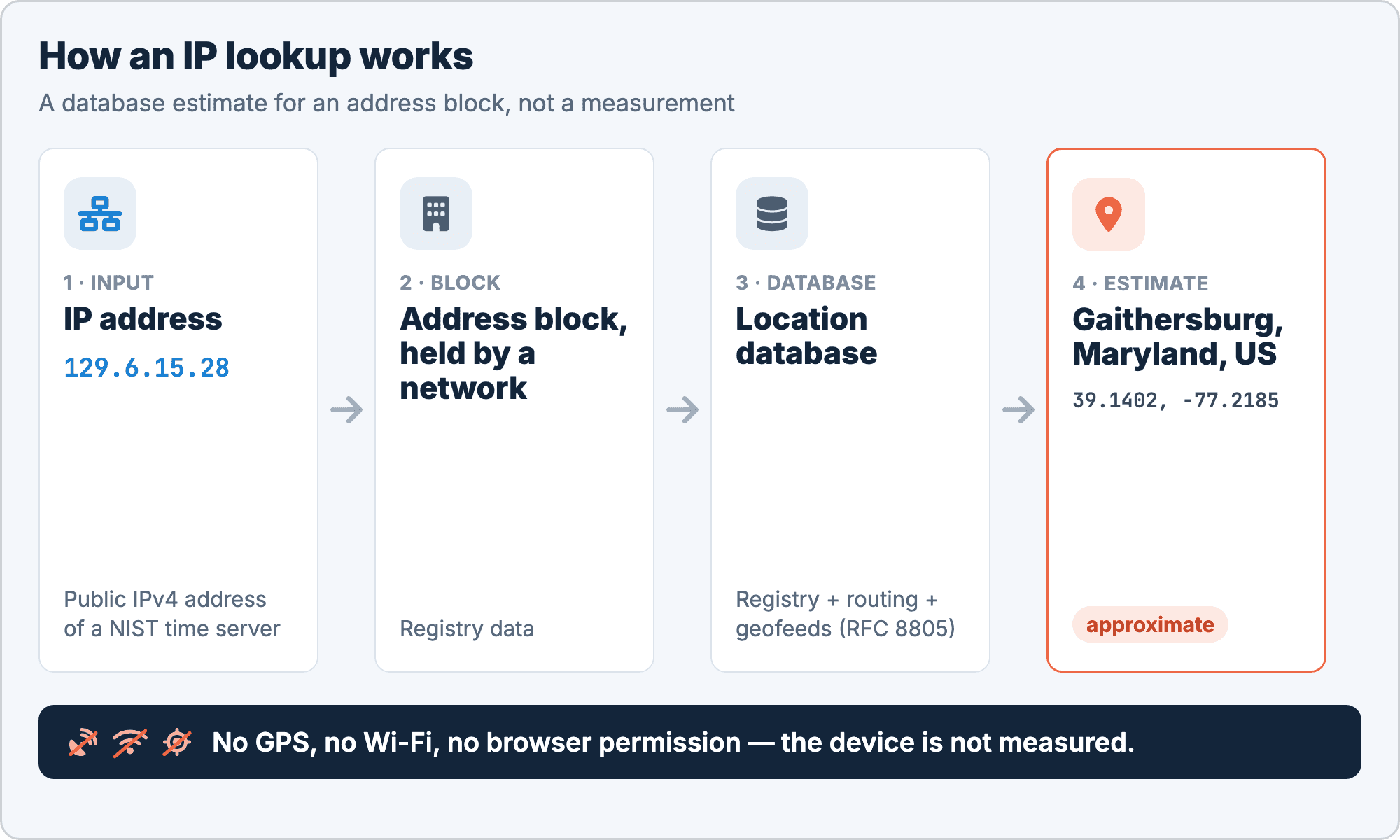
IP geolocation is the process of estimating where an IP address is used, based on a database that maps address blocks to places. It does not measure anything on the device: no GPS, no Wi-Fi scan, no browser permission.
Public IP addresses are allocated in blocks. Regional internet registries hand them to internet providers, universities, companies and cloud operators, and those networks assign them to their customers and servers. A geolocation provider builds its database from several sources:
- Registry data: which organization holds a block and the address it registered.
- Routing data: where a block is announced on the internet and which networks carry its traffic.
- Geofeeds: files in which networks publish where they use their own blocks, in the format described in RFC 8805.
The result is where the network says the block is used, combined with what the provider could infer. It is a database estimate for a range of addresses, so two devices in the same block get the same answer, wherever they really are.
How Do You Find the Location of an IP Address?
To find the location of an IP address, send it to an IP geolocation API. The Geoapify IP Geolocation API is one HTTP GET request, documented in the API reference:
| Parameter | Required | Description |
|---|---|---|
apiKey | Yes | Your Geoapify API key |
ip | No | IP address to look up, IPv4 or IPv6. When it isn't set, the API uses the IP address of whoever sends the request |
The second row matters more than it looks. Called from a browser without ip, the API sees your visitor's address. Called from a backend without ip, it sees your server's address, so a backend has to pass the visitor's IP explicitly.
Look up a specific IP address
Here is a REST request for 129.6.15.28, a public NIST time server that NIST lists in Gaithersburg, Maryland:
https://api.geoapify.com/v1/ipinfo?ip=129.6.15.28&apiKey=YOUR_API_KEYSimplified response, captured on 2026-11-10 (the names objects, subdivisions and some country fields are left out):
{
  "ip": "129.6.15.28",
  "city": { "name": "Gaithersburg" },
  "state": { "name": "Maryland" },
  "postal": { "code": "20899" },
  "country": {
    "name": "United States",
    "iso_code": "US",
    "phone_code": "1",
    "flag": "🇺🇸"
  },
  "continent": { "code": "NA", "name": "North America" },
  "location": { "latitude": 39.1402, "longitude": -77.2185 }
}
Look up the visitor from the browser
In the browser, leave out ip and the API answers for the visitor's own address:
const API_KEY = "YOUR_API_KEY";

const response = await fetch(`https://api.geoapify.com/v1/ipinfo?apiKey=${API_KEY}`);
const data = await response.json();

const city = data.city?.name;           // can be missing
const country = data.country?.iso_code; // for example "US"
const { latitude, longitude } = data.location ?? {};
A key used in the browser is visible to anyone who opens the page source. Restrict it to your domain in Geoapify MyProjects. For a complete map example, see How to center a map on the visitor's approximate location.
Look up the visitor from a backend
On a server, pass the client's IP in ip and encode it, which matters for IPv6 addresses with colons:
// Node.js 18+ (built-in fetch)
async function lookupIp(clientIp) {
  const url = `https://api.geoapify.com/v1/ipinfo?ip=${encodeURIComponent(clientIp)}&apiKey=${process.env.GEOAPIFY_API_KEY}`;
  const response = await fetch(url);
  if (!response.ok) return null; // no location instead of an error page
  return response.json();
}
clientIp must be the client's public IP address, not a private one from your internal network. The What can't an IP address tell you? section explains where to get it, and the how-to on locating visitors from your backend covers proxies, caching and privacy.
Status codes and cost
The API returns these HTTP status codes:
| Code | Meaning |
|---|---|
| 200 | The request was successful |
| 400 | The ip value isn't a valid IP address; the message field explains the problem |
| 401 | The API key is missing or invalid |
| 429 | Too many requests: rate limit exceeded |
Each request costs 1 credit, and the Free plan includes 3,000 credits per day. See the pricing page for paid plans.
What Does an IP Lookup Tell You?
An IP lookup tells you the country, region, city, postal code and an approximate point for the address, plus country details that help with defaults. These are the fields you will use most, with values from the NIST response above:
| Field | Example (NIST) | How to use it |
|---|---|---|
country.iso_code, country.name | US, United States | Reliable enough for defaults: country, currency, phone code |
country.phone_code | 1 | Pre-fill the calling code, without the + |
country.currency | Not shown | Currency code; it can list several codes, separated by commas |
country.languages | English (en) | Language defaults; each entry has iso_code, name and name_native |
country.is_in_european_union | Not present for the US | true for EU countries; missing otherwise |
state.name | Maryland | Region-level defaults |
city.name | Gaithersburg | Often right, but approximate |
postal.code | 20899 | A rough area, not necessarily the user's own postal code |
location.latitude, location.longitude | 39.1402, -77.2185 | An approximate point for the starting map view |
The city, country and continent objects, and each entry in subdivisions, also carry a names object with translated names by language code. Use it when your app shows place names in more than one language.
The docs add one rule that shapes all client code: "A field can be missing when there is no data for it." Read every field with a fallback, for example city, then state, then country, and never assume city.name or postal.code is there.
How Close Is the IP Location to the Real Place?
The IP location is a point that stands for an area, and how close it lands to the real place depends on how the network's block is mapped. We checked two public servers on 2026-11-10. The real places were geocoded with the Geoapify Geocoding API, and the distances were computed by us from the coordinates.
| IP address | API result | Point | Compared with | Distance |
|---|---|---|---|---|
129.6.15.28 (NIST time server) | Gaithersburg, Maryland | 39.1402, -77.2185 | NIST campus, 100 Bureau Drive, Gaithersburg, MD 20899 | ~0.53 km |
155.100.38.63 (University of Utah web server) | Salt Lake City, Utah | 40.7608, -111.891 | Salt Lake City city centre point | ~380 m |
| University of Utah main campus, 201 Presidents Circle | ~4.6 km |
NIST: the point lands near the site
For NIST, the point lands about half a kilometre from the campus address in Gaithersburg. That is a close result: here the point happens to sit near the organization that holds the address block.
University of Utah: the point marks the city
For the University of Utah server, the API returned the right city, but the point sits about 380 m from the Salt Lake City city centre point and about 4.6 km from the main campus. The coordinates mark the city, not the campus. They say nothing about where the server physically sits, and you should not read them that way.
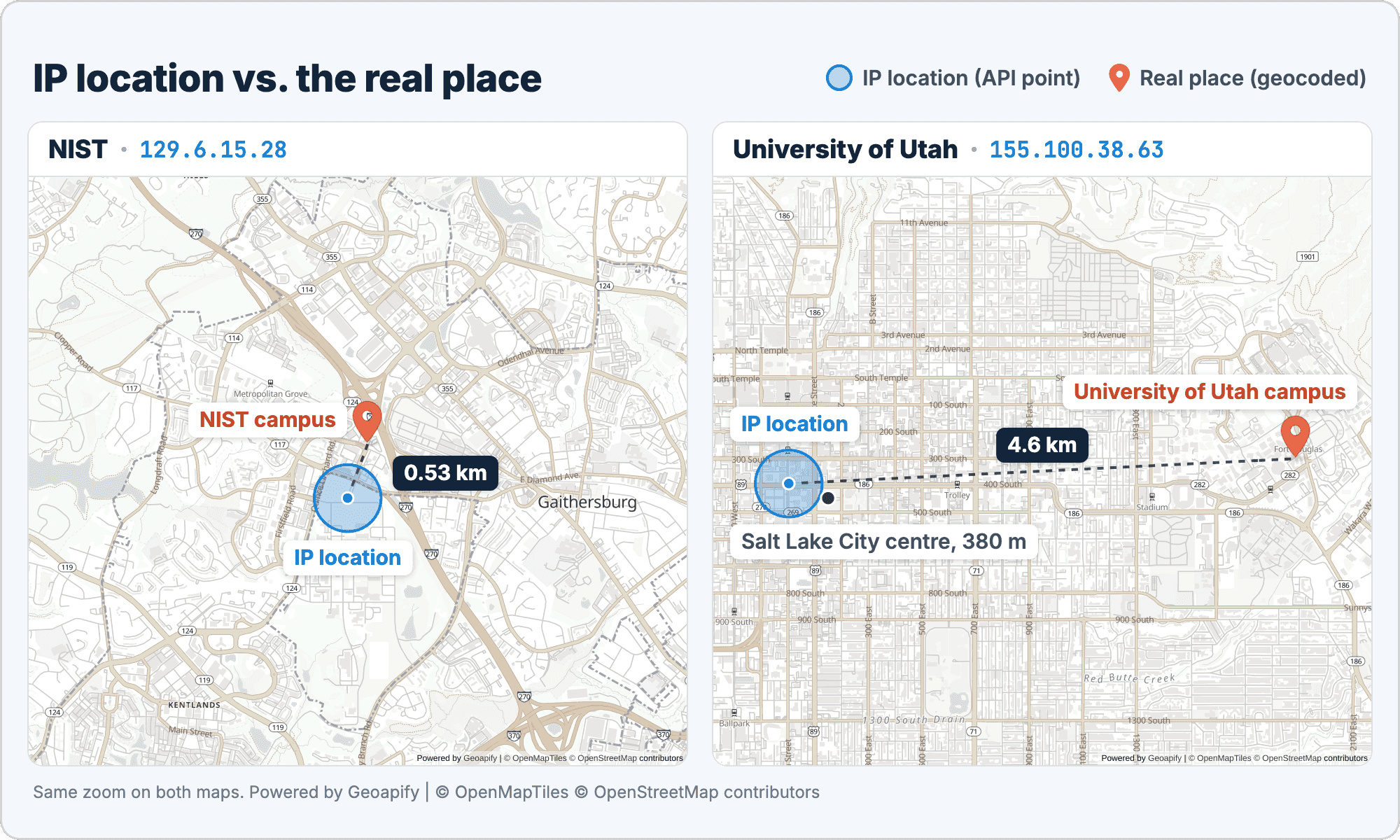
The lesson: treat IP coordinates as "somewhere in this city". Zoom the map to city level and draw an area instead of a precise pin, and don't use the point to sort stores by distance or to plan a delivery.
What Can't an IP Address Tell You?
An IP address can't tell you a street address, a building or who is using it. The API docs say it directly: "The location is approximate, usually at city level. An IP address doesn't give a street address or identify a person." Several network setups make the result even less precise:
- No street address or building. The database maps address blocks to areas, so the best case is a point near a site, as with NIST, and the usual case is a city.
- No person or household. Many people can share one IP address: a family behind a home router, an office, a café, a university network. An IP lookup describes a network, not a person.
- VPNs and proxies. The API sees the address of the VPN or proxy exit server, so the location is the VPN's, which can be in another country.
- Mobile networks. Carriers put many subscribers behind shared addresses with carrier-grade NAT, including the shared address space defined in RFC 6598. The location may be the carrier's region rather than the phone's.
- Corporate networks. Companies often route traffic through a central office or a cloud security service, so an employee in one city can appear in another.
- Private and loopback addresses. Addresses such as
10.x,172.16.xto172.31.xand192.168.x(RFC 1918), and loopback addresses such as127.0.0.1and::1, are used inside networks and can't be located.
The last point is the most common backend bug. Your server must pass the public client IP: the remote address of the connection, or the client address from X-Forwarded-For when the request came through a proxy or load balancer you trust. Never send a private address from your internal network.
An IP lookup is for app defaults, not for finding people.
When Is IP Location Enough, and When Isn't It?
IP location is enough when a wrong guess costs one click to fix, and not enough when the exact place matters. This table sorts common tasks:
| Use case | IP location? | Better tool |
|---|---|---|
| Pre-fill country, phone code and currency in a form | Yes (how-to) | |
| Default map view or nearest city | Yes | |
| Default language or content region | Yes, and let the user change it (geolocation marketing) | |
| Compare IP country with billing country | Yes, as one signal only | |
| Delivery or billing address | No | Address Autocomplete |
| Nearest store or walking distance | No | Browser geolocation with the user's permission |
| "Where is this person?" | No | None: an IP address doesn't identify people |
The pattern is the same in every "yes" row: IP location sets a starting value, and the user stays in control. For the "no" rows, ask for the information directly, either as an address the user types or as a precise location the user agrees to share.
How Do You Combine IP and Browser Geolocation?
The common pattern is to start with IP location and offer precise location as an option. IP geolocation doesn't use the browser's location permission, so the page can show a useful view at once, without a prompt:
- On page load, call the IP Geolocation API without
ipand center the map on the city, with an area instead of a pin. - Show a "Use my precise location" button next to the map.
- On click, call
navigator.geolocation.getCurrentPosition(). The browser asks the user for permission. - If the user allows it, move the map to the precise position and add a marker.
- If the user declines, keep the IP view. Nothing breaks.
document.querySelector("#precise").addEventListener("click", () => {
  navigator.geolocation.getCurrentPosition(
    (pos) => showPrecise(pos.coords.latitude, pos.coords.longitude),
    () => { /* declined or unavailable: keep the IP-based view */ }
  );
});
Browser geolocation can use GPS, Wi-Fi and cell data, so it is usually far more precise than IP. Our post on how to get user location with JavaScript covers the browser API in detail, and What is geolocation? compares the methods.
Is an IP Address Personal Data?
In the EU, an IP address can be personal data. In the Breyer case (C-582/14, 2016), the Court of Justice ruled that a dynamic IP address can be personal data for a website operator. A location derived from it falls under the same care.
In practice, that means a few habits:
- Explain why you use location, for example "to show prices in your currency".
- Keep only what you need. If you use the country, store the country, not the IP address and the coordinates.
- Follow your own privacy rules for retention and consent; our post on GDPR-compliant apps with maps, geocoding and routing APIs goes into the details.
IP Geolocation results can be cached and stored. Caching by IP for a set time also saves credits, because a returning visitor doesn't trigger a new request. This section is general information, not legal advice.
Build It With an AI Coding Agent
An AI coding agent can build both patterns from this post in a few minutes, if the prompt states the API flow and the limits. Before you start:
- Get a free API key in Geoapify MyProjects.
- Create a new folder or open an existing project folder.
- Create a
.envfile withGEOAPIFY_API_KEY=followed by your key. - Open the folder in Claude Code, Codex or Cursor and paste one of the prompts below.
Prompt A: a page with the visitor's approximate city
A standalone page that shows the visitor's approximate city on a map, with a button for precise location:
Create a single web page, index.html in this folder, that shows the visitor's approximate location on a map using the Geoapify IP Geolocation API.

- Call GET https://api.geoapify.com/v1/ipinfo without the ip parameter, so the API uses the visitor's IP address. Docs: https://apidocs.geoapify.com/docs/ip-geolocation/
- Read my Geoapify API key from the .env file in this folder (GEOAPIFY_API_KEY) and put it in one constant at the top of the script. Never show the key in chat or copy it anywhere else. Remind me to restrict the key to my website in Geoapify MyProjects.
- Show a MapLibre GL JS map with the Geoapify osm-bright style (https://maps.geoapify.com/v1/styles/osm-bright/style.json?apiKey=...). Use the current MapLibre release, pinned to an exact version, and check which files the package ships: recent releases load as an ES module (maplibre-gl.mjs in a script type="module").
- Center the map on location.latitude and location.longitude at city zoom. Draw a semi-transparent circle about the size of a city instead of a pin, labelled "Approximate location: <city>, <country> (city level)". Fields can be missing, so fall back to the country.
- Add a "Use my precise location" button that asks for browser geolocation (navigator.geolocation) and moves the map there with a marker. If the user declines, keep the IP view.
- Show a short message when the request fails (400, 401, 429). Keep the "Powered by Geoapify" and OpenStreetMap attribution visible; the map style already adds it, so don't add a second copy.

When it's done, open the page in a browser, save a screenshot, and tell me how to open it.
What happened in our test:
- The agent built one
index.htmlwith MapLibre GL JS 6.17.0, the release current on npm, and kept the key in one constant with a reminder to restrict it in MyProjects. - On the first try it wrote the classic
<script src=".../maplibre-gl.js">tag, which returned 404: MapLibre 6 ships only an ES module. It switched to the module import, and we added that hint to the prompt. - It also added its own attribution line next to the one the style already shows, so the attribution appeared twice. We added "don't add a second copy" to the prompt.
- With the NIST IP
129.6.15.28, the page centred on Gaithersburg with a 10 km circle labelled "Approximate location: Gaithersburg, United States (city level)". - With a wrong key it showed "The API key is missing or invalid (401)"; when the browser denied location, it kept the IP view and said so. The page opens by double-clicking the file, and precise location needs HTTPS outside localhost.
Prompt B: IP location in an existing backend
Add IP location to the backend of an existing project, with the client IP passed correctly:
Add visitor location by IP to the backend of my project with the Geoapify IP Geolocation API.

Before you start
- Inspect the project first: framework, HTTP client, configuration, caching and conventions. Make the smallest change.
- Read the API key from GEOAPIFY_API_KEY in the .env file. Never print, log or hardcode it.
- Ask only what the project doesn't answer: which proxies or load balancers sit in front of the app, and what the location is used for.

API flow
1. Get the client IP: the connection's remote address, or the client address from X-Forwarded-For only when the request came through a proxy I trust.
2. Skip private, loopback and link-local addresses (for example 10.x, 192.168.x, 127.0.0.1, ::1); don't send them to the API.
3. Call GET https://api.geoapify.com/v1/ipinfo?ip=<client ip>&apiKey=<key>. Docs: https://apidocs.geoapify.com/docs/ip-geolocation/. Each call costs 1 credit.
4. Return only what the app needs: country.iso_code, state.name, city.name, location.latitude and location.longitude. Any field can be missing.

Requirements
- Cache results by IP for a configurable time to save credits.
- Use a timeout, handle 400, 401 and 429 with limited retries, and on failure return no location instead of an error page.
- Treat the location as approximate (city level), never as an address.
- Add a test with ip=129.6.15.28, a public NIST server.

When you're done, run the tests, then report the files you changed and the command to start the app.
What happened in our test:
- We ran it on a small Express 5 app on Node 24 with no HTTP client, configuration library or cache. The agent used the built-in
fetch,process.loadEnvFile()and an in-memory cache with a configurable time (24 hours by default). - It would have asked the two questions from the prompt (which proxies sit in front of the app, and what the location is for). We answered: one reverse proxy on the same machine, and pre-filling the country in a form.
- It added one module and one route,
GET /api/location, trustedX-Forwarded-Foronly from the local proxy, and skipped more reserved ranges than the prompt listed, including the carrier-grade NAT range from RFC 6598. - With
X-Forwarded-For: 129.6.15.28the route returned US, Maryland, Gaithersburg and the coordinates, marked approximate. With10.0.0.5it returned no location, and no request left the app. - Its four tests passed: no API call for private addresses, a single try on 401, three tries on 429, and a real NIST lookup answered from the cache the second time. The key never appeared in the logs.
Frequently Asked Questions
Can you find someone's home address from their IP address?
No. IP geolocation maps blocks of addresses to areas, usually at city level, and the Geoapify IP Geolocation API docs state that an IP address doesn't give a street address or identify a person. Internet providers keep their own subscriber records, but those are not part of any geolocation database or API.
How accurate is IP geolocation?
The country is usually reliable enough for defaults, the city is often right, and the coordinates are an approximate point. In our checks on 2026-11-10, the point for a NIST server was about 0.53 km from the NIST campus, and the point for a University of Utah server was about 4.6 km from the main campus, in the Salt Lake City centre.
Does a VPN change the IP location?
Yes. With a VPN or proxy, the API sees the address of the exit server, so the result is the location of the VPN server, which can be in another city or country.
Does IP geolocation need the user's permission?
It doesn't trigger a browser location prompt, because it uses the IP address of the request, not the device's location. Privacy rules still apply: in the EU an IP address can be personal data. See our post on GDPR-compliant location apps.
Does the Geoapify IP Geolocation API support IPv6?
Yes. The ip parameter accepts an IPv4 or IPv6 address. Without ip, the API looks up the address of whoever sends the request. See the API reference.
How much does an IP lookup cost?
One request costs 1 credit, and the Free plan includes 3,000 credits per day. Caching results by IP saves credits for returning visitors. See the pricing page.


