


Address verification often starts with a simple question: can this address be used for shipping, customer records, or service planning? For US mailing addresses, the official USPS ZIP Code Lookup, USPS Addresses 3.0 API, and USPS AMS API are natural reference points. But many business workflows need more than a postal check: international coverage, autocomplete, bulk cleanup, coordinates, and confidence scores for automated decisions. In this guide, we’ll look at USPS address verification as one method, then compare it with alternative approaches such as the Geoapify Geocoding API.
Quick answer: To verify an address with USPS, use ZIP Code Lookup for one-off manual checks, the USPS Addresses API for controlled USPS mailing workflows, or AMS API for licensed address-matching software. If you also need coordinates, autocomplete, international coverage, or address data you can reuse in product workflows, combine USPS with geocoding and address autocomplete tools such as Geoapify Geocoding API and Address Autocomplete.
| Need | Best option | Main limitation |
|---|---|---|
| Check one US mailing address manually | USPS ZIP Code Lookup | Manual, one address at a time |
| Automate USPS postal verification | USPS Addresses API | Quotas and USPS usage restrictions |
| Build licensed address matching software | USPS AMS API | Paid licensing and specialized setup |
| Add coordinates, autocomplete, or international coverage | Geoapify Geocoding API and Address Autocomplete | Not official USPS postal verification and no ZIP+4 |
In this article, an address validation API alternative means a service that can help validate, complete, standardize, geocode, or enrich address data, even when it is not an official USPS postal verification service.
Task example
Imagine an online store receives this checkout address:
1200 Market St, San Fransisco, CAThe team needs to know whether the address is complete, whether the city typo can be corrected, which ZIP Code belongs to it, and whether the result is reliable enough to pass to shipping, CRM, analytics, or route planning systems.
On this page
What Address Verification Means
Address verification means checking whether an address can be matched to a real, usable address record. In a USPS context, that usually means confirming that the address is recognized as a US postal address and returning the USPS-standardized version when available.
In practice, USPS address services can involve all three address data quality steps: validation, verification, and standardization. They work together because a mailing address first needs enough required parts, then needs to match a USPS-recognized record, and finally needs to be returned in the format USPS expects for mail handling.
- Validation checks whether the input has the required parts, such as street address, city, state, and ZIP Code.
- Verification checks whether the address matches a real USPS postal record.
- Standardization formats the matched address in USPS style, including capitalization, abbreviations, ZIP Code, and ZIP+4 when available.


For example, 1200 Market St, San Fransisco, CA may be validated as incomplete or misspelled, verified against a postal or geocoding database, and then returned in a standardized format. This article focuses on USPS verification methods, but it is useful to keep all three steps in mind because USPS tools often validate, verify, and standardize in the same workflow.
How to Verify an Address with USPS
USPS offers several ways to check US postal addresses, from a manual web form to developer APIs and licensed address-matching software. The right option depends on how many addresses you need to check, whether the process must be automated, and whether you are building mailing software rather than a regular web app.
Choose the USPS method that matches your workflow:
- USPS ZIP Code Lookup - a generally free manual tool for checking one address at a time.
- USPS Addresses 3.0 API - a REST API for automated USPS address standardization with quotas and usage restrictions.
- USPS AMS API - a paid licensed product for specialized address matching software.
Method 1: Verify a Single Address with USPS ZIP Code Lookup
The USPS ZIP Code Lookup is a public web tool for checking one US mailing address at a time. It is useful when you need a quick manual confirmation of the USPS-recognized address format, ZIP Code, and ZIP+4.
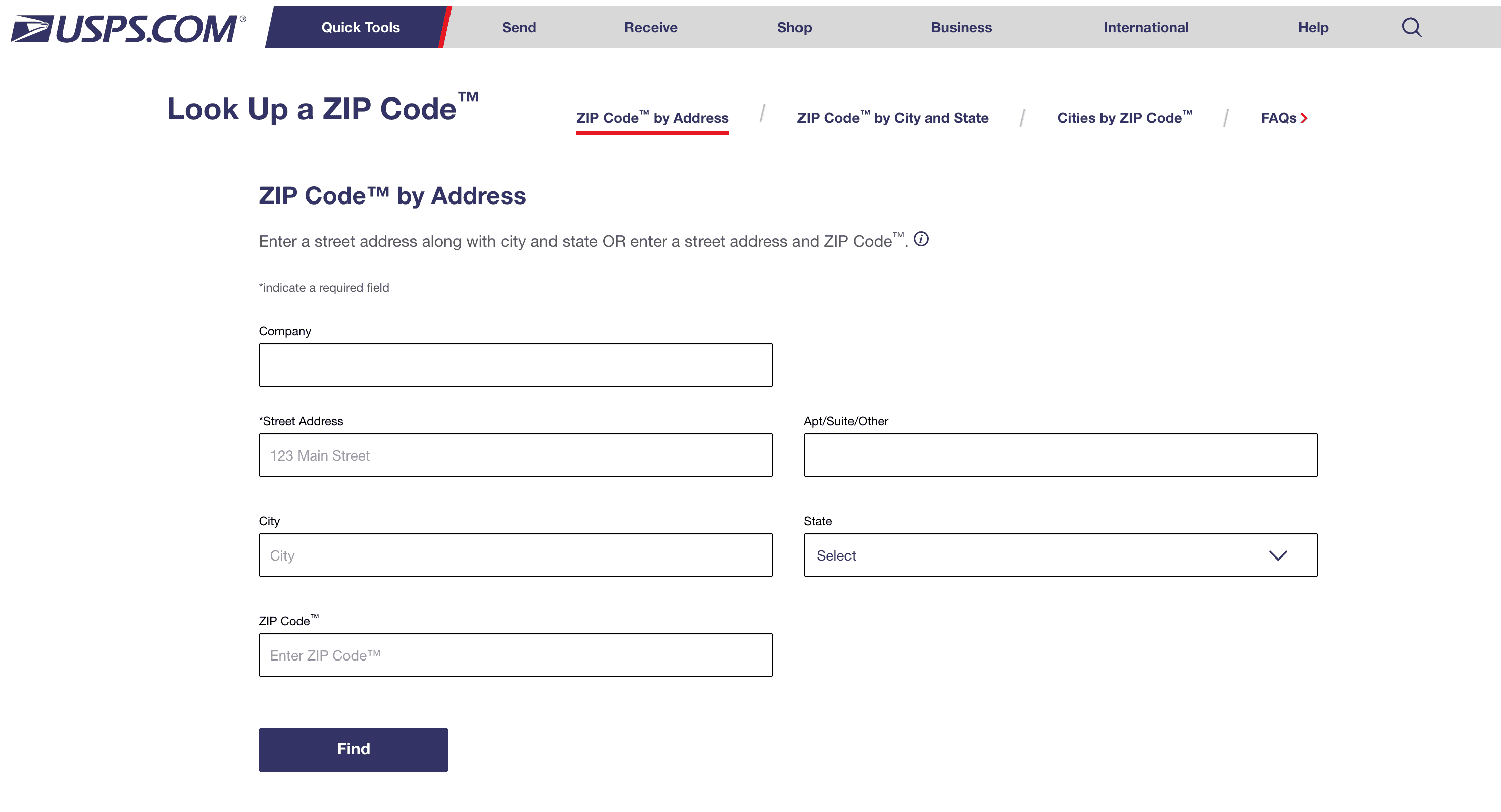
This is not a free-form search box. Use the ZIP Code by Address tab and fill the fields separately:
- Street Address
- City and State, or ZIP Code
- Company, only for business addresses
- Urbanization Code, only for Puerto Rico addresses when needed
For example, enter 1600 Pennsylvania Ave NW, Washington, DC as:
Street Address: 1600 Pennsylvania Ave NW
City: Washington
State: DC
USPS returns:
1600 PENNSYLVANIA AVE NW
WASHINGTON DC 20500-0005
Use the standardized result for mailing workflows. If USPS returns multiple matches or no result, correct the street, state, or company fields and try again. A matched address does not prove that a specific person or company is located there.
Pricing
The USPS ZIP Code Lookup web tool is generally free to use. The real cost is operational: a person must enter, check, and copy each result manually.
Limitations and Trade-Offs
- One-at-a-time use - it works for occasional checks, but it does not scale for checkout forms, imports, or bulk cleanup.
- Structured input required - users must split the address into street, city, state, and ZIP Code fields.
- No coordinates - it returns postal information, not latitude/longitude for maps, routing, or spatial analysis.
Method 2: Use the USPS Addresses API
The USPS Addresses 3.0 API is the developer option for adding USPS address checks to software. It is useful when you need to validate and standardize addresses inside a shipping workflow, internal tool, checkout process, or CRM cleanup flow.
The API includes several address utilities. For address verification, the most relevant endpoint is GET /address, but the same API family also includes ZIP Code and city/state lookups:
| Endpoint | What it does | Required input |
|---|---|---|
GET /address | Returns the best standardized USPS domestic address for a given address | streetAddress, state, and either city or ZIPCode |
GET /city-state | Returns city and state for a 5-digit ZIP Code | ZIPCode |
GET /zipcode | Returns ZIP Code and ZIP+4 for an address, city, and state | streetAddress, city, state |
Use GET /address when you want USPS to validate and standardize a domestic address. For example:
curl "https://apis.usps.com/addresses/v3/address?streetAddress=1600%20Pennsylvania%20Ave%20NW&city=Washington&state=DC" \
  -H "Authorization: Bearer YOUR_ACCESS_TOKEN" \
  -H "Accept: application/json"
A simplified successful response may look like this:
{
  "address": {
    "streetAddress": "1600 PENNSYLVANIA AVE NW",
    "city": "WASHINGTON",
    "state": "DC",
    "ZIPCode": "20500",
    "ZIPPlus4": "0005"
  },
  "additionalInfo": {
    "DPVConfirmation": "Y"
  },
  "matches": [
    {
      "code": "31",
      "text": "Single Response - exact match"
    }
  ]
}
Use address, ZIPCode, and ZIPPlus4 as the standardized USPS result. Use DPVConfirmation, matches, corrections, and warnings to decide whether to accept the address or ask for more details.
If the API cannot match an address, treat errors such as invalid city, insufficient address data, address not found, or multiple addresses found as review points.
Use the USPS API when your workflow is US-focused and postal delivery is the main goal. If your application also needs international addresses, latitude/longitude, address autocomplete, batch processing, confidence scores, or geocoding for maps and routes, compare USPS with an address validation or geocoding API before choosing the architecture.
Pricing
The USPS migration FAQ says the new USPS APIs are free for valid USPS shipping and mailing use under USPS Terms and Conditions. This makes the Addresses API useful for small, controlled US mailing workflows, but not for unrestricted bulk address validation.
USPS Addresses API Limitations and Restrictions
- Default quota is limited - USPS Getting Started lists the default Addresses API quota as 60 calls per hour; higher limits require USPS approval.
- Bulk/list validation is not permitted - USPS migration guidance says the API is for validating shipping addresses during label generation, not bulk use, batch reporting, or mailing list generation.
- Address database creation is restricted - USPS Terms restrict using USPS APIs or data to create address lists, third-party databases, data products, or similar resources.
- Structured query parameters - the API expects fields such as
streetAddress,state, and eithercityorZIPCode; it is not a universal free-form parser. - No autocomplete or coordinates - it does not provide address suggestions, latitude/longitude, or map-ready geocoding output.
Method 3: Use USPS AMS API for Licensed Address Matching Software
The USPS Address Matching System API (AMS API) is a licensed USPS software product for building address matching software. It is different from the hosted REST GET /address endpoint in the Addresses API.
AMS API is intended for products that need USPS matching logic and ZIP+4 return accuracy. It is usually not the right choice for a normal checkout form, SaaS signup, CRM import, or delivery app.
| What AMS API provides | Why it matters |
|---|---|
| Platform-specific API libraries | Lets developers build USPS address matching into licensed software |
| Interface definition files and documentation | Helps teams integrate the matching engine correctly |
| Test utility and sample configuration data | Supports implementation and validation during development |
| Monthly product updates | Keeps the local matching software aligned with USPS data updates |
Pricing
AMS API is not free. The USPS AMS API licensing fees page links to the current fee schedule. As of the fee document updated on July 8, 2025, the linked fee schedule lists these AMS API renewal fees:
| AMS API license type | Renewal fee |
|---|---|
| Interface Developer | $2,110 |
| Interface Distributor | $48,200 |
| Full Service Provider | $336,000 |
USPS also prorates fees for the initial license year. The license year runs from October 1 through September 30, so the amount can depend on the month when the license starts.
Limitations and Trade-Offs
- Paid licensing - AMS API has annual license fees and is not comparable to a free web lookup.
- Specialized setup - it is a software product with libraries, configuration files, documentation, and monthly updates, not a simple hosted REST endpoint.
- Best for mailing software - it is more appropriate for specialized address matching products than ordinary web forms or lightweight integrations.
- Operational overhead - teams must manage licensing, updates, implementation, and compliance requirements.
USPS Address Verification Methods Compared
Here is the short version of when each USPS option makes sense:
| Method | Best for | Cost and access |
|---|---|---|
| USPS ZIP Code Lookup | One-off manual checks | Generally free, but manual only |
USPS Addresses API GET /address | US-focused app integration | Generally free developer access, but hourly request quotas apply |
| USPS AMS API | Licensed address matching software | Paid annual license; published renewal fees range from $2,110 to $336,000 depending on license type |
For most product teams, the manual lookup is too slow, and AMS API is too specialized. The REST Addresses API is the practical USPS option, but only when its quota and usage restrictions fit your workflow.
USPS Services Alternatives: Geoapify Geocoding and Address Autocomplete
USPS is useful for US postal workflows, but many applications need more than a postal match. Geoapify provides two practical alternatives for product teams that need address verification, structured address data, coordinates, autocomplete, or international coverage.
| Geoapify method | Best for | Try it |
|---|---|---|
| Geocoding API | Verifying submitted addresses, returning structured components, confidence scores, and coordinates | Geocoding Playground |
| Address Autocomplete | Preventing bad input while a user types an address in checkout, signup, or booking forms | Autocomplete Playground |
Geoapify Geocoding API works with both free-form and structured address input. For example, use free-form geocoding when the address arrives as one text string:
curl "https://api.geoapify.com/v1/geocode/search?text=1600%20Pennsylvania%20Ave%20NW%2C%20Washington%2C%20DC&apiKey=YOUR_API_KEY"Use structured geocoding when your form or database already separates address fields:
curl "https://api.geoapify.com/v1/geocode/search?housenumber=1600&street=Pennsylvania%20Ave%20NW&city=Washington&state=DC&country=United%20States&apiKey=YOUR_API_KEY"A shortened response for the free-form request looks like this:
{
  "results": [
    {
      "name": "White House",
      "country": "United States",
      "state": "District of Columbia",
      "city": "Washington",
      "postcode": "20500",
      "street": "Pennsylvania Avenue Northwest",
      "housenumber": "1600",
      "lon": -77.0365528,
      "lat": 38.8976387,
      "result_type": "amenity",
      "formatted": "White House, 1600 Pennsylvania Avenue Northwest, Washington, DC 20500, United States of America",
      "address_line1": "White House",
      "address_line2": "1600 Pennsylvania Avenue Northwest, Washington, DC 20500, United States of America",
      "rank": {
        "confidence": 1,
        "confidence_city_level": 1,
        "confidence_street_level": 1,
        "confidence_building_level": 1,
        "match_type": "inner_part"
      }
    }
  ],
  "query": {
    "text": "1600 Pennsylvania Ave NW, Washington, DC",
    "parsed": {
      "housenumber": "1600",
      "street": "pennsylvania ave nw",
      "city": "washington",
      "state": "dc"
    }
  }
}
For address verification, the most important fields are:
formatted,address_line1, andaddress_line2- the readable standardized result.housenumber,street,city,state,postcode, andcountry- structured address components for storage and comparison.latandlon- coordinates for maps, routing, delivery zones, and spatial checks.rank.confidenceand level-specific confidence fields - signals for automated acceptance or manual review.query.parsed- how Geoapify interpreted the original input.
Address Autocomplete Examples
Address Autocomplete is best for incomplete or partially typed addresses. Instead of waiting until form submission, you can suggest addresses while the user types:
| User starts typing | Autocomplete can suggest |
|---|---|
1600 Pennsyl | 1600 Pennsylvania Avenue NW, Washington, DC 20500, United States |
1200 Market San | possible 1200 Market Street matches with city/state context |
10 Downing | full address candidates in the expected country or bias area |
Autocomplete reduces typos and missing fields before they enter your database. It is especially useful for checkout pages, quote forms, booking flows, delivery apps, and CRM forms.
Geoapify pricing depends on request volumes and API usage. See the Geoapify Pricing page and Pricing Details to estimate costs for geocoding, autocomplete, and batch workflows.
Geoapify Address Verification: Benefits and Trade-Offs
Geoapify is helpful when address verification is part of a broader product workflow:
- International coverage - supports addresses beyond US postal records.
- Coordinates included - returns latitude and longitude for maps, routing, analytics, and service areas.
- Flexible input - accepts both free-form and structured address data.
- Autocomplete support - helps prevent typos and missing fields before form submission.
- Business-friendly license - lets businesses store geocoding results and standardized address data in their own databases.
Limitations and Trade-Offs
Geoapify is not a replacement for official USPS postal verification:
- Not USPS-verified - Geoapify results are not official USPS-verified postal records.
- No ZIP+4 - ZIP+4 is USPS postal routing data used for mail handling and delivery-point precision, so it belongs to USPS postal services rather than general geocoding data.
- Use USPS when required - if your workflow needs USPS compliance, postal discounts, ZIP+4, or carrier-specific deliverability checks, use USPS official services for the postal verification step.
A practical setup is to use both USPS and Geoapify, each for a different step. Use USPS when you need postal verification, ZIP+4, or mailing compliance. Then use Geoapify Geocoding API to add coordinates, structured components, confidence scores, and map-ready data. In user-facing forms, add Geoapify Address Autocomplete before submission to reduce typos and missing address parts.
What to Choose: USPS, Geocoding API, or Address Autocomplete
USPS is the right choice when the main question is: is this a valid USPS mailing address? Geoapify Geocoding API and Address Autocomplete are better fits when your application needs to understand, complete, store, map, or reuse address data across product workflows.
| Requirement | Better choice |
|---|---|
| Official USPS postal verification | USPS |
| ZIP+4 | USPS |
| US mailing compliance or postal discounts | USPS |
| Checkout or signup autocomplete | Address Autocomplete |
| International address coverage | Geocoding API |
| Coordinates for maps, routes, analytics, or service areas | Geocoding API |
| CRM cleanup or database enrichment | Geocoding API |
| Storing standardized address results in your own database | Geocoding API |
| US postal verification plus coordinates and product-ready data | Combine USPS with Geocoding API |
Use USPS when you need official US postal confirmation. Use Geoapify Address Autocomplete to improve address entry, and use Geoapify Geocoding API when you need addresses that are ready for storage, maps, routing, analytics, and international workflows.
Conclusion
USPS tools are useful when your workflow depends on official US postal verification, ZIP+4, or mailing compliance:
- Use USPS ZIP Code Lookup for occasional manual checks.
- Use USPS Addresses API for controlled USPS-focused integrations.
- Use USPS AMS API only for licensed mailing software.
For most product workflows, address verification needs more than a postal match. You may need autocomplete, international coverage, coordinates, confidence scores, and address data you can store and reuse.
That is where Geoapify fits: use Address Autocomplete to prevent bad input, and use Geocoding API to turn addresses into structured, map-ready data. When USPS compliance matters, combine both: USPS for postal verification, Geoapify for product-ready address intelligence.
FAQ
Is USPS address verification free?
The USPS ZIP Code Lookup is generally free for manual checks. The USPS Addresses API is also described by USPS migration guidance as free for valid USPS shipping and mailing use, but quotas and usage restrictions apply.
Can USPS verify international addresses?
No. USPS address verification tools are focused on US postal addresses. For international address search, structured address data, and coordinates, use a geocoding service such as the Geoapify Geocoding API.
Does USPS provide ZIP+4?
Yes. USPS tools can return ZIP+4 for recognized US postal addresses. ZIP+4 is USPS postal routing data, so use official USPS services when ZIP+4 is required.
Can I use USPS APIs for bulk address validation?
USPS APIs are not intended for unrestricted bulk address validation, mailing list generation, address harvesting, or database creation. USPS migration guidance says the Addresses API is for validating shipping addresses during label generation, and USPS Terms restrict creating address lists or third-party databases from USPS API data.
What is the difference between USPS address verification and Geoapify Geocoding API?
USPS verifies US postal addresses and can provide postal details such as ZIP+4. The Geoapify Geocoding API verifies and standardizes addresses against geospatial data, returns coordinates, structured address components, confidence scores, and supports international addresses.
When should I use Address Autocomplete instead of verifying an address after submission?
Use Address Autocomplete when users type addresses into checkout, signup, booking, or delivery forms. It helps prevent typos, incomplete addresses, and missing fields before the address enters your database.
Can Geoapify return coordinates for an address?
Yes. The Geoapify Geocoding API returns latitude and longitude together with a formatted address, structured components, and confidence information, so addresses can be used in maps, routing, analytics, and service-area checks.
Can I store Geoapify address results in my database?
Yes. Geoapify offers a business-friendly license that lets businesses store geocoding results and standardized address data in their own databases. Review the Geoapify Pricing and service terms for the plan and usage volume that fits your workflow.
Is Geoapify a replacement for USPS postal verification?
No. Geoapify is not a replacement for official USPS postal verification when you need USPS compliance, postal discounts, ZIP+4, or carrier-specific deliverability checks. Use USPS for the postal verification step and Geoapify for autocomplete, geocoding, coordinates, and address enrichment.
When should I combine USPS and Geoapify?
Combine them when you need both official US postal verification and product-ready address data. For example, use USPS to confirm the mailing address and ZIP+4, then use Geoapify Geocoding API for coordinates and structured data, and Address Autocomplete to improve address entry in user-facing forms.