


The best address autocomplete API is the one that finds your users' addresses, with the right settings, at a cost that fits your traffic, and the only way to know is to test it with your own addresses. A demo with a famous landmark proves little. What matters is whether the right house number shows up while someone is still typing, in their country and language, without a long list of wrong cities. This post gives you seven tests to run on any autocomplete address API, with real Geoapify requests and results from November 25, 2026, and a scorecard to record what you find.
Key takeaways
- Test with your own addresses: 20 real entries from your data tell you more than any feature list.
- One country per request works best: ask for the country first, then filter the address field by it.
- Configure before you judge: a proximity bias, the user's language and a concrete
typechange the results a lot. - Never reject what the user types: new buildings and rural addresses can be missing from map data, so let users submit their text.
- Count the cost per keystroke: every request is billed, so debounce, set a minimum length, and check whether you may store results.
On this page
What Does an Address Autocomplete API Have to Do?
An address autocomplete API returns address suggestions for partial input, so a user can pick their address after a few keystrokes instead of typing it all. It is a search API with autocomplete built for one job: turning what someone is typing into a real, structured address. To be useful in a form, it has to do three things:
- Suggest while typing. The input is incomplete most of the time, such as "700 Boylst", so the API has to match prefixes, not only full words.
- Return structured fields. A selected suggestion should fill the form:
housenumber,street,city,postcode,country, and coordinates (lat,lon) for maps, delivery zones and routing. - Say how precise each result is. A building, a street and a city are different answers. The form needs to know which one the user picked.
Everything else, such as filters, biases and language, exists to make the right suggestion appear in the first few rows.
Seven Tests to Run Before You Choose
Each test below explains why it matters, shows a Geoapify REST request and the real result we got on November 25, 2026, and lists what to check in any API. Tests 2 to 6 also carry the setup rules our team recommends for production forms (marked ★): an API that looks average with default settings often does much better once it is configured.
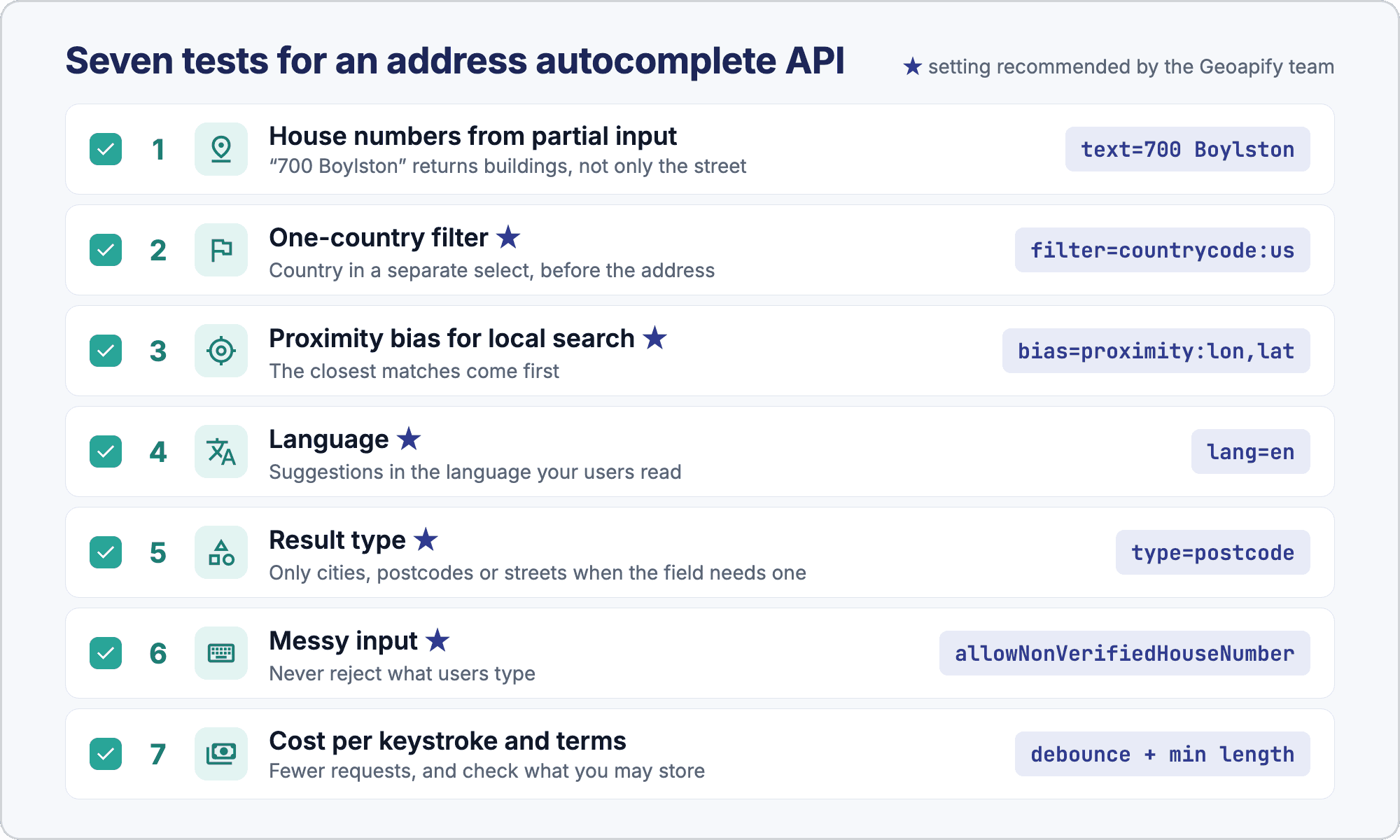
All requests use the Address Autocomplete API with format=json. Replace YOUR_API_KEY with your key, and URL-encode the text value in your code (encodeURIComponent or URLSearchParams do it for you).
1. House numbers from partial input
Users rarely type a full address before they look at the list. If the house number appears only after the street name is complete, people give up or pick the wrong row. Type a house number and the start of a street:
https://api.geoapify.com/v1/geocode/autocomplete?text=700%20Boylston&format=json&apiKey=YOUR_API_KEYReal result, November 25, 2026 (5 suggestions, the default limit):
| Suggestion | result_type |
|---|---|
| 700 Boylston Street, Boston, MA 02116 | building |
| 700 Boylston Street, Newton Highlands, Newton, MA 02461 | building |
| 700 Boylston Street, Chestnut Hill, Brookline, MA 02445 | building |
| Boston Public Library, 700 Boylston Street | amenity |
| 700 Boylston Street, Pasadena, CA 91104 | building |
Four of the five rows are buildings with the exact house number, from a street name that is only one word. The fourth row is a place at the same address, so a user looking for the library finds it too.
What to look for in any API:
- Does the house number appear while the street is still incomplete?
- Does each result say whether it is a building, a street or a city? In Geoapify, that is
result_type, andrank.confidence(0 to 1) tells you how well the result matches the input.
Setting to use: none; this is the baseline. Note that the same street exists in three Massachusetts towns and in California, which is why the next tests matter.
2. ★ Country filter: one country works best
Most forms serve one country at a time, and common names exist everywhere. A country filter is a hard restriction: results outside the listed countries are excluded. Here is a city search for Springfield, limited to the US:
https://api.geoapify.com/v1/geocode/autocomplete?text=Springfield&type=city&filter=countrycode:us&limit=8&format=json&apiKey=YOUR_API_KEYReal result, November 25, 2026: 6 cities, all in the US.
- Springfield, Illinois
- Springfield, Missouri
- Springfield, Massachusetts
- Springfield, Ohio
- Springfield, Oregon
- Springfield, Virginia
The rule from the Geoapify team: a single country gives faster and more accurate suggestions than several. The UX that works best is a separate country input, such as a select, placed before the address field; the address search is then filtered by the chosen country. If you have to allow several countries, the how-to on restricting address search to a country recommends no more than two or three, and for broader searches it suggests leaving out the restriction rather than adding a long list.
What to look for in any API: can you restrict results to one country, and is it a hard filter or only a preference?
Setting to use: filter=countrycode:us (lowercase ISO 3166-1 alpha-2 codes). A bias=countrycode:us would only prefer US results and could still return others.
3. ★ Local search: set a proximity bias
When the search is local, such as a delivery area, a store's pickup form or a "near me" field, the closest match should come first. A proximity bias reorders results by distance to a point you pass; it doesn't exclude anything. Here is a street search biased to downtown Dallas, Texas:
https://api.geoapify.com/v1/geocode/autocomplete?text=Main%20Street&type=street&filter=countrycode:us&bias=proximity:-96.7970,32.7767&format=json&apiKey=YOUR_API_KEYReal result, November 25, 2026, the first three suggestions. The distance field is in meters from the bias point:
| Suggestion | distance |
|---|---|
| Main Street, Dallas, TX | 476 m |
| Main Street, Dallas, TX | 869 m |
| Main Street, Dallas, TX | 965 m |
There are thousands of Main Streets in the US. With the bias, the top suggestions are the parts of Main Street in downtown Dallas, all within a kilometer of the point and sorted by distance.
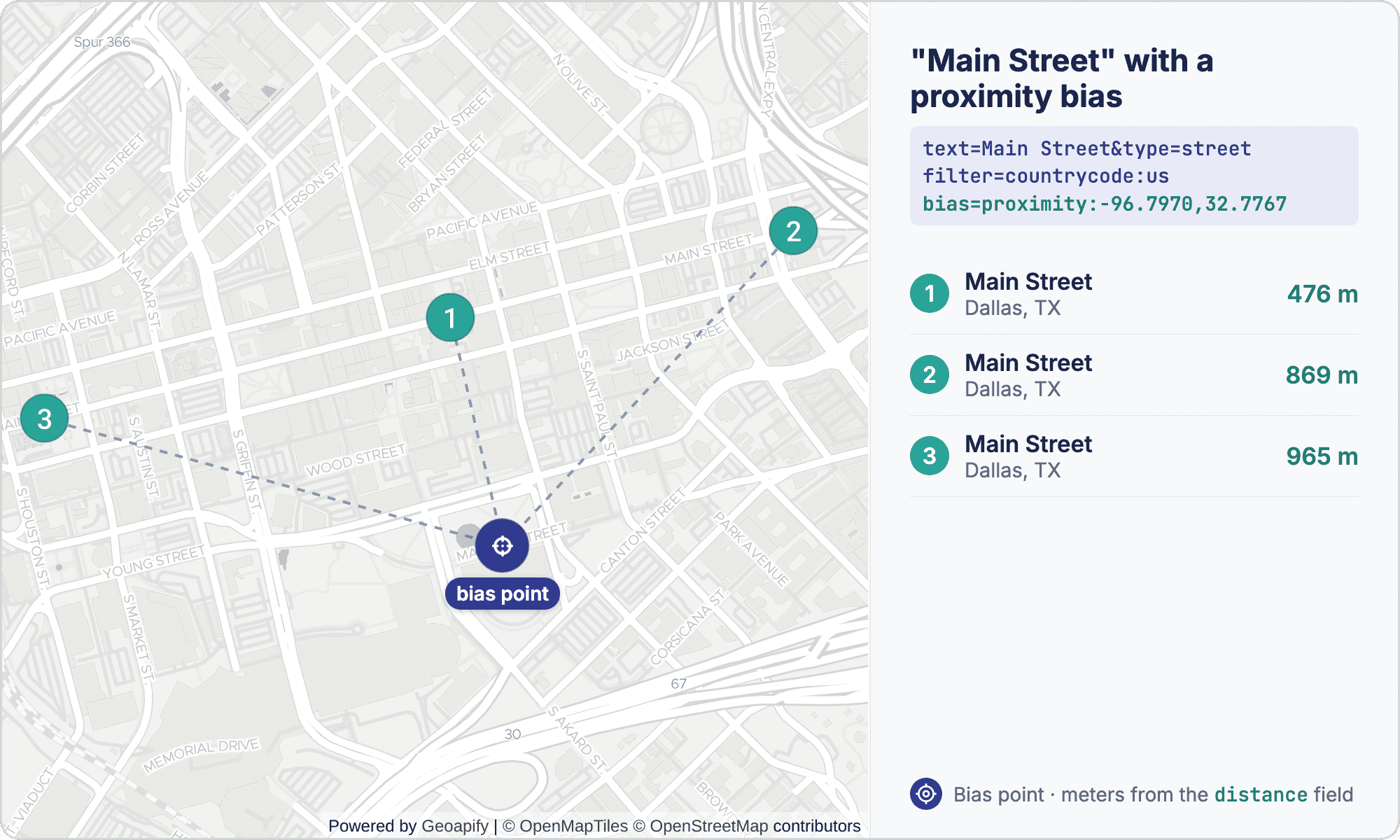
distance field, from 476 m to 965 m. Results from November 25, 2026. Map: Powered by Geoapify | © OpenMapTiles © OpenStreetMap contributors.What to look for in any API: can you pass a location to rank by, and does the response tell you the distance?
Setting to use: bias=proximity:lon,lat with the user's position, the store or the center of your service area. Note the order: longitude first.
4. ★ Language: ask for the user's language
The same city has different names in different languages. If the suggestions come back in a language the user doesn't read, the list looks wrong even when it is right. The lang parameter takes a 2-letter ISO 639-1 code:
https://api.geoapify.com/v1/geocode/autocomplete?text=Köln&type=city&lang=en&limit=1&format=json&apiKey=YOUR_API_KEY
https://api.geoapify.com/v1/geocode/autocomplete?text=München&type=city&lang=en&limit=1&format=json&apiKey=YOUR_API_KEY
Real result, November 25, 2026:
Kölnwithlang=en→ Cologne, NW, GermanyMünchenwithlang=en→ Munich, BY, Germany
The user typed the German name, and an English-speaking user still gets the English one back.
What to look for in any API: can you set the result language, and does it work for the countries and languages your users have?
Setting to use: lang with the page language or the browser language (navigator.language, cut to two letters).
5. ★ Concrete type: set type
Many forms have fields that expect one kind of place: a city field, a ZIP field, a street field. Without a type, a ZIP field can suggest streets and buildings. Here is the start of a ZIP code with type=postcode:
https://api.geoapify.com/v1/geocode/autocomplete?text=021&type=postcode&filter=countrycode:us&format=json&apiKey=YOUR_API_KEYReal result, November 25, 2026:
- Downtown, Boston, MA 02102
- Beacon Hill, Boston, MA 02108
- North End, Boston, MA 02109
- Quincy, MA 02170
- Weymouth, MA 02188
Three digits are enough to get postcodes only, each with its city and state for the rest of the form. Our post on ZIP codes and postal codes explains the formats in different countries.
What to look for in any API: can you restrict suggestions to cities, postcodes or streets?
Setting to use: type with one of country, state, city, postcode, street, amenity or locality. locality returns administrative areas, including postcodes, districts, cities, counties and states.
6. ★ Messy input, and never reject what the user types
People write "Ave" and "Avenue", "4th" and "Fourth", "Str" and "Straße". An address autocomplete API has to treat these as the same address:
https://api.geoapify.com/v1/geocode/autocomplete?text=1000%204th%20Ave%20Seattle&format=json&apiKey=YOUR_API_KEY
https://api.geoapify.com/v1/geocode/autocomplete?text=1000%20Fourth%20Avenue%2C%20Seattle&format=json&apiKey=YOUR_API_KEY
https://api.geoapify.com/v1/geocode/autocomplete?text=Lessingstr%203%20Regensburg&format=json&apiKey=YOUR_API_KEY
Real result, November 25, 2026:
1000 4th Ave Seattleand1000 Fourth Avenue, Seattle→ both 1000 4th Avenue, Seattle, WA 98104,result_type: building,rank.confidence: 1, with the Seattle Central Library at the same address in the list.Lessingstr 3 Regensburg→ Lessingstraße 3, 93049 Regensburg, Germany.
Typos are worth testing too, but with your own data: the misspellings your users actually make are the ones that count.
The rule from the Geoapify team: never reject user input. New buildings, flats and rural addresses can be missing from map data, so a missing suggestion doesn't mean the address is wrong. In practice:
- Let the user keep and submit what they typed.
- Store the selected suggestion separately from the typed text; text edited after a selection is no longer a verified selection.
- Mark addresses without a selection as unconfirmed, and check them later if you need to.
- When precision matters, for example for deliveries, let the user confirm the point on a map.
The @geoapify/geocoder-autocomplete library has two options for this: allowNonVerifiedHouseNumber and allowNonVerifiedStreet keep a house number or street the user typed even when it isn't in the map data. Here they are together with the settings from tests 2 to 4 (version 3.1.0):
import { GeocoderAutocomplete } from "@geoapify/geocoder-autocomplete";

const autocomplete = new GeocoderAutocomplete(
  document.getElementById("address"),
  "YOUR_API_KEY",
  {
    lang: "en",
    allowNonVerifiedHouseNumber: true,
    allowNonVerifiedStreet: true,
  }
);

autocomplete.addFilterByCountry(["us"]);
autocomplete.addBiasByProximity({ lon: -96.797, lat: 32.7767 });

autocomplete.on("select", (location) => {
  // the selected suggestion: keep it separate from the typed text
  console.log(location?.properties.formatted);
});
What to look for in any API: do abbreviations and full words find the same building, and can your form accept an address the API doesn't know?
Setting to use: in the library, allowNonVerifiedHouseNumber: true and allowNonVerifiedStreet: true; in your own form, a submit that never depends on a selection.
7. Cost per keystroke and terms
Autocomplete sends a request as the user types, so a single address can cost several requests. Every request is billed, which makes the price per request and the free tier more important than for one-off geocoding. With Geoapify, each Address Autocomplete request costs 1 credit, however many suggestions it returns, and the Free plan includes 3,000 credits a day. Commercial use is allowed on the Free plan with attribution, and you can store and cache the results. See pricing for paid plans.
You control most of the cost in the client. The how-to on what to consider before implementation lists the basics:
- No request for an empty value.
- A minimum input length, often two or three meaningful characters.
- Debounce typing before sending a request.
- Cancel or ignore superseded requests, so a slow response for old text can't replace newer suggestions.
The @geoapify/geocoder-autocomplete library debounces by default (debounceDelay, 100 ms in version 3.1.0) and shows 5 suggestions by default (limit).
What to ask any provider:
- What is the price per request, and is there a free tier?
- May you store and cache results, or only display them?
- What attribution is required?
- Is commercial use allowed on the plan you'd start with?
Setting to use: a debounce, a minimum length, and a limit that fits your list; five to eight suggestions is usually easier to scan than a long list.
A Scorecard You Can Copy
Run each test with your own addresses and fill in the last column. Compare APIs with the same addresses and the same settings, so the results are comparable.
| Test | What passes | Setting to check | Your result |
|---|---|---|---|
| 1. House numbers from partial input | The right building is in the top 5 before the street is complete | Result type and confidence in the response | |
| 2. Country filter | Only results from the chosen country | Country filter (hard), one country per request | |
| 3. Proximity bias | The nearest match comes first | Bias by a point, distance in the response | |
| 4. Language | Names come back in the user's language | Result language parameter | |
| 5. Concrete type | A city or ZIP field suggests only cities or ZIP codes | Type restriction | |
| 6. Messy input | Abbreviations and full words find the same address; the form accepts unknown addresses | Abbreviation handling, options to keep user input | |
| 7. Cost and terms | The monthly cost fits your traffic; storage and attribution terms fit your use | Price per request, free tier, storage rights, attribution |
How to Build Your Test List
A test list is only as good as its addresses. Take about 20 real entries from your own data, such as past orders, sign-ups or support tickets, and include the cases that cause trouble:
- New builds: addresses from the last year or two, which map data may not have yet.
- Apartments and units: "Apt 4B", "Unit 12", flat numbers, floors.
- Rural addresses: rural routes, farms, addresses without a street name.
- Abbreviations: "St", "Ave", "Rd", "Str", in the forms your users write them.
- Other languages: city and street names in the languages your users type.
- Postcodes: full and partial, in each country you serve.
- Partial input as users type it: "700 Boylst", "1000 4th", the first three digits of a ZIP code.
For each entry, record three things: whether the address the user meant is in the top 5, the result_type (or equivalent) of the best match, and the confidence. Measure response time from your users' region, not only from your office, because that is where the keystrokes come from.
How Geoapify Address Autocomplete Fits
Geoapify Address Autocomplete is one REST endpoint with the settings from the tests above:
GET https://api.geoapify.com/v1/geocode/autocomplete| Parameter | What it does |
|---|---|
text | The address or part of it |
type | country, state, city, postcode, street, amenity or locality |
lang | Result language, 2-letter ISO 639-1 code |
limit | Number of results, 1 to 100, default 5 |
filter | Hard restriction: countrycode, circle, rect, place |
bias | Preference: proximity, circle, rect, countrycode |
format | json, xml or geojson (default) |
Each result has rank.confidence and, where they apply, rank.confidence_city_level, rank.confidence_street_level and rank.confidence_building_level, so you can tell a correct city from a correct building. The data comes from OpenStreetMap and other open sources.
For the front end there are ready-made components, all at version 3.1.0: @geoapify/geocoder-autocomplete (plain JavaScript), @geoapify/react-geocoder-autocomplete and @geoapify/angular-geocoder-autocomplete. For Vue, use the core package inside a component. If your form should also find shops, restaurants and other places, see our post on address autocomplete with built-in places support.
To start:
- Run the seven tests in the Playground.
- Read the API reference and the how-to on adding address autocomplete.
- Check the credits for your traffic on the pricing page.
Try It with an AI Coding Agent
An AI coding agent can run the tests on your addresses or build a configured address field in a few minutes, if the prompt names the API and the settings. Before you start:
- Get a free API key in Geoapify MyProjects.
- Create a new folder or open an existing project folder.
- Create a
.envfile withGEOAPIFY_API_KEY=followed by your key. - Open the folder in Claude Code, Codex or Cursor and paste one of the prompts below.
Prompt A: test an autocomplete API with your own addresses
A script that runs your address list through the API and reports what is missing from the top 5:
Create a small Node.js script, test-autocomplete.mjs, that checks how well the Geoapify Address Autocomplete API finds our addresses.

API: GET https://api.geoapify.com/v1/geocode/autocomplete
Docs: https://apidocs.geoapify.com/docs/geocoding/address-autocomplete/
Parameters to use: text, filter=countrycode:<code> (one country per row), lang, type (only when the row says so), limit=5, format=json, apiKey.

- Read the API key from GEOAPIFY_API_KEY in the .env file in this folder. Never print it, log it or copy it to another file.
- Input: addresses.csv with the columns text, country (ISO code), lang (ISO 639-1, default en), type (empty, city, postcode or street), expected (what the user meant, always with the city, for example "700 Boylston Street, Boston").
  Create it with 12 example rows: full addresses, partial input as typed ("700 Boylst"), abbreviations ("Ave", "St", "Str"), a city name in another language, a postcode prefix, and two countries.
- For each row: send one request, then save to results.csv the number of results, the first result's formatted address, result_type, rank.confidence, and the position of "expected" in the top 5 (found when every word of it appears in a result's formatted address, ignoring case and accents).
- Send requests one at a time with a short pause. Use built-in fetch, no extra packages.
- Print a short summary: rows with no results, rows where the expected address is missing from the top 5, rows where the first result has confidence below 0.8, and rows where the first result is less precise than asked (a house number in the text means a building; a business at that address counts as a building).

Run it, show me the summary, and tell me how to run it again with my own addresses.
What happened in our test:
- The agent wrote
test-autocomplete.mjswith built-infetchonly, read the key from.envwithout printing it, and created 12 rows for the US and Germany: full addresses, "700 Boylst", abbreviations such as "S Wacker Dr" and "Friedrichstr", "Köln" withlang=enand two postcode prefixes. - The first run worked. The summary listed 3 rows where the expected address was missing from the top 5 and 2 rows where the first result had a confidence below 0.8, with the first result next to each.
- One flagged row was a mistake in the test list, not in the results: the prefix "0211" returned five real Boston postcodes (02110 to 02114), so 02116 couldn't reach the top 5. A longer prefix fixes it.
- In an earlier version of the prompt, the expected values had no city, and every row passed even when the first result was in another city. That is why the prompt now asks for the city in
expectedand a word-by-word match.
Prompt B: a standalone address field with the right settings
A single page with a country select and an address field that follows the setup rules from this post:
Build a single index.html page with an address form: a country select and an address input with autocomplete.

Use the @geoapify/geocoder-autocomplete library (current release, the same exact version in the script and CSS URLs, from a CDN) and read its README: https://www.npmjs.com/package/@geoapify/geocoder-autocomplete
API docs: https://apidocs.geoapify.com/docs/geocoding/address-autocomplete/

Settings:
- Country: the user picks one country in the select (default United States, plus Canada, United Kingdom, Germany). Filter suggestions to that one country only; update the filter when the select changes.
- Local search: add a "Use my location" button; when the user allows it, set a proximity bias to their position. Without it, no bias.
- Language: set the result language from the first two letters of the browser language, with English as the fallback.
- Never reject input: allow house numbers and streets that are not in the map data, submit the typed text as it is when nothing was selected, mark it as not confirmed, and never block submit.
- On select: fill street, house number, postcode, city and country fields, all still editable.
- Keep the API key in one constant, YOUR_API_KEY, at the top of the script, and remind me to restrict the key to my website in Geoapify MyProjects.

Serve the page from a local web server, open it in a browser, type an address, save a screenshot of the suggestions, and tell me how to open the page.
What happened in our test:
- The agent built one
index.htmlwith@geoapify/geocoder-autocompletepinned to 3.1.0, a country select that callsaddFilterByCountryon every change,langfrom the browser, andallowNonVerifiedHouseNumberandallowNonVerifiedStreetturned on. The key stayed in one constant with the reminder to restrict it. - After "Use my location" (we set the browser position to Boston), the requests carried
bias=proximity:-71.0787,42.3493, and "700 Boylst" suggested only Boston addresses, starting with 700 Boylston Street, Boston, MA 02116. - "12 Nowhere Lane, Testville" got no suggestions, and the form still submitted the typed text.
- With the browser set to German, "Lessingstr 3 Regensburg" came back as "Lessingstraße 3, 93049 Regensburg, Deutschland" and filled street, house number, postcode, city and country.
- We added three details to the prompt after the test: the same pinned version for the CSS, an English fallback for the language, and marking submitted text as not confirmed.
Prompt C: tune the autocomplete in an existing project
A review of an existing address form that applies the country, bias, language, type and typing rules with the smallest changes:
Our project already has an address form. Review and improve its address autocomplete with the Geoapify Address Autocomplete API.

Docs: https://apidocs.geoapify.com/docs/geocoding/address-autocomplete/ and, if the project uses it, the @geoapify/geocoder-autocomplete README.

First inspect the project: framework, the address fields, how suggestions are requested now, and where the country is known. Then make the smallest changes:
- Country: filter by one country with filter=countrycode:<code>. If the form has no country field, or only a free-text one, use a country select before the address field (ask me which countries and the default).
- Local search: if the app knows the user's or the store's location, add bias=proximity:<lon>,<lat>.
- Language: pass lang with the page's language.
- Fields that already have their own autocomplete for one type (city-only or postcode-only): set type=city or type=postcode. Don't add new autocompletes.
- Typing: no request for an empty value or fewer than 3 characters; debounce; don't send the same text twice; ignore late responses for old text.
- Never reject input: remove anything that blocks submit until a suggestion is picked; the user can always submit what they typed; keep the selected suggestion separate from the text, and mark the address as not confirmed when there was no selection.
- Read the key the project's way (for Vite: VITE_GEOAPIFY_API_KEY in a git-ignored .env.local). Never print the key. If the key ends up in the browser bundle, remind me to restrict it to my website in Geoapify MyProjects.

Ask me only what the project doesn't answer. Build it, report the files you changed, and the command to start it.
What happened in our test:
- We ran it on a small Vite checkout form that called the API on every keystroke with only
text, had a free-text country field, and kept submit disabled until a suggestion was picked. - The agent read
langfrom<html lang="en">and named two questions the project couldn't answer: which countries the new country select should list, and which location to use for the bias. The answers were the US, Canada, the UK and Germany, and a store in Boston. - Its changes touched two files: a country select before the address,
filter,biasandlangin every request, no request under 3 characters, a 300 ms debounce, and late responses ignored. Typing "700 Boylston" quickly sent 1 request instead of one per key. - Submit always worked: typed text without a selection went through with
address_confirmed: falseand a visible "not confirmed" note, and a selected suggestion set it totruewith the city and postcode filled. - On the first try a trailing space sent the same text twice, which the agent fixed. We added "don't send the same text twice" and the free-text country case to the prompt after the test.
Frequently Asked Questions
What is the best address autocomplete API?
The best address autocomplete API is the one that finds your users' addresses with the right settings and at a cost that fits your traffic. Test candidates with about 20 real addresses from your own data: house numbers from partial input, a country filter, a proximity bias, the user's language, a concrete type, abbreviations, and the price per request. You can run the tests for Geoapify in the Playground.
Should I restrict autocomplete to one country?
Yes, when you can. A single country gives faster and more accurate suggestions than several. Ask for the country in a separate select before the address field and filter by it, for example filter=countrycode:us. If you need several countries, keep it to two or three, as the country restriction how-to recommends.
What is the difference between a filter and a bias?
A filter is a hard restriction: results outside it are excluded. A bias only changes the order: matching results come first, and others can still appear. For example, filter=countrycode:us returns only US results, while bias=proximity:-96.7970,32.7767 ranks results by distance to that point. See the Address Autocomplete API reference.
How do I reduce the cost of autocomplete requests?
Don't send a request for an empty value, wait for two or three characters, debounce typing, and ignore responses for old text. The @geoapify/geocoder-autocomplete library debounces by default. Each Geoapify Address Autocomplete request costs 1 credit, and the Free plan includes 3,000 credits a day; see pricing.
Should I block an address that has no suggestion?
No. New buildings, flats and rural addresses can be missing from map data. Let the user submit what they typed, keep the selected suggestion separate from the text, and mark addresses without a selection as unconfirmed. In the Geoapify library, allowNonVerifiedHouseNumber and allowNonVerifiedStreet keep a house number or street that isn't in the map data. See how to add address autocomplete.
Can I store autocomplete results?
It depends on the provider's terms, so check them before you choose. With Geoapify, you can store and cache Address Autocomplete results, with the required attribution. See the Address Autocomplete page and the attribution requirements.
How do I get suggestions in the user's language?
Pass the page or browser language as a 2-letter ISO 639-1 code in the lang parameter. For example, text=Köln&type=city&lang=en returns Cologne, and text=München&type=city&lang=en returns Munich. See the API reference.


