


Reverse geocoding is the process of converting geographic coordinates (latitude and longitude) into a human-readable address or place name. For example, instead of working with raw coordinates like (40.748817, -73.985428), reverse geocoding can return a readable result such as "Empire State Building, New York."
Geocode Meaning vs Reverse Geocode Meaning:
These terms sound similar, but they represent opposite directions of the same conversion:
- Geocode meaning: convert a readable address (for example, "1600 Amphitheatre Parkway") into coordinates.
- Reverse geocode meaning: convert coordinates (for example, 37.423021, -122.083739) into a readable address or place.
In everyday usage, people also use "reverse geocode" as a verb ("reverse geocode this point"), which refers to the same reverse geocoding process.
In this guide, you will learn:
- what reverse geocoding means in practice
- how the reverse geocoding process works
- where reverse geocoding is used and how to choose a suitable implementation approach
On this page
What Is Reverse Geocoding?
Imagine yourself standing in an unfamiliar place, and all you have are numbers like (51.50349, -0.12770) on your smartphone’s GPS to describe your location. What do these numbers mean? This is where reverse geocoding steps in. It takes these geographic coordinates—now easily provided by any smart device—and converts them into meaningful place information, like “10 Downing Street, London, UK.”
In other words, reverse geocoding turns raw location data into a human-readable format that you can easily understand and use.
How Reverse Geocoding Works
Reverse geocoding starts with a pair of coordinates (latitude and longitude), usually collected by smartphones, GPS trackers, or connected vehicles.
-
Collect coordinates Your device determines its location using GPS and network signals, then outputs latitude/longitude values.
-
Match coordinates to geodata A reverse geocoding service searches its geospatial database for the nearest known address or place.
-
Return a readable result The service responds with structured location data such as address, city, postcode, country, and a formatted display string.
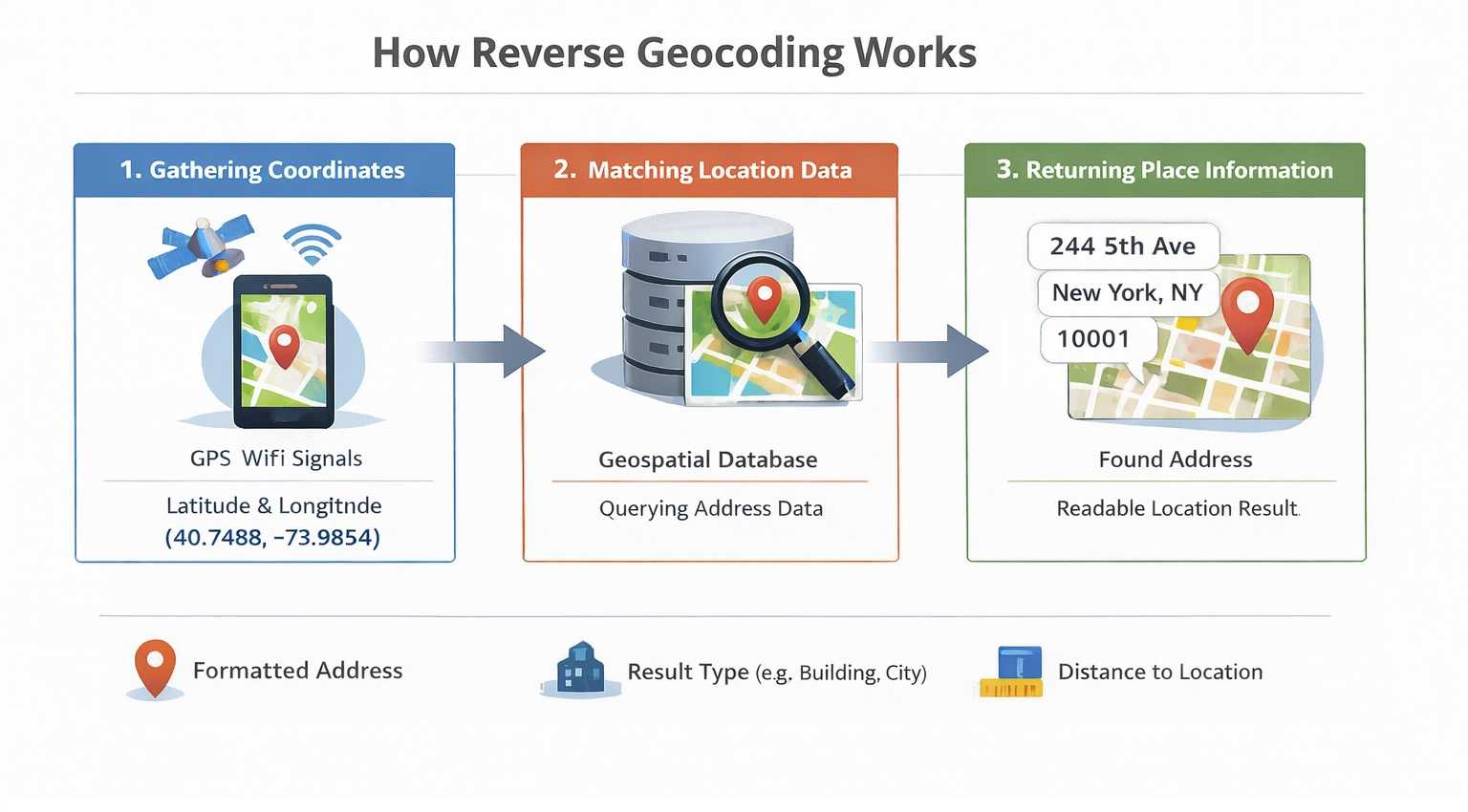
If you want to test reverse geocoding quickly, a minimal API request looks like this:
https://api.geoapify.com/v1/geocode/reverse?lat=40.748817&lon=-73.985428&format=json&apiKey=YOUR_API_KEYYou can also try the request interactively in the Reverse Geocoding Playground.
In the response, three fields are useful for a quick sanity check:
formatted- the final human-readable address string.result_type- whether the match is a building, street, postcode, city, amenity, and so on.distance- how far the returned result is from the original coordinates.
What Reverse Geocoding Returns
The reverse geocoding meaning is often misunderstood as being limited to finding postal addresses, but it can do much more. Depending on your needs, reverse geocoding can provide:
- City Names: Useful for determining a user's general location for services like weather apps.
- Postal Codes: Important for shipping and delivery logistics.
- Country Information: Crucial for displaying location context in international applications.
- Neighborhoods or Points of Interest: Ideal for local search applications or mapping services. You can also use our Place Search API to gather points of interest data.
For example, a building-level reverse geocoding response can look like this:
{
  "results": [
    {
      "country_code": "us",
      "housenumber": "2615",
      "street": "Larsen Road",
      "country": "United States",
      "county": "Duval County",
      "datasource": {
        "sourcename": "openaddresses",
        "attribution": "© OpenAddresses contributors",
        "license": "BSD-3-Clause License"
      },
      "postcode": "32207",
      "state": "Florida",
      "state_code": "FL",
      "county_code": "DU",
      "city": "Jacksonville",
      "suburb": "South Metro",
      "lon": -81.632622,
      "lat": 30.275913,
      "distance": 13.183589003305176,
      "result_type": "building",
      "formatted": "2615 Larsen Road, Jacksonville, FL 32207, United States of America",
      "address_line1": "2615 Larsen Road",
      "address_line2": "Jacksonville, FL 32207, United States of America",
      "timezone": {
        "name": "America/New_York",
        "offset_STD": "-05:00",
        "offset_STD_seconds": -18000,
        "offset_DST": "-04:00",
        "offset_DST_seconds": -14400,
        "abbreviation_STD": "EST",
        "abbreviation_DST": "EDT"
      },
      "plus_code": "862W79G8+9X",
      "plus_code_short": "79G8+9X, 32207 Jacksonville, United States",
      "iso3166_2": "US-FL",
      "rank": {
        "popularity": 3.272529819605514
      },
      "place_id": "51ba2efce07c6854c0598f8aff3ba2463e40c00203e203436f70656e6164647265737365733a616464726573733a75732f666c2f647576616c2d6164647265737365732d636f756e74793a33356331643433666234623831616630"
    }
  ],
  "query": {
    "lat": 30.27602580130811,
    "lon": -81.63266427615059,
    "plus_code": "862W79G8+CW"
  }
}
Find City, Postcode, and Country by Coordinates
Reverse geocoding can return different location levels from the same latitude/longitude pair. For example, you can use it to find the nearest city, postcode, street, or country based on what your app needs to display.
If you want to test this behavior, use the Reverse Geocoding API and request the result type you need, such as type=city, type=postcode, or type=country.
https://api.geoapify.com/v1/geocode/reverse?lat=26.359584312432958&lon=-80.09044513840178&type=postcode&format=json&apiKey=YOUR_API_KEY{
"results": [
{
"country": "United States",
"country_code": "us",
"state": "Florida",
"county": "Palm Beach County",
"city": "Boca Raton",
"postcode": "33432",
"state_code": "FL",
"result_type": "postcode",
"lon": -80.086949702,
"lat": 26.348770704,
"distance": 1251.8435889094628,
"formatted": "Boca Raton, FL 33432, United States of America",
"address_line1": "Boca Raton, FL 33432",
"address_line2": "United States of America"
}
],
"query": {
"lat": 26.359584312432958,
"lon": -80.09044513840178,
"plus_code": "76RX9W55+RR"
}
}Reverse Geocoding Accuracy
Reverse geocoding does not always return the exact same coordinates you submitted, and that is expected behavior. The service returns the best matching known place (building, street, postcode area, city, etc.), which can have its own representative point.
Why Input and Returned Coordinates Can Differ
- Nearest known feature: Your input point may be on a road, parking lot, or open area, while the result is mapped to a nearby address feature.
- Feature geometry: Postcodes, cities, and administrative areas are polygons; the response can use a representative point inside that area.
- GPS noise and precision: Mobile and IoT coordinates can drift, especially indoors or in dense urban areas.
- Data coverage level: Some regions support building-level precision; others only support street- or city-level precision.
Use distance to Make Decisions
Reverse geocoding responses include a distance value (in meters) between your input coordinates and the matched result. Use this field to set acceptance rules in production.
- Define thresholds by use case: For example, stricter thresholds for delivery confirmation and looser thresholds for city-level analytics.
- Handle outliers: If
distanceis above your threshold, ask for user confirmation or fall back to broader levels like street/city. - Monitor quality over time: Track distance distributions per country/region to tune your thresholds and UX.
How to Reverse Geocode?
You can reverse geocode in three common ways, depending on your volume and workflow:
-
Call a reverse geocoding API (real-time) Use the Reverse Geocoding API for interactive lookups in web and mobile apps. If you are building in JavaScript, use rate limiting to avoid bursts and 429 errors - for example with @geoapify/request-rate-limiter.
-
Use Batch API for larger datasets For bulk jobs, use the Batch Geocoding API to process large coordinate lists asynchronously. You can also run batch requests in Postman using
POSTrequests, so no coding is required. -
Use an online tool (no code) For one-off or spreadsheet-style tasks, use the Lat/Lon to Address Online Tool. It supports up to 2,500 rows for free.
Learn More
Related resources for reverse geocoding APIs, implementation guides, and hands-on tutorials. Use these links to compare geocoding vs reverse geocoding, test endpoints, and integrate reverse geocoding in JavaScript or Python.


Geocoding vs Reverse Geocoding - What Is The Difference


Reverse Geocoding API - Convert Lat/Long to Address


Javascript Tutorial: How to get address by coordinates with Reverse Geocoding API


Reverse Geocoding Using Python


How to Get User Location with JavaScript: A Comprehensive Guide


What is Geolocation: How It Works and Its Many Uses
FAQ
What is Reverse Geocoding?
Reverse Geocoding is a process of searching for an address using provided geographic coordinates. The result is a human-readable address and components such as house number, street, postcode, city, and country.
How to get city name from coordinates?
To find a city name from coordinates, you can use a Reverse Geocoding API that can convert latitude and longitude into city-level information by using the "type=city" parameter.
How to get a postcode from coordinates?
To get a postcode from coordinates, use the Geoapify Reverse Geocoding API. By providing latitude and longitude with the "type=postcode" parameter, the API returns postcode-level results. This is helpful for verifying locations, organizing address data, or supporting delivery operations.
How to get GPS coordinates?
You can obtain GPS coordinates from your smartphone, GPS devices, or any personal computer. These values can then be used in reverse geocoding to find addresses or detailed location information.
How accurate is reverse geocoding?
The accuracy of reverse geocoding depends on the quality of the geospatial data used. Some services, like the Geoapify Reverse Geocoder, provide a "distance to original coordinates" value to indicate the proximity of the matched address to the given coordinates, helping you estimate the precision of the result.
Why can returned coordinates differ from my input coordinates?
Reverse geocoding returns the best matching known feature (for example, a building, street, or postcode area), not always the exact same point you submitted. Small differences are common because GPS can be noisy and many results represent polygons or nearby mapped features.
What does the "distance" field mean in reverse geocoding results?
The "distance" field is the distance in meters between your input coordinates and the matched result. You can use it to define acceptance thresholds in production, for example auto-accepting close matches and flagging larger distances for review.
Can I return only city, postcode, or country from coordinates?
Yes. Use the Reverse Geocoding API with the "type" parameter, such as "type=city", "type=postcode", or "type=country", to request the level you need.
How can I reverse geocode large datasets without writing code?
For bulk jobs, use Batch Geocoding API and run POST requests in Postman. For one-off files, you can also use online tools like Lat/Lon to Address Online Tool.
How do I avoid reverse geocoding rate-limit errors in JavaScript?
Throttle request bursts and queue API calls on the client or backend. If you use JavaScript, @geoapify/request-rate-limiter helps control request rate and reduce 429 errors.
What is the difference between Geocoding and Reverse Geocoding?
The difference between geocoding and reverse geocoding lies in the direction of conversion. Geocoding transforms a human-readable address into geographic coordinates (latitude and longitude), while reverse geocoding converts coordinates back into an address or location name. Essentially, geocoding helps locate positions on a map using addresses, whereas reverse geocoding reveals what a specific set of coordinates represents.
How many coordinates can I process for free with Geoapify?
Geoapify offers a generous free tier for both its Reverse Geocoding Tool and API. You can process up to 500 coordinates at once for free with the tool, and the API allows up to 3,000 requests per day, making it ideal for individual projects or small-scale commercial use.