


What's new
Stay up-to-date with the latest news and updates about the Geoapify Location Platform.
This is your go-to source for information on new features, important announcements, and other helpful resources related to Geoapify.
August 2026
28 August 2026
Geometry Operations Are Now Available Through Geoapify MCP
Geometry Operations are now available through Geoapify MCP. AI applications can combine, measure, compare, and transform GeoJSON geometries—including intersections, buffers, spatial predicates, distances, areas, and line lengths.
Example MCP tool call:
{
  "name": "measure_geometry",
  "arguments": {
    "operation": "length",
    "geometry": {
      "type": "LineString",
      "coordinates": [[13.38, 52.5], [13.44, 52.54]]
    },
    "units": "meters"
  }
}
See the available tools and connection instructions in the Geoapify MCP documentation.
6 August 2026
Geoapify MCP Server Adds Places and Routing Tools
We expanded Geoapify MCP Server from three geocoding tools to seven location tools. AI assistants can now discover place categories, find places near coordinates, calculate routes, and build travel time and distance matrices in addition to geocoding and reverse geocoding.
The new tools are:
search_placesto find places and points of interest by category.list_place_categoriesto discover the categories supported by place search.calculate_routeto calculate routes for driving, trucks, cycling, walking, hiking, and public transit.calculate_route_matrixto calculate travel times and distances between multiple sources and targets.
Connect the server to an MCP-compatible AI client, then try requests such as “Find cafés within 1 km of these coordinates” or “Calculate a bicycle route between these locations.” See all available tools and example prompts on the Geoapify MCP Server page.
July 2026
10 July 2026
Geoapify MCP Server for AI Assistants
We launched Geoapify MCP Server, a remote Maps MCP server that lets AI assistants use Geoapify geocoding and reverse geocoding tools.
Connect it to an MCP-compatible AI client and ask location questions in natural language.
Example AI request:
Find coordinates for 1000 5th Avenue, New York, NY.
Learn how to connect the server, authenticate with a Geoapify API key, and try example prompts on the Geoapify MCP Server page.
May 2026
29 May 2026
New NPM Library: @geoapify/route-waypoint-selector
We’ve created @geoapify/route-waypoint-selector, a TypeScript waypoint selector UI component for route planning with Geoapify Autocomplete.
Use it to help users add, reorder, and manage route waypoints in applications that rely on route planning workflows.
Explore the package on npm or view the source on GitHub.
17 May 2026
New NPM Library: @geoapify/batch-geocoding
We’ve also released @geoapify/batch-geocoding, a library for batch geocoding with the Geoapify API.
It helps geocode address lists and reverse geocode latitude/longitude coordinates in bulk, making it easier to process larger datasets programmatically.
Explore the package on npm or view the source on GitHub.
14 May 2026
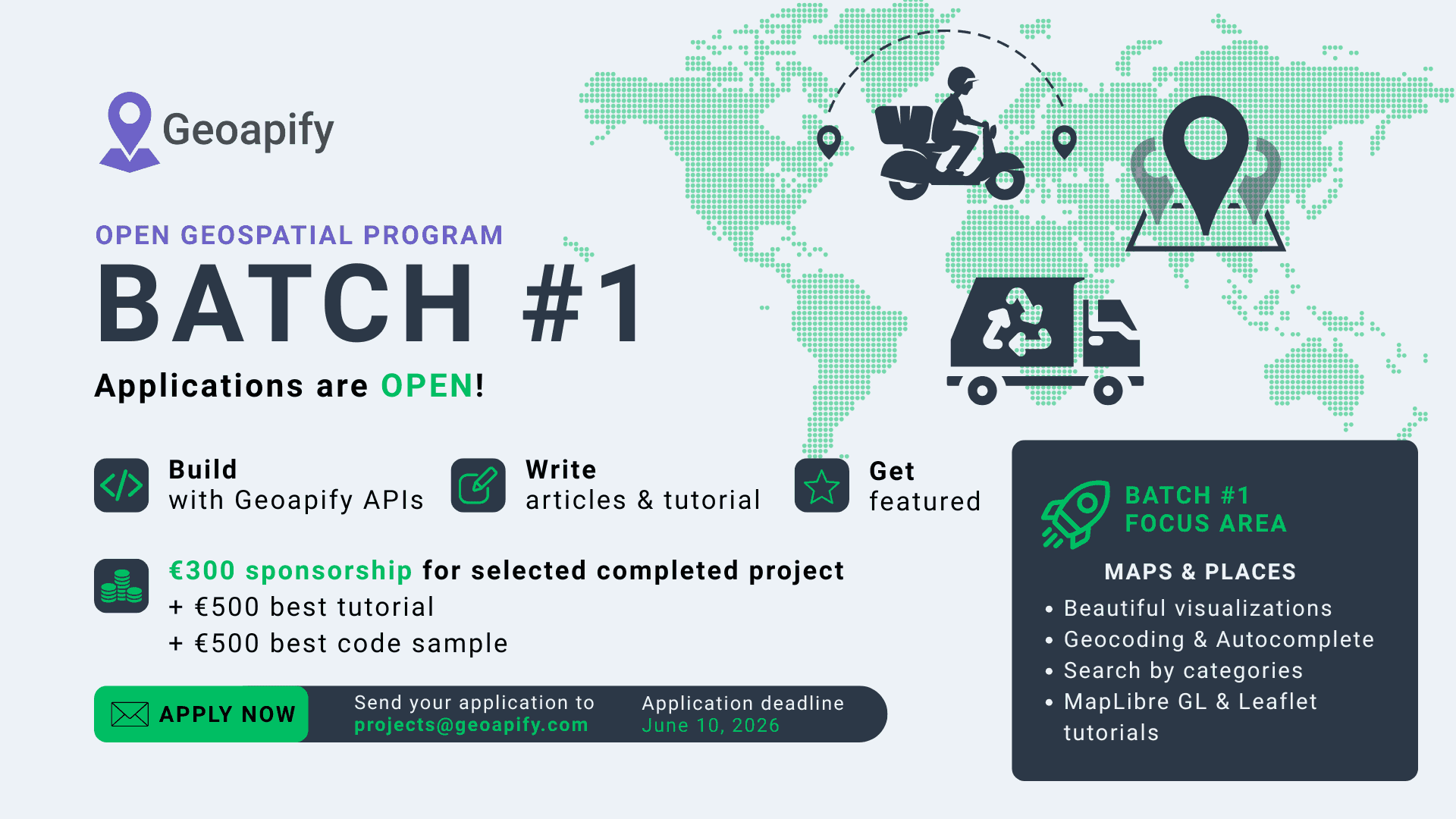
Geoapify Open Geospatial Program: Batch #1 Is Open
Batch #1 of the Geoapify Open Geospatial Program is now open.
This batch focuses on practical maps and places projects built with Geoapify APIs.
- Application deadline: June 10, 2026, 23:59 UTC
- Program page: Geoapify Open Geospatial Program
- Apply by email: [email protected]
8 May 2026
Routing API: intermediate_waypoint_mode Added
We added a new Routing API parameter: intermediate_waypoint_mode.
It controls how intermediate waypoints are treated when a route contains 3 or more waypoints. Supported values are:
stopover(default)through_stoppass_through
Example request:
https://api.geoapify.com/v1/routing?waypoints=49.266798,4.0152071|49.267243,4.0166331|49.267668,4.0181211&mode=drive&format=json&intermediate_waypoint_mode=through_stop&apiKey=YOUR_API_KEYSee the full details in the Routing API documentation.
6 May 2026
Places API Categories Expanded to 800+
We’ve added more categories and subcategories to the Places API. The catalog now includes more than 800 categories and subcategories, giving you more precise ways to search for places and amenities.
Examples of newly available categories:
activity.events_venueactivity.hackerspaceairport.terminalamenity.toilet.changing_tablehighway.roundaboutmaritime.marinamemorial.cemeterymemorial.christian.catholicnatural.desertnatural.water.bayoffice.government.embassypet.animal_shelterproduction.distillerypublic_transport.platformservice.post.parcel_lockerservice.social_facility.nursing_homesport.fitness.gymtourism.attraction.artwork.muraltourism.sights.wreckwaterway.whitewater
See the full list in the Places API categories documentation.
4 May 2026
Elevation API Is Now in Production
Geoapify Elevation API is now in production. Use it to look up terrain elevation for latitude/longitude coordinates and integrate elevation data into mapping, routing, outdoor, and analytics workflows.
Example request:
curl -X POST "https://api.geoapify.com/v1/geodata/elevation?apiKey=YOUR_API_KEY" \
  -H "Content-Type: application/json" \
  -d '{
    "locations": [
      { "lat": 46.5774, "lon": 8.3855 },
      { "lat": 45.9763, "lon": 7.6586 }
    ]
  }'
Learn more on the Elevation API page or see the full Elevation API docs.
March 2026
12 March 2026
Batch API Priority Parameter Added
We added a priority parameter to Batch API requests. It lets you run asynchronous jobs with higher queue priority when faster processing is required.
Set priority from 0.5 to 1 (default is 0.5), where 1 is the highest priority.
Cost impact:
- Batch cost includes
1credit to create the job,1credit to get status/result, plus wrapped API credits multiplied bypriority. - Lower priority (for example
0.5) reduces wrapped API cost but may take longer. - Higher priority (
1) processes faster under load, with no price reduction.
Formula: Total credits = 1 + 1 + (wrapped API credits × priority)
Example request body:
{
  "api": "/v1/geocode/search",
  "priority": 1,
  "params": {
    "format": "json",
    "filter": "countrycode:us"
  },
  "inputs": [
    {
      "id": "addr-1",
      "params": {
        "text": "5201 Julianna Drive, Norfolk, VA 23502, United States of America"
      }
    }
  ]
}
Use this body in POST https://api.geoapify.com/v1/batch?apiKey=YOUR_API_KEY.
Try it in the Batch Playground or see full details in the Batch API docs.
December 2025
16 December 2025
Downloadable Timezone Dataset (IANA + GeoJSON)
We’ve published a new Timezone dataset that pairs IANA timezone metadata with GeoJSON polygons so you can run timezone lookups offline, sync local-time rules, and render world timezone maps without extra processing.
Highlights:
timezone-info.jsonwith canonical + alias identifiers, ISO country coverage, offsets, abbreviations, and DST flags.timezone-geojson.zipcontaining dissolved Polygon/MultiPolygon geometries per timezone (tzidin properties) for point-in-polygon queries.
Use it to power scheduling tools, travel and logistics dashboards, compliance workflows, or any application that needs a reliable “timezone by coordinates” lookup.
November 2025
14 November 2025
Updated UN/LOCODE Dataset in @geoapify/un-locode
We’ve released a new version of @geoapify/un-locode with a fully refreshed UN/LOCODE dataset — updated entries, improved consistency, and cleaner structure for easier lookups in logistics and supply-chain apps.
Example:
const { query } = require('@geoapify/un-locode');

const aberdeen = query('US', 'APG');
console.log(aberdeen?.locationName); // "Aberdeen"
Use UN/LOCODE with routing, geocoding, or mapping workflows to standardize global locations efficiently.
3 November 2025
Geocoder Autocomplete v3 RC: Category Search
We are preparing a major update of the @geoapify/geocoder-autocomplete library. The release candidate for version 3 adds support for category-based search so you can suggest POIs (e.g., emergency services) in addition to addresses.
Try the RC:
npm i @geoapify/geocoder-autocomplete@nextHighlights:
- Category search with Places API categories (e.g., "cafes", "hotels", "restaurants").
- Works alongside existing filters and bias options.
Minimal example:
import { GeocoderAutocomplete } from '@geoapify/geocoder-autocomplete';

const apiKey = 'YOUR_API_KEY';
const container = document.getElementById('autocomplete');

const ac = new GeocoderAutocomplete(container, apiKey, {
  // New in v3
  addCategorySearch: true,
  limit: 5,
  placesLimit: 20
});

ac.on('select', (feature) => {
  console.log('Selected:', feature.properties);
});
We welcome feedback on the RC to help finalize v3.
2 November 2025
Rect and Circle Bias in Places API
We added two new bias modes to the Places API so you can prefer results near a map view or within a radius while still allowing results just outside the area if needed to satisfy limit.
bias=rect:west,south,east,north— prefers results within a viewport or map boundsbias=circle:lon,lat,radius— prefers results within a radius (meters)
Examples:
Prefer results inside a map view (rectangular viewport):
https://api.geoapify.com/v2/places?categories=catering.restaurant&bias=rect:-122.52,37.70,-122.35,37.83&limit=20&apiKey=YOUR_API_KEYPrefer results within 3 km of a center point:
https://api.geoapify.com/v2/places?categories=accommodation.hotel&bias=circle:-0.1276,51.5072,3000&limit=20&apiKey=YOUR_API_KEYTip: combine bias with filter for hard boundaries when needed (e.g., filter=rect:... or filter=circle:...).
1 November 2025
Emergency Services Categories Added to Places API
We expanded the Places API taxonomy with emergency- and rescue-related categories. Use them to discover critical infrastructure and service points with precise filtering.
New categories:
| Category | Description |
|---|---|
| emergency.access_point | Signed emergency access/meeting point to guide responders. |
| emergency.air_rescue_service | Facility or base for helicopter/air rescue operations. |
| emergency.ambulance_station | Ambulance station or depot for EMS crews and vehicles. |
| emergency.bleed_control_kit | Public bleed control kit (Stop‑the‑Bleed) location. |
| emergency.control_centre | Emergency control/dispatch coordination center. |
| emergency.disaster_help_point | Designated help/assembly point for disaster situations. |
| emergency.disaster_response | Disaster response hub or logistics site. |
| emergency.drinking_water | Emergency drinking water point or tap. |
| emergency.dry_riser_inlet | Dry riser inlet for fire brigade connection. |
| emergency.emergency_ward_entrance | Hospital emergency department entrance (ER/A&E). |
| emergency.fire_alarm_box | Manual fire alarm call point/alarm box. |
| emergency.fire_detection_system | Fire detection/control panel or sensor infrastructure. |
| emergency.fire_flapper | Fire beater/flapper for wildfire suppression. |
| emergency.fire_hose | Fire hose cabinet or reel location. |
| emergency.fire_lookout | Fire lookout tower or observation post. |
| emergency.fire_water_pond | Firefighting water pond/cistern access. |
| emergency.first_aid | First aid station/room providing basic care. |
| emergency.first_aid_kit | Publicly accessible first aid kit. |
| emergency.key_depot | Emergency key depot/box for responders. |
| emergency.landing_site | Marked emergency helicopter landing site. |
| emergency.life_ring | Life ring/buoy for water rescue. |
| emergency.lifeguard | Lifeguard post/stand (on-duty position). |
| emergency.lifeguard_base | Lifeguard base/station with equipment and staff. |
| emergency.marine_rescue | Marine/coast water rescue facility. |
| emergency.mountain_rescue | Mountain rescue base or hut. |
| emergency.rescue_box | Box with emergency/rescue equipment. |
| emergency.siren | Civil defense/emergency warning siren. |
| emergency.slipway | Boat slipway/launch ramp (emergency access). |
| emergency.water_rescue | Water rescue station or service. |
Example: list ambulance stations in an area
https://api.geoapify.com/v2/places?categories=emergency.ambulance_station&filter=rect:-0.55,51.72,-0.05,51.40&limit=20&apiKey=YOUR_API_KEYRefer to the Places API category reference for full hierarchy and combine with filters such as countrycode, bbox, and lang.
September 2025
16 September 2025
Worldwide Cities & Towns Dataset Refreshed
We’ve refreshed the All Cities, Towns, Villages, and Hamlets dataset with the latest OpenStreetMap edits. The update improves administrative boundary matching, adds localized naming guidance, and expands the documentation with new examples so you can plug the data into analytics or GIS tools faster. Download the new country archives and explore the enriched FAQ section for localization tips.
12 September 2025
Memorial & Funeral Service Categories Added to Places API
We’ve expanded the Places API taxonomy to cover memorial grounds, crematoria, and mourning services. The new categories let you surface culturally specific burial sites and funeral infrastructure with a single query.
| Category | Description |
|---|---|
| memorial | Generic memorial points of interest |
| memorial.graveyard | Graveyards without formal boundaries |
| memorial.cemetery | Cemeteries and burial complexes |
| memorial.cemetery.sector | Individual sectors inside large cemeteries |
| memorial.christian[.*] | Christian memorial sites (Catholic, Orthodox, Protestant) |
| memorial.jewish | Jewish memorial grounds |
| memorial.muslim | Muslim memorial grounds |
| memorial.buddhist | Buddhist memorial sites |
| memorial.hindu | Hindu memorial sites |
| pet.crematorium | Crematoria dedicated to pets |
| service.crematorium[.*] | Human and pet cremation services |
| service.funeral_hall | Funeral halls and chapels |
| service.mortuary | Mortuaries and morgues |
| service.place_of_mourning | Dedicated mourning or wake facilities |
| tourism.sights.memorial.necropolis | Historical necropolises |
| tourism.sights.memorial.tumulus | Burial mounds and tumuli |
Sample query returning memorial cemeteries within a bounding box:
https://api.geoapify.com/v2/places?categories=memorial.cemetery&filter=rect:-122.517,37.832,-122.355,37.708&limit=20&apiKey=YOUR_API_KEYRefer to the Places API category reference for the full hierarchy and combine the new tags with existing filters (e.g., countrycode, lang) to localize results.
July 2025
20 July 2025
Marker Icon API v2 Released: Custom Sizes + Lucide Icon Support
We’ve released Map Marker Icon API v2, which brings more flexibility and visual customization for your map markers.
What's new in version 2:
-
Numeric size support — Instead of fixed size keywords like
small,medium, orx-large, you can now set precise values in pixels usingsizeandcontentSize.
Example:https://api.geoapify.com/v2/icon/?type=awesome&color=%2375f1ef&size=100&icon=cloud&contentSize=40&noWhiteCircle&scaleFactor=2&apiKey=YOUR_API_KEY
- Lucide icons support — We’ve added support for the open-source Lucide Icons set. Use
icontype=lucideand access a clean, modern set of line icons.
Now you can fully customize your marker icons in terms of:
- shape and background (
type) - main color and stroke
- icon type:
awesome,material, orlucide - icon size and layout
- retina display support via
scaleFactor
Learn more and experiment with different styles in the Marker Icon API documentation.
March 2025
28 March 2025
New Categories Added to Places API
We’ve extended the Places API with new categories focused on emergency infrastructure and road network details. These categories help you access more specific and detailed location data for critical infrastructure and navigation purposes.
Here’s the list of new categories:
| Category | Description |
|---|---|
| emergency | General emergency-related locations |
| emergency.fire_hydrant | Fire hydrant locations |
| emergency.fire_service_inlet | Fire service water inlet points |
| emergency.suction_point | Fire department suction points |
| emergency.defibrillator | Publicly accessible defibrillator devices |
| emergency.water_tank | Water tanks for firefighting |
| emergency.phone | Emergency telephones |
| emergency.assembly_point | Emergency assembly points |
| emergency.fire_extinguisher | Fire extinguisher locations |
| highway.primary.link | Primary road link (connection) |
| highway.secondary.link | Secondary road link |
| highway.tertiary.link | Tertiary road link |
| highway.trunk.link | Trunk road link |
| highway.motorway.junction | Motorway junctions |
| highway.motorway.link | Motorway link roads |
| service.fire_station | Fire station services |
| service.ambulance_station | Ambulance station services |
You can now search for these categories using the Places API. Learn more in the Places API documentation.
5 March 2025
New NPM Library for Route Planner API
We are excited to introduce the official @geoapify/route-planner-sdk NPM package — a developer-friendly SDK for working with the Geoapify Route Planner API.
The library helps you easily integrate advanced route optimization and delivery planning into your applications. It supports both frontend (browser) and backend (Node.js) environments and provides a simple interface to create, configure, and execute route optimization tasks.
Learn more about the package and see usage examples on the NPM package page.
January 2025
27 January 2025
Code Samples Repository Launched on GitHub
We are happy to announce the launch of our official Geoapify Code Samples repository on GitHub. The repository contains ready-to-use code examples for working with Geoapify APIs in JavaScript and Python.
These samples will help you quickly get started, understand typical use cases, and easily integrate Geoapify Location Platform into your projects.
You can explore the repository and start building: https://github.com/geoapify/maps-api-code-samples
We will continue updating the repository with new examples and best practices. Stay tuned!
2024 Release Highlights
November 2024
5 November 2024
Enhanced Netherlands Address Search Support in the Autocomplete API
We have enhanced the Autocomplete API to include searching by postcode and house number specifically for addresses in the Netherlands. This update significantly improves precision and the overall user experience for location searches within the region. This functionality can be accessed using filter=countrycode:nl in your requests.
To illustrate, here is an example of a request URL:
https://api.geoapify.com/v1/geocode/autocomplete?text=3012%20CL%2C%2025&limit=5&filter=countrycode:nl&apiKey=YOUR_API_KEYSupport for UN/LOCODE Codes in the Geocoding and Autocomplete APIs
We are excited to announce that both the Geocoding API and the Autocomplete API now support searches using UN/LOCODE codes. This enhancement enables users to find locations more efficiently and consistently by leveraging standardized UN/LOCODEs.
For example, you can use the following request URL to search with UN/LOCODE:
https://api.geoapify.com/v1/geocode/search?text=US%20JBE&format=json&apiKey=YOUR_API_KEYTo learn more about UN/LOCODE and its applications, please refer to UN/LOCODE documentation.
September 2024
30 September 2024
We Added the "confidence_building_level" to Geocoding/Autocomplete Results
We have added a new property called confidence_building_level as part of the Geocoding/Autocomplete response. This enhancement provides more granular information about the validation confidence specifically at the building level, helping differentiate address validation between the building, street, and city levels.
How confidence_building_level works:
confidence_building_level = 1: The building is fully confirmed.confidence_building_level = 0: The building is not found, but the street and city may still be valid.0 < confidence_building_level < 1: There are doubts about the exact position of the building.
Here is an example of usage for address validation:
let message = '';

if (foundAddress.properties.rank.confidence === 1) {
  message = `We verified the address you entered. The formatted address is: ${foundAddress.properties.formatted}`;
} else if (foundAddress.properties.rank.confidence_street_level === 1 && foundAddress.properties.rank.confidence_building_level === 0) {
  message = `We verified the address up to street level, but the building could not be found: ${foundAddress.properties.formatted}`;
} else if (foundAddress.properties.rank.confidence_street_level === 1 && foundAddress.properties.rank.confidence_building_level > 0 && foundAddress.properties.rank.confidence_building_level < 1) {
  message = `The address is valid up to street level, but there are doubts about the building's exact position: ${foundAddress.properties.formatted}`;
} else if (foundAddress.properties.rank.confidence_street_level === 1) {
  message = `We can confirm the address up to street level: ${foundAddress.properties.formatted}`;
} else {
  message = `We can only verify your address partially. The address we found is ${foundAddress.properties.formatted}`;
}
May 2024
20 May 2024
Introducing Enhanced Map Customization and Functionality
We're excited to introduce some major updates to enhance your mapping experience:
- Custom Map Style Customization: We've listened to your feedback and are thrilled to announce that we've added the ability to customize map styles in our Static Maps API. Now, you can tailor the look and feel of your maps to match your unique preferences or branding.
Here is an example of customized map picture:
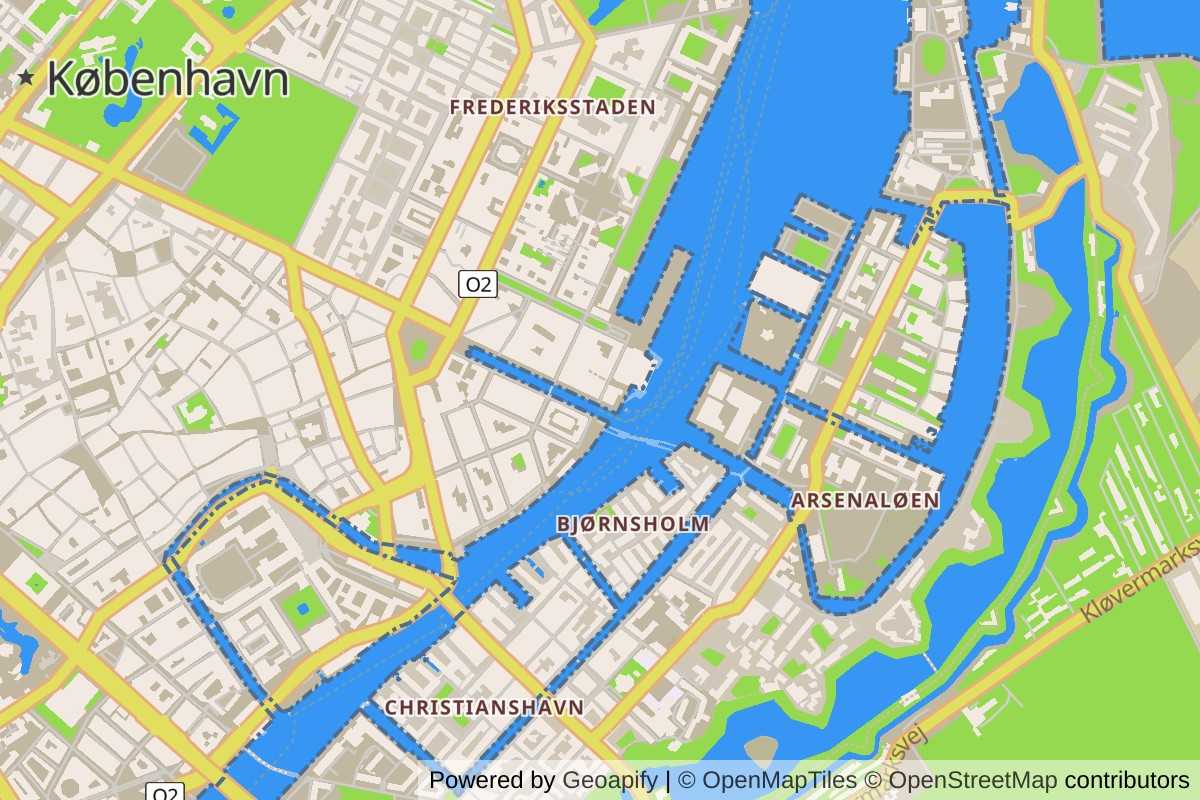
Here is an example of a map URL with style customization:
https://maps.geoapify.com/v1/staticmap?style=osm-bright&width=600&height=400¢er=lonlat:-122.300301,47.522805&zoom=14&styleCustomization=background:%23caa27b|water:%23cedbe7|water-pattern:none|waterway-name:%233f5a75|highway-name-major:27&scaleFactor=2&apiKey=YOUR_API_KEY- Improved Map Playground: Our Map Playground just got even better! You can now dynamically change map styles interactively within the Playground. Not only does this allow you to see immediate visual changes, but the Playground also generates Static Maps API URLs and code snippets for updating styles in interactive maps. It's never been easier to experiment with different map aesthetics.
Here is an example of a customization code for interactive maps:
map.on('load', () => {
    map.setPaintProperty('background', 'background-color', '#cdc2b8');
    map.setPaintProperty('landcover-grass', 'fill-color', '#daf4c0');
    map.setPaintProperty('place-town', 'text-color', '#4f3516');
    map.setLayoutProperty('place-town', 'text-size', {"base":1.2,"stops":[[10,27.416666666666664],[15,47]]});
    map.setLayoutProperty('place-city', 'text-size', {"base":1.2,"stops":[[7,15.166666666666668],[11,26]]});
    map.setLayoutProperty('place-city-capital', 'text-size', {"base":1.2,"stops":[[7,14.583333333333334],[11,25]]});
    map.setLayoutProperty('place-country-other', 'text-size', {"stops":[[3,11.647058823529411],[7,18]]});
});- Support for POST Requests in Static Maps: Say goodbye to URL-length limits! We've implemented support for POST requests in our Static Maps API, enabling you to create map images with complex geometries without being constrained by URL length restrictions. This opens up a world of possibilities for creating detailed and intricate map visuals.
These updates are designed to empower you with more flexibility and control over your mapping projects. We can't wait to see how you utilize these new features!
February 2024
7 February 2024
Introducing the max_speed Parameter to Our Suite of Routing APIs
We are excited to announce the addition of the max_speed parameter to our comprehensive range of routing services, including the Routing API, Route Matrix API, Route Planner API, and Isoline API. This innovative feature is designed to enhance your routing capabilities, offering more personalized and efficient navigation solutions.
Key Benefits of the max_speed Parameter:
- Customized Routing: With the max_speed parameter, users can now set a maximum travel speed for their routes.
- Efficiency and Realism: The inclusion of a max_speed setting contributes to more realistic route planning. It takes into account the vehicle's maximum speed capability, ensuring that the estimated arrival times are more accurate and that routes are optimized for time and fuel efficiency.
- Versatile Application: Applicable across various modes of transport, including all truck modes and buses, the max_speed parameter is a versatile tool for a wide range of routing needs, from commercial logistics to personal travel planning.
We believe that this new feature will significantly enhance the user experience by providing more control over route planning and optimization.
2023 Release Highlights
November 2023
8 November 2023
Postcodes Dataset Unveiled
Elevate your location-based projects with our Open Postcodes Dataset.
We curate open data from various sources, both official and non-official, ensuring a comprehensive and accurate collection of postal code information. Whether you're crafting geocoding solutions, optimizing routes, or enhancing user experiences, our dataset, sourced from diverse and open data streams, provides a rich foundation.
1 November 2023
Introducing New "Recycling" Categories in Places API
In a bid to enhance your location-based experiences, we're thrilled to introduce three new categories to our Places API — "service.recycling", "service.recycling.container", "service.recycling.bin", and "service.recycling.centre".
Here is an example of an API URL:
https://api.geoapify.com/v2/places?categories=service.recycling.centre&filter=rect:32.954431,34.754873,33.109805,34.640372&limit=20&apiKey=YOUR_API_KEYSeptember 2023
11 September 2023
OSM's Settlements Dataset
Explore the dynamic world of settlements with our Settlements Dataset, derived directly from OpenStreetMap (OSM). From bustling cities to serene villages, this collection offers a comprehensive view of urban landscapes.
Whether it's for research or commercial use, this dataset guides you through the intricate patterns of urban living.
July 2023
10 July 2023
Introducing Plus Codes for Enhanced Geocoding
We're excited to announce the integration of Plus Codes into our Geocoding API! With this update, the Geocoding API response now includes Plus Codes, a convenient way to encode locations.
In addition, the Geocoding API now accepts Plus Codes as input and returns the corresponding address information. This means you can utilize Plus Codes as an alternative to traditional address formats, simplifying the geocoding process and improving the overall user experience.
7 July 2023
Enhanced Autocomplete: French Department Code Support
We're delighted to introduce an exciting enhancement to our autocomplete feature! With the latest update, when using autocomplete with bias or filter set to France, the API returns French Department by the corresponding French Department code. For example, if you send "08" as an input for the Autocomplete API, it will return "Ardennes, France."
To enable this feature, set the "bias=countrycode:fr" or "filter=countrycode:fr" parameter. Here is an example URL:
https://api.geoapify.com/v1/geocode/autocomplete?text=08&bias=countrycode:fr&format=json&apiKey=YOUR_API_KEYMay 2023
9 May 2023
Introducing New Categories to Our Places API for Enhanced Social Inclusion
We're excited to announce the addition of several new categories to our Places API! These new categories include "service.social_facility", "service.social_facility.shelter", "service.social_facility.food", "service.social_facility.clothes", "amenity.give_box", "amenity.give_box.food", and "amenity.give_box.books".
The "service.social_facility" category includes locations that provide social services to people in need, such as counseling, support groups, and other types of assistance. The sub-categories under this category, such as "shelter", "food", and "clothes", help to specify the type of assistance provided by each location. Here is an example of an API URL:
https://api.geoapify.com/v2/places?categories=amenity.give_box&filter=rect:1.9551667274513598,49.11083222569353,2.6462152224779167,48.65832480785126&limit=20&apiKey=YOUR_API_KEYThe "amenity.give_box" category includes locations where people can donate or leave items for others to take for free, such as books or food items. The sub-categories under this category, such as "food" and "books", specify the types of items that are available for donation. Here is an example of an API URL:
https://api.geoapify.com/v2/places?categories=religion.place_of_worship&filter=rect:2.238261781728731,48.914334683358526,2.4285652756822813,48.78963839210784&limit=20&apiKey=YOUR_API_KEYWe believe that these new categories will help developers to create more comprehensive and inclusive applications that cater to the needs of a wider audience. We're excited to see the innovative ways in which our customers will utilize these new categories in their location-based applications.
2022 Release Highlights
November 2022
7 November 2022
We've added a new category that will help you find places that produce something
The new "production" category and its "production.factory", "production.winery", "production.brewery", "production.cheese", "production.pottery" subcategories are available now in Places API.
For example, you can query all breweries in Munich now:
https://api.geoapify.com/v2/places?categories=production.brewery&filter=place:51c69eecf83f18274059dd3ad3f89a134840f00101f901dcf3000000000000c002099203084dc3bc6e6368656e&limit=20&apiKey=YOUR_API_KEYThis will return:
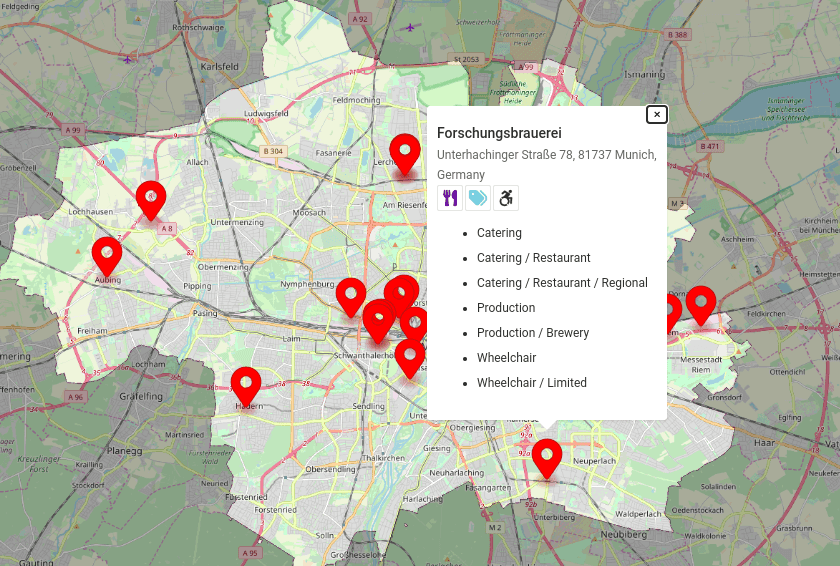
October 2022
24 October 2022
Improved navigation in the API Documentation
We've made navigation in our API Documentation portal easier and more convenient. In the API Documentation, you can read the detailed documentation for our APIs and try them without registration.
September 2022
28 September 2022
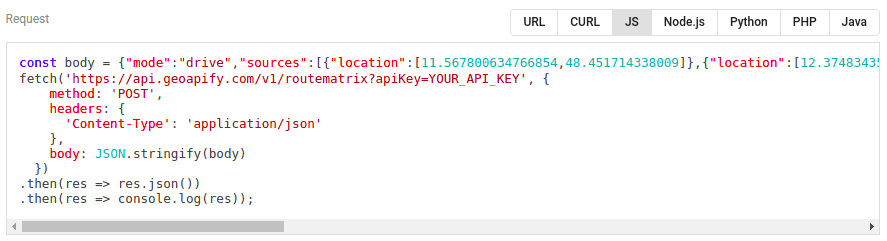
New code samples generator
We've made the API Playground even better. You can now generate code samples in the playground, including CURL, JavaScript, Node.js, Python, and more:
20 September 2022
Timezones added
We've added information about time zones to the Geocoding / Reverse Geocoding / Address Autocomplete / Place Details results. The time zone data includes names, time zone offsets for standard and daylight saving times, and abbreviations. Here is an example of a time zone object:
{
  "timezone": {
    "name": "Europe/London",
    "offset_STD": "+00:00",
    "offset_STD_seconds": 0,
    "offset_DST": "+01:00",
    "offset_DST_seconds": 3600,
    "abbreviation_STD": "GMT",
    "abbreviation_DST": "BST"
  }
}
You can test the functionality with Geocoding API Playground >>
Next steps
- Learn more about Geoapify APIs and services >>
- Try our APIs without registration with our Playground >>
- Sign up and get a Free API key >>