Timezone Dataset: IANA-Based Timezone Metadata and GeoJSON Boundaries
The Geoapify timezone download is an offline dataset with timezone metadata and geographic boundaries for all official IANA time zones.
Source data and :
- Timezone identifiers and offset rules from the IANA Time Zone Database
- Timezone boundaries generated with timezone-boundary-builder
- Underlying geographic data sourced from OpenStreetMap
Geoapify processes and packages this data into JSON metadata and GeoJSON files, ready for use in databases, GIS tools, and mapping applications — you can download the complete timezone dataset here:
Timezone by Location: Common Use Cases
Knowing the correct timezone for a geographic location is essential for many applications that work with global data, schedules, and maps. This dataset supports reliable “timezone by location” logic without relying on external services at runtime.
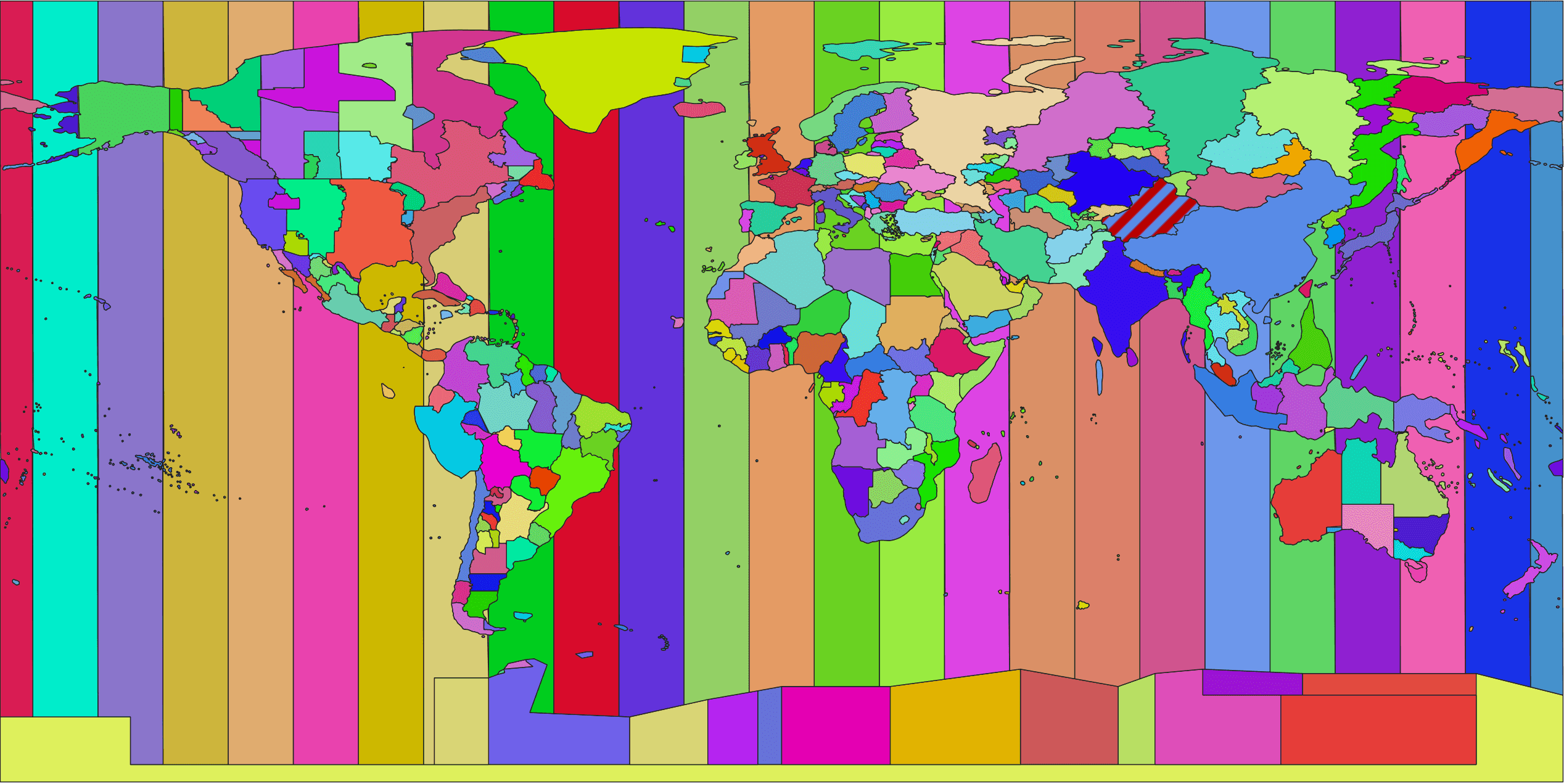
World timezone map based on IANA time zones and OpenStreetMap boundaries. Data source: timezone-boundary-builder (Evan Siroky)
Typical use cases include:
- Timezone lookup by latitude and longitude using point-in-polygon checks
- Building a global timezone timetable for flights, deliveries, or events
- Scheduling systems that need correct local time across countries and regions
- Travel planning and logistics applications working across multiple time zones
- Compliance, reporting, and billing workflows that depend on local time rules
- Map-based applications showing a world timezone map with political boundaries
By combining IANA timezone definitions with geographic boundaries derived from OpenStreetMap, the dataset enables accurate timezone resolution even in complex border regions.
What’s Inside the Dataset
The Timezone Dataset includes two complementary files: one for structured timezone metadata and one for geographic boundaries. Together, they cover all official IANA time zones and are designed for both data processing and spatial use cases.
Dataset Files
| File | Type | Description |
|---|---|---|
| timezone-info.json | JSON | Structured metadata for each IANA timezone, including identifiers, country coverage, offsets, abbreviations, and alias relationships. |
| timezone-geojson.zip | ZIP (GeoJSON) | Archive containing one GeoJSON Feature per canonical timezone, representing the dissolved outer geographic boundary. |
timezone-info.json (Metadata)
This file is a JSON array with one object per tz database identifier. The metadata is derived from the Wikipedia tz database table and is intended for search, filtering, validation, and UI display.
Example entry:
{
  "countryCodes": ["AW"],
  "tzIdentifier": "America/Aruba",
  "type": "alias",
  "utcOffsetStandard": "−04:00",
  "utcOffsetDst": "−04:00",
  "abbreviationStandard": "AST",
  "abbreviationDst": "AST",
  "canonicalLink": "America/Puerto_Rico"
}
Field description:
| Field | Description |
|---|---|
| countryCodes | ISO 3166-1 alpha-2 country codes covered by the timezone |
| tzIdentifier | IANA timezone name (for example, America/New_York) |
| type | Each timezone entry is marked as either canonical or alias. Canonical entries represent the primary IANA timezones and have corresponding geographic boundaries. Alias entries are alternative identifiers that point to a canonical timezone via the canonicalLink field and share the same geometry and offset rules. |
| utcOffsetStandard | Standard time UTC offset in ±HH:MM format |
| utcOffsetDst | Daylight-saving time UTC offset in ±HH:MM format |
| abbreviationStandard | Common standard-time abbreviation (for example, CET, GMT) |
| abbreviationDst | Common daylight-saving abbreviation |
| canonicalLink | Target canonical timezone for alias entries |
timezone-geojson.zip (Geographic Boundaries)
The ZIP archive contains one GeoJSON file per canonical timezone, for example America__Los_Angeles.geojson.
Each file contains a single GeoJSON Feature with Polygon or MultiPolygon geometry and a properties object that includes the IANA timezone identifier:
"properties": {
  "tzid": "America/Los_Angeles"
}
These GeoJSON files are suitable for map rendering and spatial operations such as point-in-polygon checks.
Download Timezone Files
Download a complete, offline IANA Time Zone dataset with global coverage or choose country- and continent-specific archives. All boundary files are provided in GeoJSON format, suitable for streaming, GIS tools, and spatial databases.
Use the dataset as a local copy of the IANA Time Zone Database, with geographic boundaries derived from OpenStreetMap data and processed into per-timezone polygons.
If you only need identifiers and offsets, download the lightweight metadata-only JSON. For mapping and spatial analysis, use the GeoJSON archives that mirror official IANA timezone definitions and their real-world geographic extents.
When to Use a Downloadable Dataset
A downloadable timezone dataset is a good choice when you need full control over the data, offline access, or predictable performance without runtime API calls.
timezone-info.json (metadata only)
This file is lightweight and contains timezone identifiers, offsets, abbreviations, and alias information, but no geometries. It can be safely bundled into backend services, scripts, or even frontend projects as a static data file.
- Suitable for configuration, validation, scheduling logic
- Small file size, easy to ship with any project
- Based on the IANA Time Zone Database
timezone-geojson.zip (geographic boundaries)
This archive contains full GeoJSON geometries for all canonical timezones and is relatively large. It is best suited for backend services, GIS tools, or preprocessing pipelines.
- Recommended for servers, spatial databases, and offline processing
- Not recommended to load the full dataset directly in frontend applications
- Frontend usage may be possible if you extract and ship only a small regional subset, but this should be evaluated carefully
Licensing Notes
The Timezone Dataset is built from multiple open data sources. Please review their licenses before redistributing or embedding the data in your products:
-
IANA Time Zone Database: Timezone identifiers and offset rules are provided under a permissive license
-
OpenStreetMap data (via timezone-boundary-builder / geo-tz): Geographic boundary data is derived from OpenStreetMap and distributed under the Open Database License (ODbL)
-
Wikipedia tz database table: Textual metadata is based on Wikipedia content, available under CC BY-SA and GFDL
Users are responsible for ensuring license compliance, including attribution requirements, when using or redistributing the dataset.
Alternative Ways to Get a Timezone
If downloading and maintaining a full timezone dataset is not the right fit, there are two common alternatives depending on where your logic runs.
Server-Side Lookup Libraries
Many backend languages already provide mature libraries that resolve an IANA timezone from latitude and longitude. Most of them are built on top of the same data produced by timezone-boundary-builder and OpenStreetMap, but hide the geometry handling behind a simple API call.
These options are best suited for server environments where memory usage and preprocessing are acceptable.
| Language | Library | Description |
|---|---|---|
| JavaScript (Node.js) | node-geo-tz | Fast timezone lookup for Node.js using precompiled boundaries |
| JavaScript (Node.js & browser) | tz-lookup | Lightweight lookup library with simple API |
| Python | timezonefinder | Popular Python library for offline timezone detection |
| Go | tzf | High-performance Go library optimized for speed |
| .NET | GeoTimeZone | Timezone lookup for .NET applications |
| Java | TimeZoneMap | Java/Android library for offline timezone detection |
These libraries typically bundle preprocessed geometry data and return a timezone identifier such as America/Los_Angeles for a given coordinate.
2. API-Based Lookup (Frontend Friendly)
For frontend or lightweight applications, downloading large GeoJSON datasets or running geometry checks in the browser is usually not recommended. In this case, an API-based approach is simpler and more efficient.
A common option is Reverse Geocoding with timezone support, for example via the Geoapify Reverse Geocoding API. You send latitude and longitude, and the API returns the corresponding IANA timezone along with address data. This avoids shipping large geometry files to the client and keeps the frontend fast.
Use this approach when:
- you need timezone detection directly in the browser
- you want up-to-date data without managing releases
- dataset size and performance are critical
Here is example of data you get from Geoapify Reverse Geocoding API:
{
  "results": [
    {
      "country_code": "us",
      "housenumber": "180",
      "street": "Ivanhoe Drive",
      "country": "United States",
      "county": "Tazewell County",
      "datasource": {
        "sourcename": "openaddresses",
        "attribution": "© OpenAddresses contributors",
        "license": "BSD-3-Clause License"
      },
      "postcode": "24637",
      "state": "Virginia",
      "state_code": "VA",
      "county_code": "TA",
      "city": "Pounding Mill",
      "lon": -81.764595,
      "lat": 37.016065,
      "distance": 403.48059004551124,
      "result_type": "building",
      "formatted": "180 Ivanhoe Drive, Pounding Mill, VA 24637, United States of America",
      "address_line1": "180 Ivanhoe Drive",
      "address_line2": "Pounding Mill, VA 24637, United States of America",
      "timezone": {
        "name": "America/New_York",
        "offset_STD": "-05:00",
        "offset_STD_seconds": -18000,
        "offset_DST": "-04:00",
        "offset_DST_seconds": -14400,
        "abbreviation_STD": "EST",
        "abbreviation_DST": "EDT"
      },
      "plus_code": "869W268P+C5",
      "iso3166_2": "US-VA",
      "rank": {
        "popularity": 1.608275757780542
      },
      "place_id": "51d9ebdd1fef7054c0591ccefc6a0e824240c00203e203466f70656e6164647265737365733a616464726573733a75732f76612f7374617465776964652d6164647265737365732d73746174653a61303033636532303561363136316363"
    }
  ],
  "query": {
    "lat": 37.01894174439195,
    "lon": -81.76736479940843,
    "plus_code": "869W269M+H3"
  }
}
Together, these alternatives cover most use cases where a downloadable timezone dataset is not the optimal solution.
FAQ
What files are included in the Timezone Dataset download?
The download includes timezone-info.json (timezone metadata such as offsets, abbreviations, and alias links) and timezone-geojson.zip (one GeoJSON boundary file per timezone).
What is the difference between canonical and alias timezones?
canonical entries are the primary IANA timezone identifiers. alias entries are alternative names that point to a canonical zone via canonicalLink. If type is alias, use the geometry of the canonicalLink timezone.
How do I find the timezone for a latitude/longitude?
Use the GeoJSON boundaries from timezone-geojson.zip and run a point-in-polygon check, or call an API such as the Geoapify Reverse Geocoding API to get the timezone directly from coordinates.
How can I check whether a point is inside a timezone boundary in JavaScript?
If you load a timezone GeoJSON Feature, you can test coordinates with Turf.js. Use booleanPointInPolygon to check whether a given point is inside a timezone polygon.
Can I use the full GeoJSON dataset in the frontend?
The complete timezone-geojson.zip dataset can be large, so it’s usually better to keep it server-side. For frontend use, consider downloading a subset (for example, a single country or region) or use an API that returns timezone results on demand.
Is timezone-info.json enough on its own?
It’s great for a timezone list, offsets, abbreviations, and alias resolution, but it does not contain geometries. If you need “timezone by location” (coordinate lookup), you’ll also need boundary polygons (GeoJSON) or an API-based lookup.
Where does the dataset come from?
Timezone identifiers and rules come from the IANA Time Zone Database. Boundaries are generated via timezone-boundary-builder, which relies on OpenStreetMap data and Overpass queries. Metadata fields are derived from the Wikipedia tz database table.
What licensing applies to this dataset?
The dataset combines multiple sources. Review the IANA tzdb license (tzdb LICENSE) and OpenStreetMap licensing under ODbL (ODbL). Wikipedia content is licensed under CC BY-SA and GFDL. Always confirm your attribution and redistribution requirements.
How often is the dataset updated?
Updates are typically aligned with IANA timezone database releases. If you need the most recent changes, re-download the latest dataset and refresh your local copy.